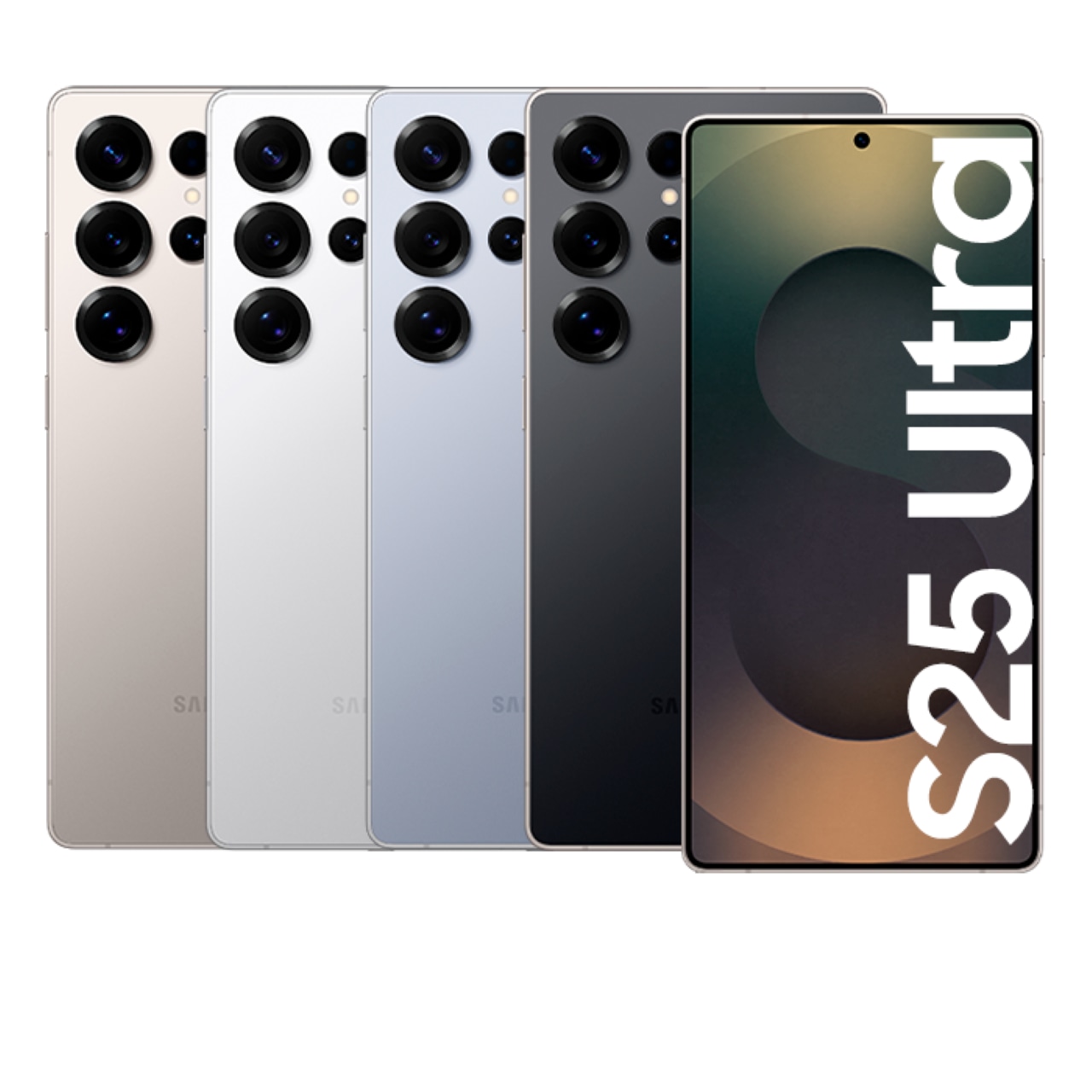

Galaxy S Ultra Series Phone Rental at Incheon Airport

Incheon, South Korea
5 (103 отзывов)
Travel Equipment Rental
Мгновенное подтверждение
Мобильный ваучер

Доступные варианты

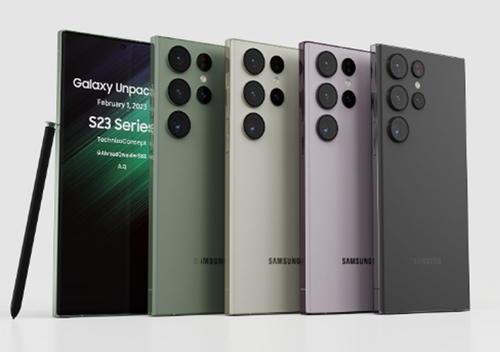
Galaxy S25 Ultra Rental

Per Day
159 900 UZS
≈$13
Data transfer service
221 400 UZS
≈$18

What's included

  • The minimum rental period is 3 days. (If you pay for 3 days, you can also rent for 1-2 days.)
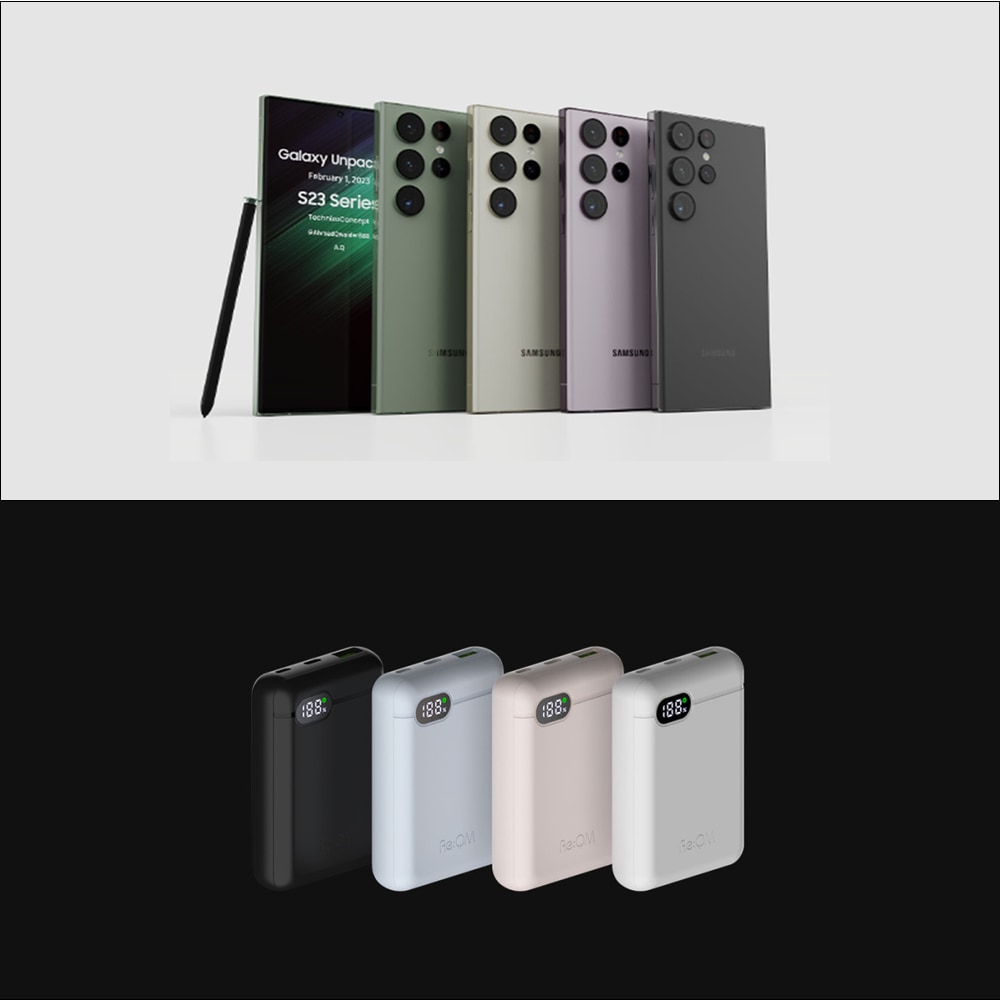
  • Galaxy S25 Ultra Device
  • Charger
  • Supplementary Battery
  • Camera proteced case

Not included

  • Unable to support communication services such as USIM (Device Rental Only)

Address

  • Pickup / Retrun Location:
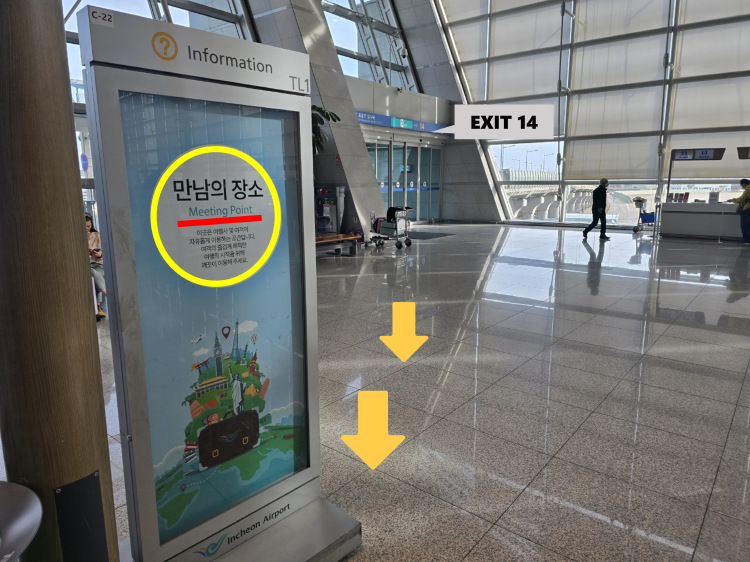
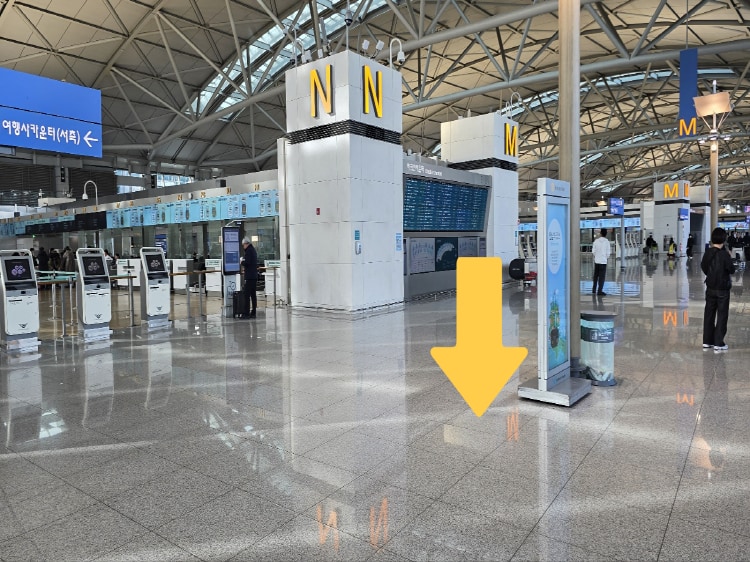
  • Incheon Airport T1 : Meeting Point inside Exit 14 on the 3F
  • [Operating hours]
  • 05:00 - 23:00
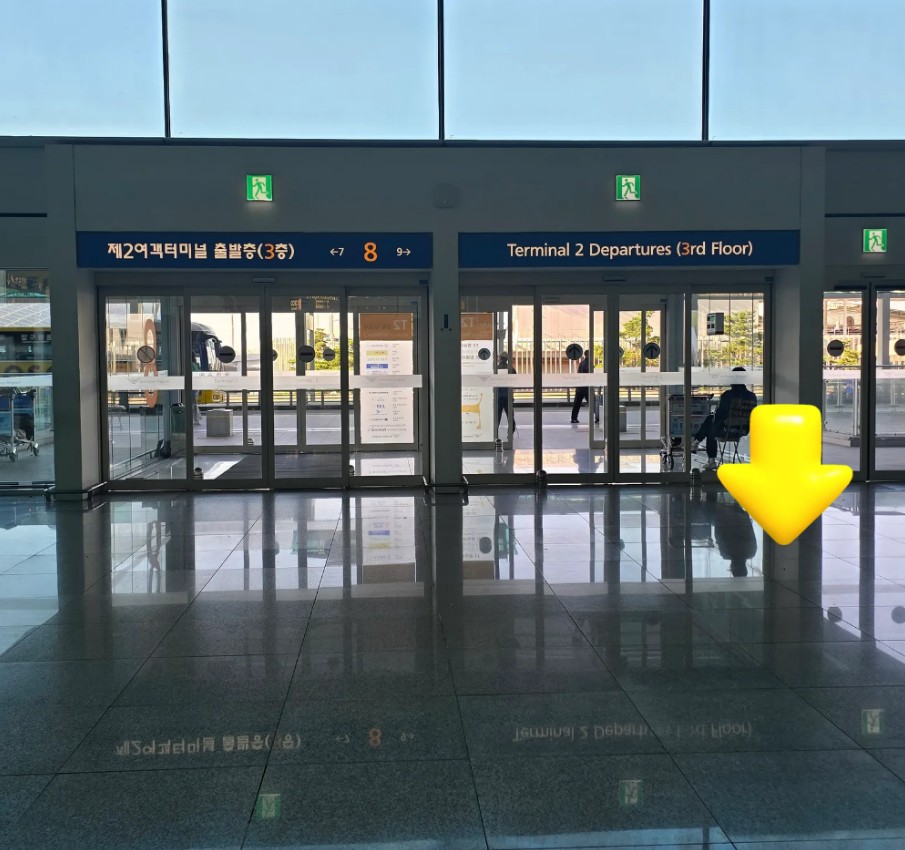
  • Incheon Airport T2 : Inside Exit 8 on the 3F, Departure floor
  • [Operating hours]
  • 05:00 - 22:00
  • NOTE: Rental services are not available for storage/pick-up or return outside of operating hours.

Usage validity

  • The voucher is valid only on the specified date (and time if applicable)

Confirmation

  • You'll get confirmation within minutes. If you don't see any confirmation, reach out to our customer support.

Voucher type

  • Present your mobile voucher

Redemption information

  • Please fill out the form after you complete the reservation
  • The form must be completed at least one day in advance, and you must receive confirmation from the operator to use the service.
  • If your passport copy is not confirmed, you may refuse to use this service on-site.
  • If the form is not completed before the visit, there may be a wait time of over 1 hour for pickup, or other issues may arise.
  • ※ The gimbal rental fee is fixed for the duration of the mobile phone rental period.
  • ※ Portable Photo Printer (CP1500) Fixed fee for the period of the mobile phone rental
  • CP1500 Photo Printer + 4x6cm size photo printing paper 36 sheets (worth about 18,000 KRW)
  • If you need to purchase additional film, please contact to the CS ceneter.
  • ※ data transfer service
  • Customers who want to enjoy their schedule without worrying about transferring data
  • Available as a purchase once
  • For more details, please refer to the official page.
  • To change the pickup terminal, you must contact CS center by 6PM(KST) the day before the pickup date.
  • Requests to change the pickup terminal or pickup time cannot be made on the day of pickup.
  • Pickup and return are available at both T1 and T2, and returns must be made during the operating hours.※ Google Form must be submitted by 1:00 PM the day before the rental date. (If not submitted or submitted after the deadline, the product can only be picked up at T1.)
  • Please fill out the form after you complete the reservation. This form must be completed at least 1 day in advance, and you must receive confirmation from the operator to ensure proper service. If your passport copy is not confirmed, you may refuse to use this service on-site.
  • For customers who couldn't transfer their videos during the rental period or want to enjoy their schedule without worrying about data transfer, a data transfer service is available. Please follow the process below.
  • Contact CS Center after purchasing the product.
  • Send your English full name, rental schedule and request data transfer to the CS Center.
  • After returning the device, data will be uploaded to our cloud within 4 days, and a download link will be sent via your messenger.
  • You must download the data within 7 days after the link is received.
  • Data will be deleted after 7 days.
  • ※ When returning the phone, the device will be rest the following day after collection, so any purchase or CS inquiries must be made on the same day the device is returned.

Opening hours

  • If there are no staff members available, please send the information via the link

How to get there

  • [Rental Equipment Pickup Process]
  • Please wait at the meeting point, and a staff will arrvie within 5 minutes. (There is no one at the booth. Please wait a moment.)
  • Please inform the staff of the service you have reserved.
  • If you are picking up the equipment after 9 pm, please contact us in advance.
  • [Rental Equipment Return Process]
  • Please check the rental package to ensure no items are missing.
  • If any items or components are missing, please contact us before returning the equipment.
  • Wait at the meeting point, and a staff member will come to collect the equipment. You can also return it directly to the staff.
  • If you are returning the equipment after 9 pm, please contact us in advance.

  • Incheon Airport T1 : Meeting Point inside Exit 14 on the 3F

Incheon Airport T1 : Meeting Point inside Exit 14 on the 3F

Incheon Airport T1 : Meeting Point inside Exit 14 on the 3F

  • Incheon Airport T1 : Meeting Point inside Exit 14 on the 3F

Incheon Airport T1 : Meeting Point inside Exit 14 on the 3F

Incheon Airport T1 : Meeting Point inside Exit 14 on the 3F

  • Incheon Airport T2 : Inside Exit 8 on the 3F, Departure floor

Incheon Airport T2 : Inside Exit 8 on the 3F, Departure floor

Incheon Airport  T2 : Inside Exit 8 on the 3F, Departure floor

Выбрать этот вариант

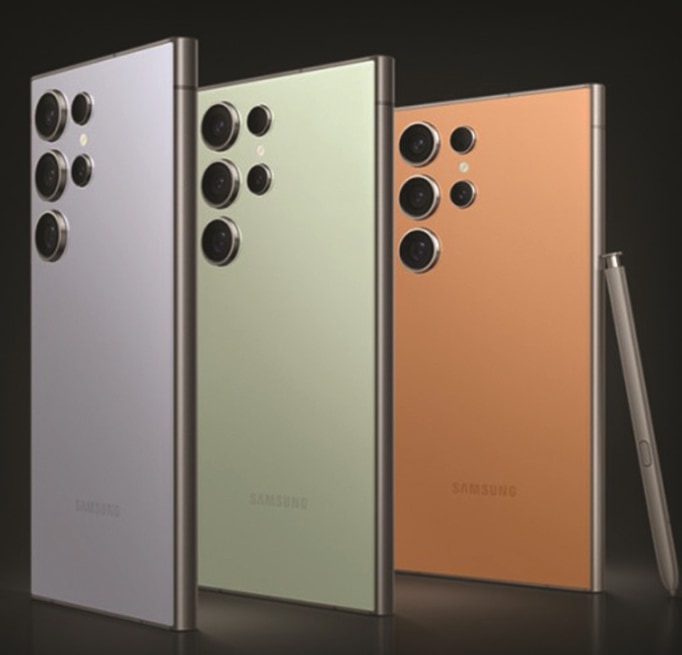
Galaxy S26 Ultra Rental

Per Day
221 400 UZS
≈$18
Data transfer service
221 400 UZS
≈$18

What's included

  • The minimum rental period is 3 days. (If you pay for 3 days, you can also rent for 1-2 days.)
  • [Reservation Information] Please choose the time to start the equipment rental at the airport.
  • Galaxy S26 Ultra Device
  • Charger
  • Supplementary Battery
  • Camera proteced case

Not included

  • Unable to support communication services such as USIM (Device Rental Only)

Address

  • Pickup / Retrun Location:
  • Incheon Airport T1 : Meeting Point inside Exit 14 on the 3F
  • [Operating hours]
  • 05:00 - 23:00
  • Incheon Airport T2 : Inside Exit 8 on the 3F, Departure floor
  • [Operating hours]
  • 05:00 - 22:00
  • NOTE: Rental services are not available for storage/pick-up or return outside of operating hours.

Confirmation

  • You'll get confirmation within minutes. If you don't see any confirmation, reach out to our customer support.

Voucher type

  • Present your mobile voucher

Usage validity

  • The voucher is valid only on the specified date (and time if applicable)

Redemption information

  • Please fill out the form after you complete the reservation
  • The form must be completed at least one day in advance, and you must receive confirmation from the operator to use the service.
  • If your passport copy is not confirmed, you may refuse to use this service on-site.
  • If the form is not completed before the visit, there may be a wait time of over 1 hour for pickup, or other issues may arise.
  • ※ The gimbal rental fee is fixed for the duration of the mobile phone rental period.
  • ※ Portable Photo Printer (CP1500) Fixed fee for the period of the mobile phone rental
  • CP1500 Photo Printer + 4x6cm size photo printing paper 36 sheets (worth about 18,000 KRW)
  • If you need to purchase additional film, please contact to the CS ceneter.
  • ※ data transfer service
  • Customers who want to enjoy their schedule without worrying about transferring data
  • Available as a purchase once
  • For more details, please refer to the official page.
  • To change the pickup terminal, you must contact CS center by 6PM(KST) the day before the pickup date.
  • Requests to change the pickup terminal or pickup time cannot be made on the day of pickup.
  • Pickup and return are available at both T1 and T2, and returns must be made during the operating hours.※ Google Form must be submitted by 1:00 PM the day before the rental date. (If not submitted or submitted after the deadline, the product can only be picked up at T1.)
  • Please fill out the form after you complete the reservation. This form must be completed at least 1 day in advance, and you must receive confirmation from the operator to ensure proper service. If your passport copy is not confirmed, you may refuse to use this service on-site.
  • For customers who couldn't transfer their videos during the rental period or want to enjoy their schedule without worrying about data transfer, a data transfer service is available. Please follow the process below.
  • Contact CS Center after purchasing the product.
  • Send your English full name, rental schedule and request data transfer to the CS Center.
  • After returning the device, data will be uploaded to our cloud within 4 days, and a download link will be sent via your messenger.
  • You must download the data within 7 days after the link is received.
  • Data will be deleted after 7 days.
  • ※ When returning the phone, the device will be rest the following day after collection, so any purchase or CS inquiries must be made on the same day the device is returned.

Opening hours

  • If there are no staff members available, please send the information via the link

How to get there

  • [Rental Equipment Pickup Process]
  • Please wait at the meeting point, and a staff will arrvie within 5 minutes. (There is no one at the booth. Please wait a moment.)
  • Please inform the staff of the service you have reserved.
  • If you are picking up the equipment after 9 pm, please contact us in advance.
  • [Rental Equipment Return Process]
  • Please check the rental package to ensure no items are missing.
  • If any items or components are missing, please contact us before returning the equipment.
  • Wait at the meeting point, and a staff member will come to collect the equipment. You can also return it directly to the staff.
  • If you are returning the equipment after 9 pm, please contact us in advance.

  • Incheon Airport T1 : Meeting Point inside Exit 14 on the 3F

Incheon Airport T1 : Meeting Point inside Exit 14 on the 3F

Incheon Airport T1 : Meeting Point inside Exit 14 on the 3F

  • Incheon Airport T1 : Meeting Point inside Exit 14 on the 3F

Incheon Airport T1 : Meeting Point inside Exit 14 on the 3F

Incheon Airport T1 : Meeting Point inside Exit 14 on the 3F

  • Incheon Airport T2 : Inside Exit 8 on the 3F, Departure floor

Incheon Airport T2 : Inside Exit 8 on the 3F, Departure floor

Incheon Airport  T2 : Inside Exit 8 on the 3F, Departure floor

Выбрать этот вариант

Data transfer service

Single Use
221 400 UZS
≈$18

What's included

  • Data transfer service - Available for one-time use

Address

  • Pickup / Retrun Location:
  • Incheon Airport T1 : Meeting Point inside Exit 14 on the 3F
  • [Operating hours]
  • 05:00 - 23:00
  • Incheon Airport T2 : Inside Exit 8 on the 3F, Departure floor
  • [Operating hours]
  • 05:00 - 22:00
  • NOTE: Rental services are not available for storage/pick-up or return outside of operating hours.

Usage validity

  • The voucher is valid only on the specified date (and time if applicable)

Confirmation

  • You'll get confirmation within minutes. If you don't see any confirmation, reach out to our customer support.

Voucher type

  • Present your mobile voucher

Redemption information

  • Please fill out the form after you complete the reservation
  • The form must be completed at least one day in advance, and you must receive confirmation from the operator to use the service.
  • If your passport copy is not confirmed, you may refuse to use this service on-site.
  • If the form is not completed before the visit, there may be a wait time of over 1 hour for pickup, or other issues may arise.

[Data transfer service]

  • Available as a purchase once
  • Customers who couldn't transfer their videos during the rental period.
  • Customers who want to enjoy their schedule without worrying about transferring data
  • For more details, please refer to the official page.
  • To change the pickup terminal, you must contact CS center by 6PM(KST) the day before the pickup date.
  • Requests to change the pickup terminal or pickup time cannot be made on the day of pickup.
  • Pickup and return are available at both T1 and T2, and returns must be made during the operating hours.※ Google Form must be submitted by 1:00 PM the day before the rental date. (If not submitted or submitted after the deadline, the product can only be picked up at T1.)
  • Please fill out the form after you complete the reservation. This form must be completed at least 1 day in advance, and you must receive confirmation from the operator to ensure proper service. If your passport copy is not confirmed, you may refuse to use this service on-site.
  • For customers who couldn't transfer their videos during the rental period or want to enjoy their schedule without worrying about data transfer, a data transfer service is available. Please follow the process below.
  • Contact CS Center after purchasing the product.
  • Send your English full name, rental schedule and request data transfer to the CS Center.
  • After returning the device, data will be uploaded to our cloud within 4 days, and a download link will be sent via your messenger.
  • You must download the data within 7 days after the link is received.
  • Data will be deleted after 7 days.
  • ※When returning the phone, the device will be rest the following day after collection, so any purchase or CS inquiries must be made on the same day the device is returned.
  • If there are no staff members available, please send the information via the link

How to get there

  • [Data Transfer Service Process]
  • Contact CS Center after purchasing the product.
  • Send your English full name, rental schedule and request data transfer to the CS Center.
  • After returning the device, data will be uploaded to our cloud within 4 days, and a download link will be sent via your messenger.
  • You must download the data within 7 days after the link is received.
  • Data will be deleted after 7 days.
  • ※When returning the phone, the device will be rest the following day after collection, so any purchase or CS inquiries must be made on the same day the device is returned.
  • [CS Center]
  • LINE ID : @558hovam (@ should be included)
  • kakao ID : forholiday
  • whatsapp: +82 10 5241 5257

  • Incheon Airport T1 : Meeting Point inside Exit 14 on the 3F

Incheon Airport T1 : Meeting Point inside Exit 14 on the 3F

Incheon Airport T1 : Meeting Point inside Exit 14 on the 3F

  • Incheon Airport T1 : Meeting Point inside Exit 14 on the 3F

Incheon Airport T1 : Meeting Point inside Exit 14 on the 3F

Incheon Airport T1 : Meeting Point inside Exit 14 on the 3F

  • Incheon Airport T2 : Inside Exit 8 on the 3F, Departure floor

Incheon Airport T2 : Inside Exit 8 on the 3F, Departure floor

Incheon Airport  T2 : Inside Exit 8 on the 3F, Departure floor

Выбрать этот вариант
от
159 900 UZS за человека
≈$13
Выбрать и забронировать

Выберите вариант выше

Безопасная оплата
Мгновенное подтверждение

Политика отмены

  • You'll get a full refund if you cancel at least 48 hour(s) before the activity date (destination local time)
  • To find out more about the cancellation policy, contact Klook customer support

Похожие экскурсии