Скидки на путешествия в Бельгии, Нидерландах и Люксембурге
Неограниченные поездки на поездах в пределах Бельгии, Нидерландов и Люксембурга (Карта маршрутов)
Не включено
Плата за резервирование мест
Питание и напитки
Поезда Eurostar и местные трамваи/метро
Информация об обмене
Электронный ваучер будет отправлен на вашу электронную почту сразу после подтверждения бронирования
Процесс резервирования мест
Резервирование мест обязательно для внутренних скоростных поездов, международных поездов, живописных поездов и ночных поездов
Резервирование можно сделать на сайте Eurail.com или в приложении Eurail/Interrail Rail Planner. Чтобы увидеть окончательные цены и наличие мест, вы должны быть авторизованы и иметь проездной документ
В качестве альтернативы резервирование можно сделать на местных вокзалах или на сайтах соответствующих железнодорожных перевозчиков
Вы можете активно использовать мобильный проездной документ в течение 11 месяцев с даты покупки, скачав приложение Eurail/Interrail Rail Planner
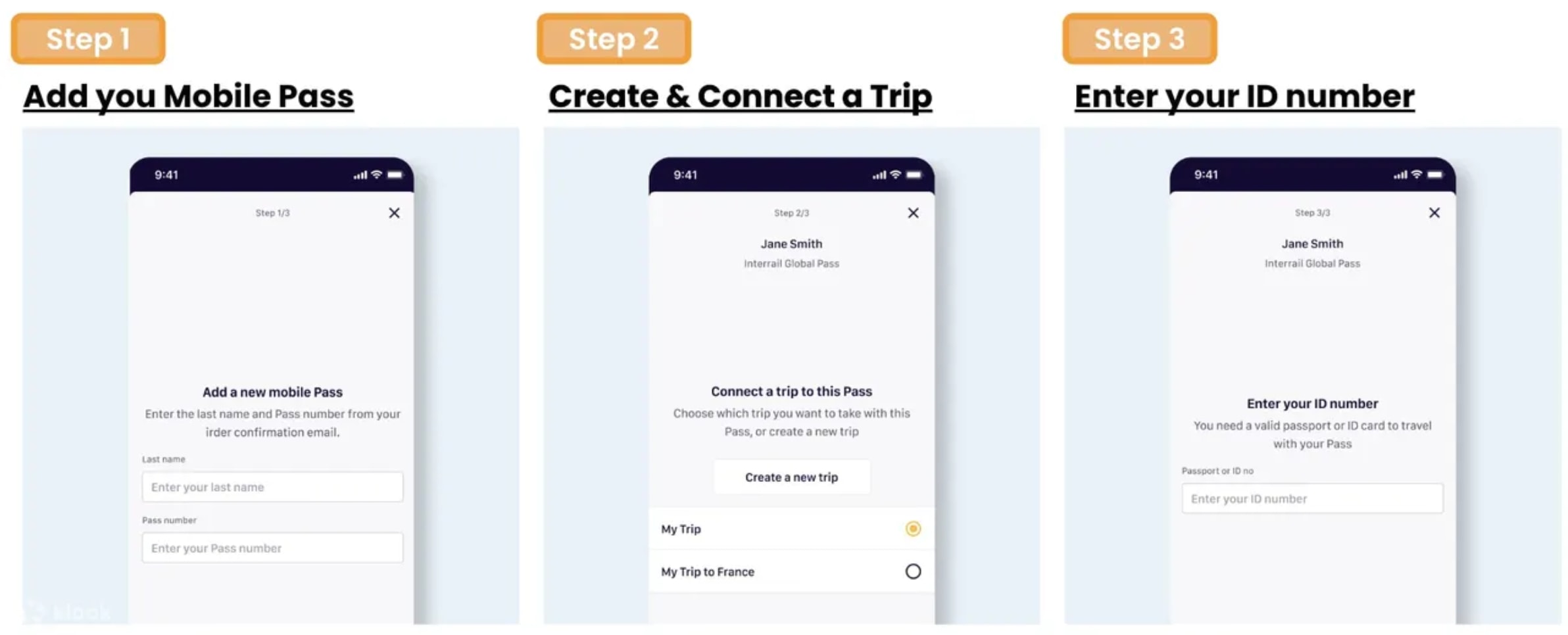
Шаг 1: Добавьте свой проездной документ, введя фамилию и номер проездного документа, отправленные Klook
Шаг 2: Свяжите поездку с вашим проездным документом, создав новую поездку или выбрав уже созданную в приложении
Шаг 3: Активируйте проездной документ, введя номер паспорта / ID и выбрав первый день путешествия. Обратите внимание, что вы не сможете сесть на первый поезд, пока проездной документ не активирован, и для активации требуется подключение к интернету
Обратите внимание, что для резервирования мест активация проездного документа не требуется
Телефон должен быть настроен на григорианский календарь, чтобы активировать проездной документ в приложении Rail Planner
Как деактивировать мобильный проездной документ Eurail
Вы можете деактивировать проездной документ в любое время до начала выбранной даты начала (00:00 CET в этот день). В приложении Rail Planner перейдите в раздел My Pass, нажмите на три точки в правом верхнем углу и выберите «Deactivate Pass». Затем вы сможете активировать проездной документ снова, когда будете готовы к путешествию
Как путешествовать с мобильным проездным документом Eurail
Шаг 2: Нажмите, чтобы сохранить предпочтительный маршрут в вашу поездку
Шаг 3: Когда будете готовы к путешествию, нажмите, чтобы добавить маршрут к проездному документу
Шаг 4: Для проверки билетов просто покажите мобильный проездной документ, перейдя в My Pass и нажав «Show ticket». Обратите внимание, что каждый день путешествия в вашем проездном документе имеет отдельный билет, и каждый билет показывает все маршруты, добавленные к проездному документу на этот день путешествия
Только для Flexi Passes: Если дата вашего маршрута еще не является днем путешествия, вам нужно будет использовать один из ваших дней путешествия. Вы можете увидеть, сколько дней путешествия у вас осталось, в My Trip и My Pass, а также обзор всех ваших дней путешествия
Групповые путешествия
Если вы путешествуете в группе и загружаете более одного проездного документа на устройство, обратите внимание на следующее:
Для каждого проездного документа нужно создать отдельную поездку в приложении
Если вы уже создали поездку, вы можете дублировать существующую поездку, чтобы связать копию с другим проездным документом. Пожалуйста, называйте каждую поездку по-разному, чтобы отслеживать все ваши маршруты
Для проверки билетов вам нужно показать билет для каждого путешествующего с проездным документом. Просто выберите другой проездной документ из списка в My Pass, затем нажмите «Show ticket»
Подтверждение
Вы получите подтверждение в течение нескольких минут. Если вы не видите подтверждение, обратитесь в службу поддержки клиентов.
Электронный ваучер будет отправлен на вашу электронную почту сразу после подтверждения бронирования
Процесс активации
Вы можете активно использовать мобильный проездной в течение 11 месяцев с даты покупки, скачав приложение Eurail/Interrail Rail Planner
Шаг 1: Добавьте свой проездной, введя фамилию и номер проездного, отправленные Klook
Шаг 2: Свяжите поездку с вашим проездным, создав новую поездку или выбрав уже созданную в приложении
Шаг 3: Активируйте проездной, введя номер паспорта / ID и выбрав первый день путешествия. Обратите внимание, что вы не сможете сесть на первый поезд, пока проездной не активирован, и для активации требуется подключение к интернету
Обратите внимание, что для резервирования мест активация проездного не требуется
Телефон должен быть настроен на григорианский календарь, чтобы активировать проездной в приложении Rail Planner
Вы можете деактивировать проездной в любое время до начала выбранной даты начала (00:00 CET в этот день). В приложении Rail Planner перейдите в раздел My Pass, нажмите на три точки в правом верхнем углу и выберите «Deactivate Pass». Затем вы сможете активировать проездной снова, когда будете готовы к путешествию
Шаг 2: Нажмите, чтобы сохранить предпочтительный маршрут в вашу поездку
Шаг 3: Когда будете готовы к путешествию, нажмите, чтобы добавить маршрут к проездному
Шаг 4: Для проверки билетов просто покажите мобильный проездной, перейдя в My Pass и нажав «Show ticket». Обратите внимание, что каждый день путешествия в вашем проездном имеет отдельный билет, и каждый билет показывает все маршруты, добавленные к проездному на этот день путешествия
Только для гибких проездных: Если дата вашего маршрута еще не является днем путешествия, вам нужно будет использовать один из ваших дней путешествия. Вы можете увидеть, сколько дней путешествия осталось, в My Trip и My Pass, а также обзор всех ваших дней путешествия
Групповые путешествия
Если вы путешествуете группой и загружаете более одного проездного на устройство, обратите внимание на следующее:
Для каждого проездного нужно создать отдельную поездку в приложении
Если вы уже создали поездку, вы можете дублировать существующую поездку, чтобы связать копию с другим проездным. Пожалуйста, называйте каждую поездку по-разному, чтобы отслеживать все маршруты
Для проверки билетов вам нужно показать билет для каждого путешествующего с проездным. Просто выберите другой проездной из списка в My Pass и нажмите «Show ticket»
Процесс резервирования мест
Резервирование мест обязательно для внутренних скоростных поездов, международных поездов, живописных поездов и ночных поездов
Резервирование можно сделать на сайте Eurail.com или в приложении Eurail/Interrail Rail Planner. Чтобы увидеть окончательные цены и наличие мест, вы должны быть авторизованы и иметь проездной
В качестве альтернативы резервирование можно сделать на местных вокзалах или на сайтах соответствующих железнодорожных перевозчиков
Обычный · Первый класс · 6 дней в течение 1 месяца
Взрослый
4 453 000 UZS
≈$365
Пенсионер (60+)
(60-0 лет)
4 013 800 UZS
≈$329
Ребёнок (0-11)
(0-11 лет)
Цена по запросу
Молодёжь (12-27)
(12-27 лет)
3 342 800 UZS
≈$274
Включено
Flexible 6 Day(s) in 1 month(s)
Access to both first and second class
Travel discounts in Belgium, the Netherlands, and Luxembourg
Unlimited train rides within Belgium, the Netherlands, and Luxembourg (Route map)
Не включено
Seat reservation fees
Meals and beverages
Eurostar trains and local tram/metro services
Confirmation
You'll get confirmation within minutes. If you don't see any confirmation, reach out to our customer support.
Redemption information
An electronic voucher will be sent to your email instantly after booking confirmation
Activation Process
You can actively use the Mobile Pass up to 11 months from the date of purchase by downloading the Eurail/Interrail Rail Planner app
Step 1: Add your Pass by entering your Last Name & Pass Number sent by Klook
Step 2: Connect a trip to your Pass by either creating a new trip or choosing a trip you’ve already created in the App
Step 3: Activate your Pass by entering your Passport / ID Number and choosing your first travel day. Note that you can't board your first train unless your Pass has been activated, and you need to be online to activate your Pass
Do take note that it is not necessary to activate your pass to make seat reservations
Phones must be set as Gregorian calendar in order to activate the pass in Rail Planner App
You can deactivate your Pass any time before the start of your chosen start date (00:00 CET on that day). On the Rail Planner App, go to My Pass, tap the three dots on the top right, and tap ‘Deactivate Pass’. You can then activate your Pass again when you’re ready to travel
How to Travel with the Eurail Mobile Pass
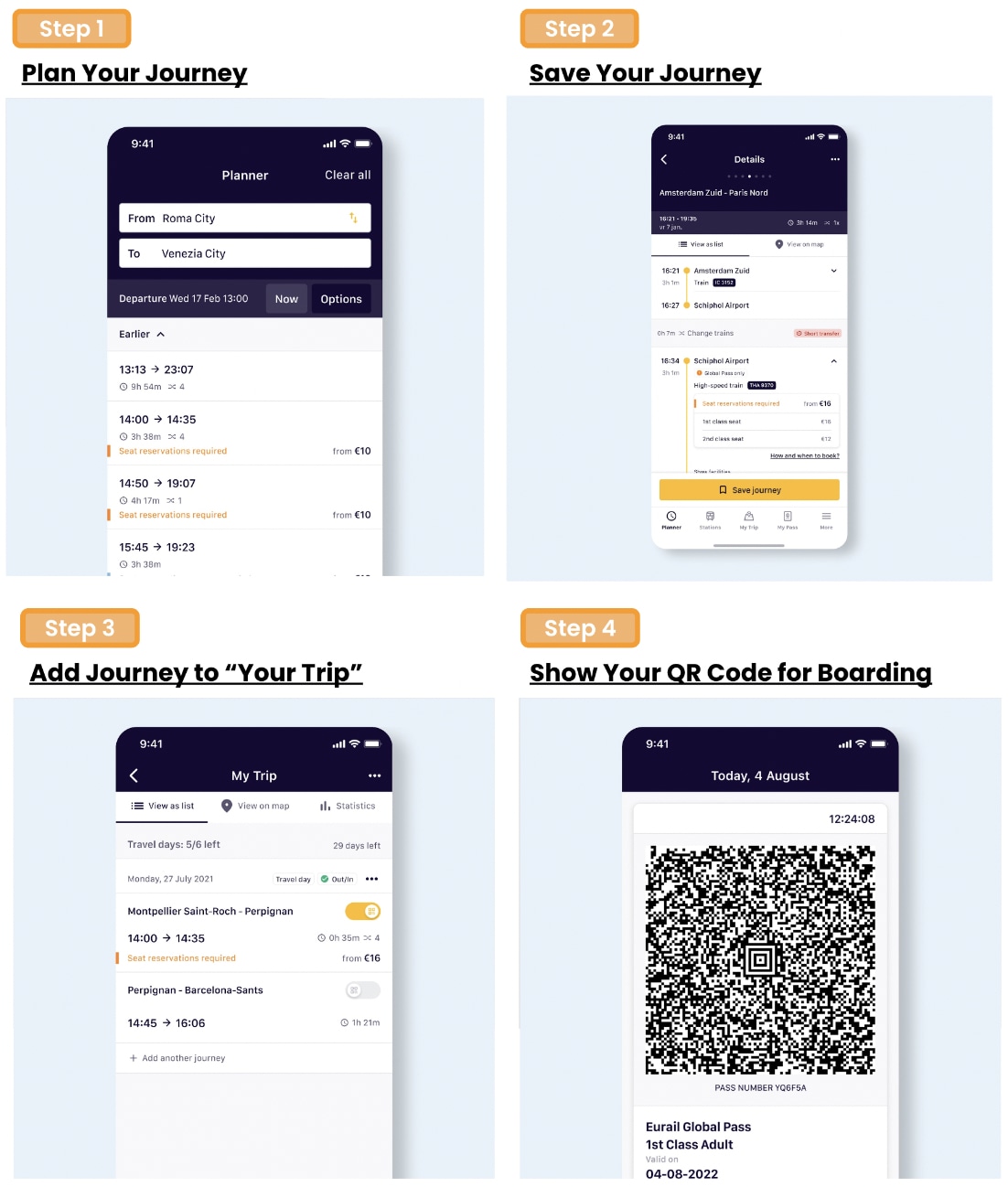
Step 1: Plan your journey by searching for train times in the Eurail/Interrail Rail Planner app
Step 2: Tap to save the preferred journey to your trip
Step 3: Once you are ready to travel, tap to add your journey to your Pass
Step 4: For ticket inspection, simply present your Mobile Pass by going to My Pass and tapping ‘Show ticket’. Note that every travel day in your Pass has a different ticket, and each ticket shows all the journeys you add to your Pass for that travel day
Flexi Passes only: If the date of your journey is not a travel day yet, you'll need to use one of your travel days. You can see how many travel days you have left in My Trip and in My Pass, along with an overview of all your travel days
Group Travel
In case you are traveling in a group and loading more than one Pass on your device, please note the following:
For each Pass, you need to create a separate trip in the App
If you've already created a trip, you can duplicate an existing trip to connect a copy of that trip to another Pass. Please name each trip differently to keep track of all your journeys
For ticket inspection, you'll need to show a ticket for everyone traveling with a Pass. Simply choose another Pass from the list in My Pass, then tap 'Show ticket'
Seat Reservation Process
Reservations are required to board domestic high speed trains, international trains, scenic trains and night trains
Reservations can be made at Eurail.com website or Eurail/Interrail Rail Planner app. To view final prices and seat availability, you must be logged in and have a Pass
Alternatively, reservations can also be made at local train stations or respective railway carriers websites
Обычный · Второй класс · 6 дней в течение 1 месяца
Взрослый
3 440 400 UZS
≈$282
Молодёжь (12-27)
(12-27 лет)
2 586 400 UZS
≈$212
Пенсионер (60+)
(60-0 лет)
3 086 600 UZS
≈$253
Ребёнок (0-11)
(0-11 лет)
Цена по запросу
Включено
Гибкие 6 дней в течение 1 месяца
Доступ только ко второму классу
Скидки на путешествия в Бельгии, Нидерландах и Люксембурге
Неограниченные поездки на поездах в пределах Бельгии, Нидерландов и Люксембурга (Карта маршрутов)
Не включено
Плата за резервирование мест
Питание и напитки
Поезда Eurostar и местные трамваи/метро
Срок действия
Ваучер действителен в течение 334 дней с даты подтверждения бронирования. Он истекает в 23:59 в последний день
Информация об обмене
Электронный ваучер будет отправлен на вашу электронную почту сразу после подтверждения бронирования
Процесс резервирования мест
Резервирование мест требуется для посадки на внутренние скоростные поезда, международные поезда, живописные поезда и ночные поезда
Резервирование можно сделать на сайте Eurail.com или в приложении Eurail/Interrail Rail Planner. Чтобы увидеть окончательные цены и наличие мест, вы должны быть авторизованы и иметь проездной
В качестве альтернативы резервирование можно сделать на местных вокзалах или на сайтах соответствующих железнодорожных перевозчиков
Вы можете активно использовать мобильный проездной в течение 11 месяцев с даты покупки, скачав приложение Eurail/Interrail Rail Planner
Шаг 1: Добавьте свой проездной, введя фамилию и номер проездного, отправленные Klook
Шаг 2: Свяжите поездку с проездным, создав новую поездку или выбрав уже созданную в приложении
Шаг 3: Активируйте проездной, введя номер паспорта / ID и выбрав первый день путешествия. Обратите внимание, что вы не сможете сесть на первый поезд, пока проездной не активирован, и для активации требуется подключение к интернету
Обратите внимание, что для резервирования мест активация проездного не требуется
Телефон должен быть настроен на григорианский календарь для активации проездного в приложении Rail Planner
Вы можете деактивировать проездной в любое время до начала выбранной даты начала (00:00 CET в этот день). В приложении Rail Planner перейдите в раздел My Pass, нажмите на три точки в правом верхнем углу и выберите «Deactivate Pass». Затем вы сможете активировать проездной снова, когда будете готовы к путешествию
Как путешествовать с мобильным проездным Eurail
Шаг 1: Спланируйте маршрут, найдя время поездов в приложении Eurail/Interrail Rail Planner
Шаг 2: Нажмите, чтобы сохранить предпочтительный маршрут в вашу поездку
Шаг 3: Когда будете готовы к путешествию, нажмите, чтобы добавить маршрут к проездному
Шаг 4: Для проверки билетов просто покажите мобильный проездной, перейдя в My Pass и нажав «Show ticket». Обратите внимание, что каждый день путешествия в вашем проездном имеет отдельный билет, и каждый билет показывает все маршруты, добавленные к проездному на этот день путешествия
Только для гибких проездных: Если дата вашего маршрута еще не является днем путешествия, вам нужно будет использовать один из ваших дней путешествия. Вы можете увидеть, сколько дней путешествия осталось, в My Trip и My Pass, а также обзор всех ваших дней путешествия
Групповые путешествия
Если вы путешествуете в группе и загружаете более одного проездного на устройство, обратите внимание на следующее:
Для каждого проездного нужно создать отдельную поездку в приложении
Если вы уже создали поездку, вы можете дублировать существующую поездку, чтобы связать копию с другим проездным. Пожалуйста, называйте каждую поездку по-разному, чтобы отслеживать все ваши маршруты
Для проверки билетов вам нужно показать билет для каждого путешествующего с проездным. Просто выберите другой проездной из списка в My Pass, затем нажмите 'Show ticket'
Подтверждение
Вы получите подтверждение в течение нескольких минут. Если вы не видите подтверждение, обратитесь в службу поддержки клиентов.
Скидки на путешествия в Бельгии, Нидерландах и Люксембурге
Неограниченные поездки на поездах в пределах Бельгии, Нидерландов и Люксембурга (Карта маршрутов)
Не включено
Плата за резервирование мест
Питание и напитки
Поезда Eurostar и местные трамваи/метро
Подтверждение
Вы получите подтверждение в течение нескольких минут. Если вы не видите подтверждение, обратитесь в службу поддержки клиентов.
Срок действия
Ваучер действителен в течение 334 дней с даты подтверждения бронирования. Он истекает в 23:59 в последний день
Информация об обмене
Электронный ваучер будет отправлен на вашу электронную почту сразу после подтверждения бронирования
Процесс активации
Вы можете активно использовать мобильный проездной документ в течение 11 месяцев с даты покупки, загрузив приложение Eurail/Interrail Rail Planner
Шаг 1: Добавьте свой проездной документ, введя фамилию и номер проездного документа, отправленные Klook
Шаг 2: Свяжите поездку с вашим проездным документом, создав новую поездку или выбрав уже созданную в приложении
Шаг 3: Активируйте проездной документ, введя номер паспорта / ID и выбрав первый день путешествия. Обратите внимание, что вы не сможете сесть на первый поезд, пока проездной документ не будет активирован, и для активации требуется подключение к интернету
Обратите внимание, что для резервирования мест активация проездного документа не требуется
Телефон должен быть настроен на григорианский календарь для активации проездного документа в приложении Rail Planner
Как деактивировать мобильный проездной документ Eurail
Вы можете деактивировать проездной документ в любое время до начала выбранной даты начала (00:00 CET в этот день). В приложении Rail Planner перейдите в раздел My Pass, нажмите на три точки в правом верхнем углу и выберите «Deactivate Pass». Затем вы сможете активировать проездной документ снова, когда будете готовы к путешествию
Как путешествовать с мобильным проездным документом Eurail
Шаг 1: Спланируйте маршрут, найдя время поездов в приложении Eurail/Interrail Rail Planner
Шаг 2: Нажмите, чтобы сохранить предпочтительный маршрут в вашу поездку
Шаг 3: Когда будете готовы к путешествию, нажмите, чтобы добавить маршрут к вашему проездному документу
Шаг 4: Для проверки билетов просто покажите мобильный проездной документ, перейдя в My Pass и нажав «Show ticket». Обратите внимание, что каждый день путешествия в вашем проездном документе имеет отдельный билет, и каждый билет показывает все маршруты, добавленные к проездному документу на этот день путешествия
Только для Flexi Passes: Если дата вашего маршрута еще не является днем путешествия, вам нужно будет использовать один из ваших дней путешествия. Вы можете увидеть, сколько дней путешествия осталось, в My Trip и My Pass, а также обзор всех ваших дней путешествия
Групповые путешествия
Если вы путешествуете в группе и загружаете более одного проездного документа на устройство, обратите внимание на следующее:
Для каждого проездного документа нужно создать отдельную поездку в приложении
Если вы уже создали поездку, вы можете дублировать существующую поездку, чтобы связать копию с другим проездным документом. Пожалуйста, называйте каждую поездку по-разному, чтобы отслеживать все ваши маршруты
Для проверки билетов вам нужно показать билет для каждого путешествующего с проездным документом. Просто выберите другой проездной документ из списка в My Pass, затем нажмите 'Show ticket'
Тип ваучера
Вы можете использовать мобильный проездной документ, загрузив приложение Eurail Rail Planner
Резервирование мест обязательно для внутренних скоростных поездов, международных поездов, живописных поездов и ночных поездов
Резервирование можно сделать на сайте Eurail.com или в приложении Eurail/Interrail Rail Planner. Чтобы увидеть окончательные цены и наличие мест, вы должны быть авторизованы и иметь проездной документ
В качестве альтернативы резервирование можно сделать на местных вокзалах или на сайтах соответствующих железнодорожных перевозчиков
Скидки на путешествия в Бельгии, Нидерландах и Люксембурге
Неограниченные поездки на поездах в Бельгии, Нидерландах и Люксембурге (Карта маршрутов)
Не включено
Плата за резервирование мест
Питание и напитки
Поезда Eurostar и местные трамваи/метро
Подтверждение
Вы получите подтверждение в течение нескольких минут. Если вы не видите подтверждение, обратитесь в службу поддержки клиентов.
Срок действия
Ваучер действителен в течение 334 дней с даты подтверждения бронирования. Он истекает в 23:59 в последний день
Информация о兑ении
Электронный ваучер будет отправлен на вашу электронную почту сразу после подтверждения бронирования
Процесс бронирования мест
Бронирование мест обязательно для внутренних скоростных поездов, международных поездов, живописных поездов и ночных поездов
Бронирование можно сделать на сайте Eurail.com или в приложении Eurail/Interrail Rail Planner. Чтобы увидеть окончательные цены и наличие мест, вы должны быть авторизованы и иметь проездной
В качестве альтернативы бронирование можно сделать на местных вокзалах или на сайтах соответствующих железнодорожных перевозчиков
Вы можете активно использовать мобильный проездной в течение 11 месяцев с даты покупки, скачав приложение Eurail/Interrail Rail Planner
Шаг 1: Добавьте свой проездной, введя фамилию и номер проездного, отправленные Klook
Шаг 2: Свяжите поездку с проездным, создав новую поездку или выбрав уже созданную в приложении
Шаг 3: Активируйте проездной, введя номер паспорта / ID и выбрав первый день путешествия. Обратите внимание, что вы не сможете сесть в первый поезд, пока проездной не активирован, и для активации требуется подключение к интернету
Обратите внимание, что для бронирования мест активация проездного не требуется
Телефон должен быть настроен на григорианский календарь, чтобы активировать проездной в приложении Rail Planner
Вы можете деактивировать проездной в любое время до начала выбранной даты начала (00:00 CET в этот день). В приложении Rail Planner перейдите в раздел My Pass, нажмите на три точки в правом верхнем углу и выберите «Deactivate Pass». Затем вы сможете активировать проездной снова, когда будете готовы к путешествию
Шаг 2: Нажмите, чтобы сохранить предпочтительный маршрут в вашу поездку
Шаг 3: Когда будете готовы к путешествию, нажмите, чтобы добавить маршрут к проездному
Шаг 4: Для проверки билетов просто покажите мобильный проездной: перейдите в My Pass и нажмите «Show ticket». Обратите внимание, что каждый день путешествия в проездном имеет отдельный билет, и каждый билет показывает все маршруты, добавленные к проездному на этот день путешествия
Только для гибких проездных: Если дата вашего маршрута еще не является днем путешествия, вам нужно будет использовать один из ваших дней путешествия. Вы можете увидеть, сколько дней путешествий осталось, в My Trip и My Pass, а также обзор всех ваших дней путешествий
Групповые путешествия
Если вы путешествуете группой и загружаете более одного проездного на устройство, обратите внимание на следующее:
Для каждого проездного нужно создать отдельную поездку в приложении
Если вы уже создали поездку, вы можете дублировать существующую поездку, чтобы связать копию с другим проездным. Пожалуйста, называйте каждую поездку по-разному, чтобы отслеживать все маршруты
Для проверки билетов вам нужно показать билет для каждого путешествующего с проездным. Просто выберите другой проездной из списка в My Pass и нажмите 'Show ticket'
Скидки на путешествия в Бельгии, Нидерландах и Люксембурге
Неограниченные поездки на поездах в Бельгии, Нидерландах и Люксембурге (Карта маршрутов)
Не включено
Плата за резервирование мест
Питание и напитки
Поезда Eurostar и местные трамваи/метро
Подтверждение
Вы получите подтверждение в течение нескольких минут. Если вы не видите подтверждение, обратитесь в службу поддержки клиентов.
Срок действия
Ваучер действителен в течение 334 дней с даты подтверждения бронирования. Он истекает в 23:59 в последний день
Процесс резервирования мест
Резервирование мест обязательно для внутренних скоростных поездов, международных поездов, живописных поездов и ночных поездов
Резервирование можно сделать на сайте Eurail.com или в приложении Eurail/Interrail Rail Planner. Чтобы увидеть окончательные цены и наличие мест, вы должны быть авторизованы и иметь проездной
Альтернативно, резервирование можно сделать на местных вокзалах или на сайтах соответствующих железнодорожных перевозчиков
Вы можете активно использовать мобильный проездной в течение 11 месяцев с даты покупки, скачав приложение Eurail/Interrail Rail Planner
Шаг 1: Добавьте свой проездной, введя фамилию и номер проездного, отправленные Klook
Шаг 2: Свяжите поездку с проездным, создав новую поездку или выбрав уже созданную в приложении
Шаг 3: Активируйте проездной, введя номер паспорта/ID и выбрав первый день поездки. Обратите внимание, что вы не сможете сесть на первый поезд, пока проездной не активирован, и для активации требуется подключение к интернету
Обратите внимание, что для резервирования мест активация проездного не требуется
Телефон должен быть настроен на григорианский календарь для активации проездного в приложении Rail Planner
Вы можете деактивировать проездной в любое время до начала выбранной даты (00:00 CET в этот день). В приложении Rail Planner перейдите в раздел My Pass, нажмите на три точки в правом верхнем углу и выберите «Deactivate Pass». Затем вы сможете активировать проездной снова, когда будете готовы к поездке
Шаг 2: Нажмите, чтобы сохранить предпочтительный маршрут в вашу поездку
Шаг 3: Когда будете готовы к поездке, нажмите, чтобы добавить маршрут к проездному
Шаг 4: Для проверки билетов просто покажите мобильный проездной: перейдите в My Pass и нажмите «Show ticket». Обратите внимание, что каждый день поездки в вашем проездном имеет отдельный билет, на котором отображаются все маршруты, добавленные на этот день
Только для Flexi Passes: Если дата поездки еще не является днем поездки, вам нужно будет использовать один из ваших дней поездки. Вы можете увидеть количество оставшихся дней поездки в My Trip и My Pass, а также обзор всех ваших дней поездки
Групповые поездки
Если вы путешествуете в группе и загружаете более одного проездного на устройство, обратите внимание на следующее:
Для каждого проездного нужно создать отдельную поездку в приложении
Если вы уже создали поездку, вы можете дублировать существующую поездку, чтобы связать копию с другим проездным. Назовите каждую поездку по-разному, чтобы отслеживать все маршруты
Для проверки билетов вам нужно показать билет для каждого путешествующего с проездным. Просто выберите другой проездной из списка в My Pass и нажмите «Show ticket»
Обычный · Второй класс · 5 дней в течение 1 месяца
Взрослый
3 037 800 UZS
≈$249
Молодёжь (12-27)
(12-27 лет)
2 281 400 UZS
≈$187
Пенсионер (60+)
(60-0 лет)
2 757 200 UZS
≈$226
Ребёнок (0-11)
(0-11 лет)
Цена по запросу
Включено
Гибкие 5 дней в течение 1 месяца
Доступ только ко второму классу
Скидки на путешествия в Бельгии, Нидерландах и Люксембурге
Неограниченные поездки на поездах в пределах Бельгии, Нидерландов и Люксембурга (Карта маршрутов)
Не включено
Плата за резервирование мест
Питание и напитки
Поезда Eurostar и местные трамвайные/метро услуги
Подтверждение
Вы получите подтверждение в течение нескольких минут. Если вы не видите подтверждение, обратитесь в службу поддержки клиентов.
Срок действия
Ваучер действителен в течение 334 дней с даты подтверждения бронирования. Он истекает в 23:59 в последний день
Информация об обмене
Электронный ваучер будет отправлен на вашу электронную почту сразу после подтверждения бронирования
Процесс активации
Вы можете активно использовать Мобильный проездной документ в течение 11 месяцев с даты покупки, скачав приложение Eurail/Interrail Rail Planner
Шаг 1: Добавьте свой проездной документ, введя вашу фамилию и номер проездного документа, отправленный Klook
Шаг 2: Свяжите поездку с вашим проездным документом, создав новую поездку или выбрав уже созданную поездку в приложении
Шаг 3: Активируйте проездной документ, введя номер вашего паспорта / ID и выбрав первый день путешествия. Обратите внимание, что вы не сможете сесть на первый поезд, пока проездной документ не будет активирован, и для активации требуется подключение к интернету
Обратите внимание, что для резервирования мест активация проездного документа не требуется
Телефоны должны быть настроены на григорианский календарь для активации проездного документа в приложении Rail Planner
Как деактивировать Мобильный проездной документ Eurail
Вы можете деактивировать проездной документ в любое время до начала выбранной даты начала (00:00 CET в этот день). В приложении Rail Planner перейдите в раздел My Pass, нажмите на три точки в правом верхнем углу и выберите «Deactivate Pass». Затем вы сможете активировать проездной документ снова, когда будете готовы к путешествию
Как путешествовать с Мобильным проездным документом Eurail
Шаг 2: Нажмите, чтобы сохранить предпочтительный маршрут в вашу поездку
Шаг 3: Когда будете готовы к путешествию, нажмите, чтобы добавить маршрут к вашему проездному документу
Шаг 4: Для проверки билетов просто покажите Мобильный проездной документ, перейдя в My Pass и нажав «Show ticket». Обратите внимание, что каждый день путешествия в вашем проездном документе имеет отдельный билет, и каждый билет показывает все маршруты, добавленные к проездному документу на этот день путешествия
Только для Flexi Passes: Если дата вашего маршрута еще не является днем путешествия, вам нужно будет использовать один из ваших дней путешествия. Вы можете увидеть, сколько дней путешествия у вас осталось, в My Trip и My Pass, а также обзор всех ваших дней путешествия
Групповые путешествия
Если вы путешествуете в группе и загружаете более одного проездного документа на ваше устройство, обратите внимание на следующее:
Для каждого проездного документа нужно создать отдельную поездку в приложении
Если вы уже создали поездку, вы можете дублировать существующую поездку, чтобы связать копию этой поездки с другим проездным документом. Пожалуйста, называйте каждую поездку по-разному, чтобы отслеживать все ваши маршруты
Для проверки билетов вам нужно показать билет для каждого путешествующего с проездным документом. Просто выберите другой проездной документ из списка в My Pass, затем нажмите 'Show ticket'
Тип ваучера
Вы можете использовать Мобильный проездной документ, скачав приложение Eurail Rail Planner
Резервирование мест обязательно для посадки на внутренние скоростные поезда, международные поезда, живописные поезда и ночные поезда
Резервирование можно сделать на сайте Eurail.com или в приложении Eurail/Interrail Rail Planner. Чтобы увидеть окончательные цены и наличие мест, вы должны быть авторизованы и иметь проездной документ
Альтернативно, резервирование также можно сделать на местных вокзалах или на сайтах соответствующих железнодорожных перевозчиков
Электронный ваучер будет отправлен на вашу электронную почту сразу после подтверждения бронирования
Процесс активации
Вы можете активно использовать мобильный проездной документ в течение 11 месяцев с даты покупки, скачав приложение Eurail/Interrail Rail Planner
Шаг 1: Добавьте ваш проездной документ, введя вашу фамилию и номер проездного документа, отправленный Klook
Шаг 2: Свяжите поездку с вашим проездным документом, создав новую поездку или выбрав уже созданную поездку в приложении
Шаг 3: Активируйте проездной документ, введя номер вашего паспорта / удостоверения личности и выбрав первый день путешествия. Обратите внимание, что вы не сможете сесть в первый поезд, пока проездной документ не будет активирован, и для активации требуется подключение к интернету
Обратите внимание, что для резервирования мест активация проездного документа не требуется
Телефоны должны быть настроены на григорианский календарь, чтобы активировать проездной документ в приложении Rail Planner
Как деактивировать мобильный проездной документ Eurail
Вы можете деактивировать проездной документ в любое время до начала выбранной даты начала (00:00 CET в этот день). В приложении Rail Planner перейдите в раздел My Pass, нажмите на три точки в правом верхнем углу и выберите «Deactivate Pass». Затем вы сможете активировать проездной документ снова, когда будете готовы к путешествию
Как путешествовать с мобильным проездным документом Eurail
Шаг 2: Нажмите, чтобы сохранить предпочтительный маршрут в вашу поездку
Шаг 3: Когда будете готовы к путешествию, нажмите, чтобы добавить маршрут к вашему проездному документу
Шаг 4: Для проверки билетов просто покажите мобильный проездной документ, перейдя в My Pass и нажав «Show ticket». Обратите внимание, что каждый день путешествия в вашем проездном документе имеет отдельный билет, и каждый билет показывает все маршруты, добавленные к проездному документу на этот день путешествия
Только для Flexi Passes: Если дата вашего маршрута еще не является днем путешествия, вам нужно будет использовать один из ваших дней путешествия. Вы можете увидеть, сколько дней путешествия у вас осталось, в My Trip и My Pass, а также обзор всех ваших дней путешествия
Групповые путешествия
Если вы путешествуете в группе и загружаете более одного проездного документа на ваше устройство, обратите внимание на следующее:
Для каждого проездного документа нужно создать отдельную поездку в приложении
Если вы уже создали поездку, вы можете дублировать существующую поездку, чтобы связать копию этой поездки с другим проездным документом. Пожалуйста, называйте каждую поездку по-разному, чтобы отслеживать все ваши маршруты
Для проверки билетов вам нужно показать билет для каждого путешествующего с проездным документом. Просто выберите другой проездной документ из списка в My Pass, затем нажмите 'Show ticket'
Процесс резервирования мест
Резервирование мест требуется для посадки на внутренние скоростные поезда, международные поезда, живописные поезда и ночные поезда
Резервирование можно сделать на сайте Eurail.com или в приложении Eurail/Interrail Rail Planner. Чтобы увидеть окончательные цены и наличие мест, вы должны быть авторизованы и иметь проездной документ
В качестве альтернативы резервирование также можно сделать на местных вокзалах или на сайтах соответствующих железнодорожных перевозчиков
Резервирование мест обязательно для внутренних скоростных поездов, международных поездов, живописных поездов и ночных поездов
Резервирование можно сделать на сайте Eurail.com или в приложении Eurail/Interrail Rail Planner. Чтобы увидеть окончательные цены и наличие мест, вы должны быть авторизованы и иметь проездной
В качестве альтернативы резервирование можно сделать на местных вокзалах или на сайтах соответствующих железнодорожных перевозчиков
Для резервирования мест активация проездного не требуется
Процесс активации
Вы можете активно использовать мобильный проездной в течение 11 месяцев с даты покупки, скачав приложение Eurail/Interrail Rail Planner
Шаг 1: Добавьте свой проездной, введя фамилию и номер проездного, отправленные Klook
Шаг 2: Свяжите поездку с проездным, создав новую поездку или выбрав уже созданную в приложении
Шаг 3: Активируйте проездной, введя номер паспорта / ID и выбрав первый день путешествия. Обратите внимание, что вы не сможете сесть на первый поезд, пока проездной не активирован, и для активации требуется подключение к интернету
Обратите внимание, что для резервирования мест активация проездного не требуется
Телефон должен быть настроен на григорианский календарь для активации проездного в приложении Rail Planner
Вы можете деактивировать проездной в любое время до начала выбранной даты начала (00:00 CET в этот день). В приложении Rail Planner перейдите в раздел My Pass, нажмите на три точки в правом верхнем углу и выберите «Deactivate Pass». Затем вы сможете активировать проездной снова, когда будете готовы к путешествию
Шаг 2: Нажмите, чтобы сохранить предпочтительный маршрут в вашу поездку
Шаг 3: Когда будете готовы к путешествию, нажмите, чтобы добавить маршрут к проездному
Шаг 4: Для проверки билетов просто покажите мобильный проездной, перейдя в My Pass и нажав «Show ticket». Обратите внимание, что каждый день путешествия в вашем проездном имеет отдельный билет, и каждый билет показывает все маршруты, добавленные к проездному на этот день путешествия
Только для гибких проездных: Если дата вашего маршрута еще не является днем путешествия, вам нужно будет использовать один из ваших дней путешествия. Вы можете увидеть, сколько дней путешествия осталось, в My Trip и My Pass, а также обзор всех ваших дней путешествия
Групповые путешествия
Если вы путешествуете в группе и загружаете более одного проездного на устройство, обратите внимание на следующее:
Для каждого проездного нужно создать отдельную поездку в приложении
Если вы уже создали поездку, вы можете дублировать существующую поездку, чтобы связать копию с другим проездным. Пожалуйста, называйте каждую поездку по-разному, чтобы отслеживать все маршруты
Для проверки билетов вам нужно показать билет для каждого путешествующего с проездным. Просто выберите другой проездной из списка в My Pass и нажмите 'Show ticket'
Подтверждение
Вы получите подтверждение в течение нескольких минут. Если вы не видите подтверждение, обратитесь в службу поддержки клиентов.
Обратите внимание, что возврат средств за частично использованные или активированные проездные документы не предусмотрен
Возврат 100% применяется к неактивированным обычным проездным документам в течение 1 года с даты покупки
Пожалуйста, деактивируйте проездной документ, если запрашиваете возврат средств. Вы можете деактивировать проездной документ в любое время до начала выбранной даты начала (00:00 CET в этот день). В приложении Rail Planner перейдите в раздел My Pass, нажмите на три точки в правом верхнем углу и выберите «Deactivate Pass». Затем вы сможете активировать проездной документ снова, когда будете готовы к путешествию
Вы получите полный возврат средств, если не обмениваете ваучер
Получить консультацию
Оставьте ваши данные и наш оператор свяжется с вами через Telegram





 Zoos & Animal Parks