


5G eSIM Kolumbiya | movistar
Mavjud variantlar
Kunlik internet · 2 kun · 1GB · Faqat internet
Tasdiqlash siyosati
- Bir necha daqiqa ichida tasdiq olasiz. Agar tasdiqni ko‘rmasangiz, mijozlarni qo‘llab-quvvatlash xizmatimizga murojaat qiling.
ESIM-ni faollashtiring Android / iOS
- eSIM tarifingiz manzil mobil tarmog‘iga ulangan vaqtdan boshlab ishga tushadi. Masalan, 3 kunlik tarifni soat 10:00 da faollashtirsangiz, u 3 kundan so‘ng soat 10:00 da tugaydi.
- Klook eSIM-ni safarga chiqishdan oldin faollashtiring
ESIM-ni safarga chiqishdan oldin faollashtiring
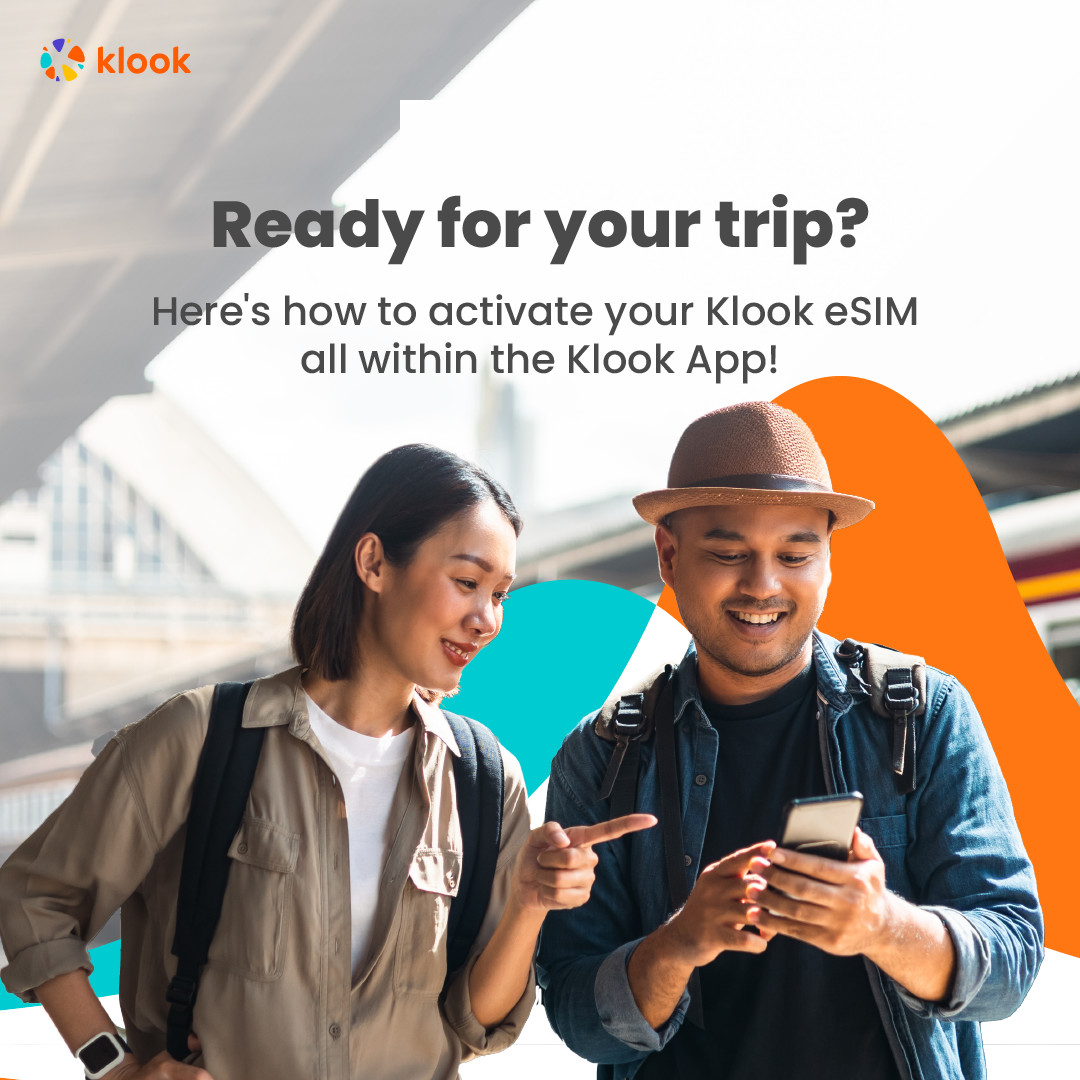
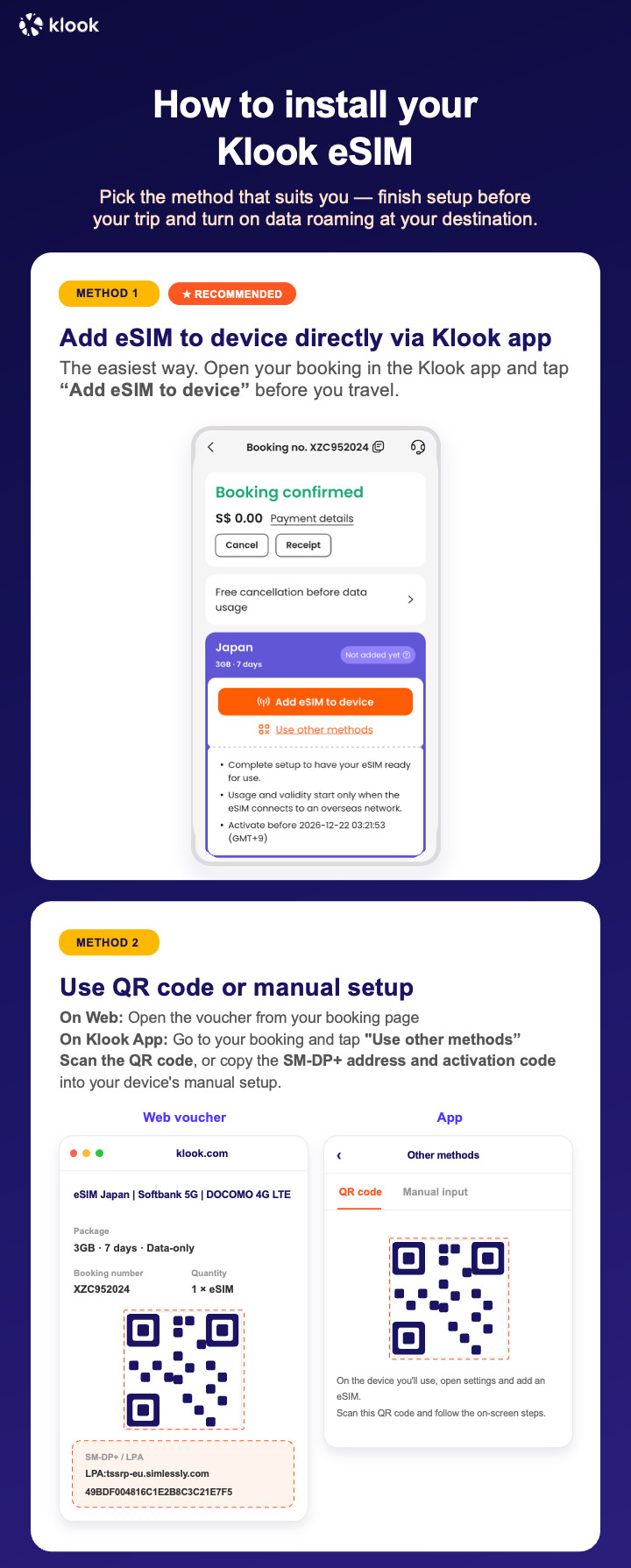
- Klook eSIM o‘rnatish usullari
ESIM-ni Klook ilovasida faollashtirish, QR kodni skanerlash yoki SMDP+ ma’lumotlarini qo‘lda kiritish orqali faollashtiring
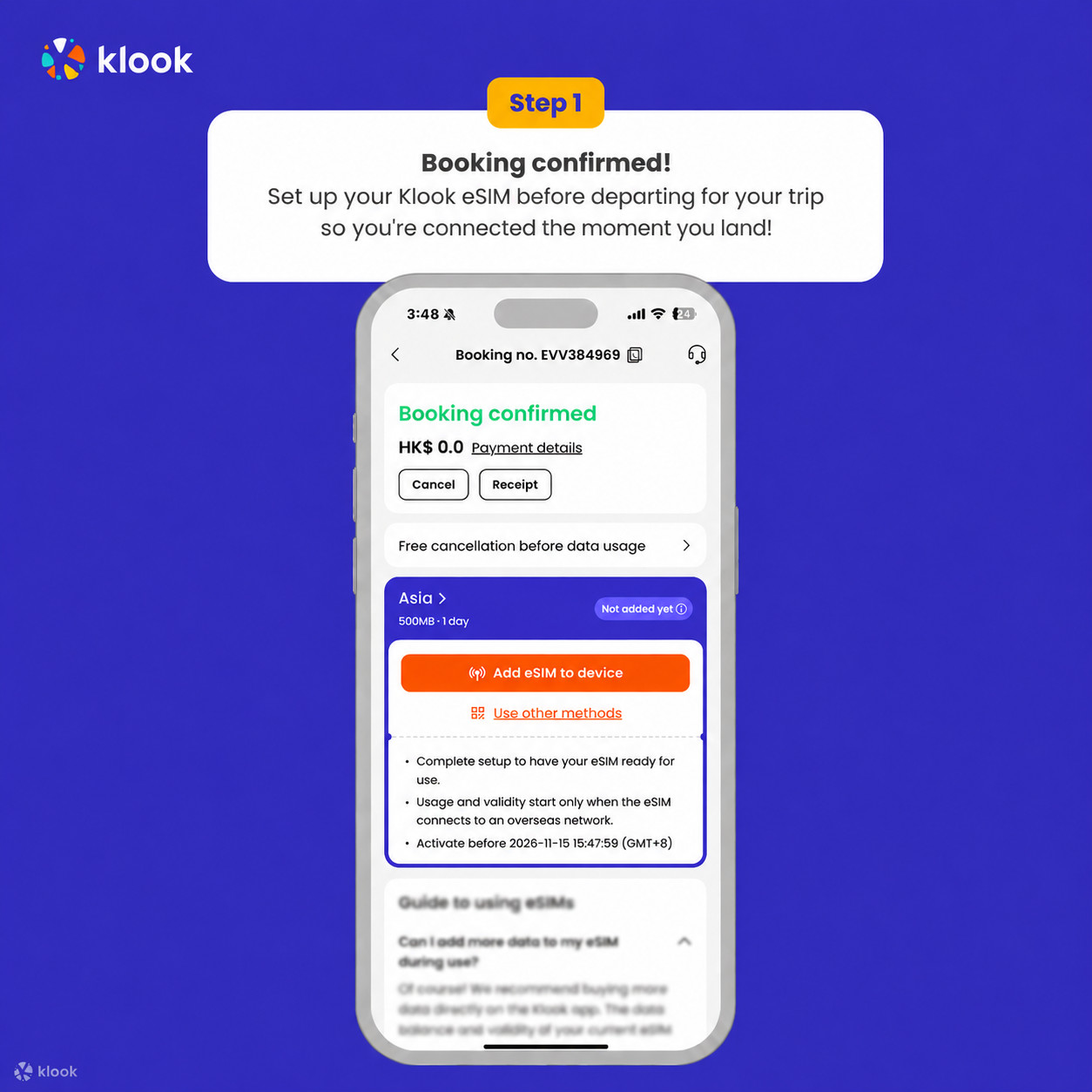
- Klook eSIM ilovada faollashtirish
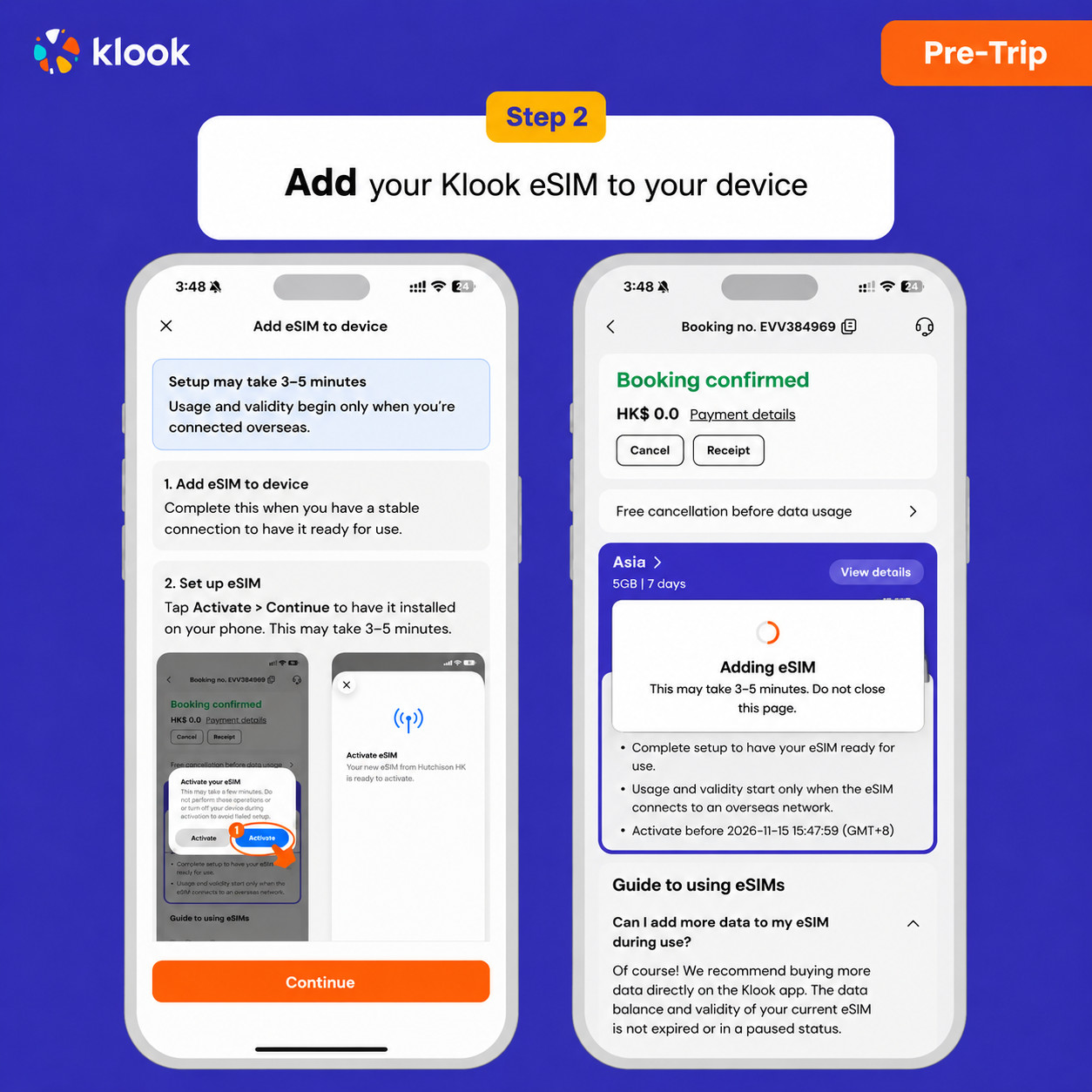
O‘rnatishni boshlash uchun broningizda Qurilmaga eSIM qo‘shish tugmasini bosing. Havotir olmang, internet va amal qilish muddati faqat manzilingizga yetib borganingizda boshlanadi
- Klook eSIM ilovada faollashtirish
ESIM o‘rnatilishi avtomatik tarzda boshlanadi
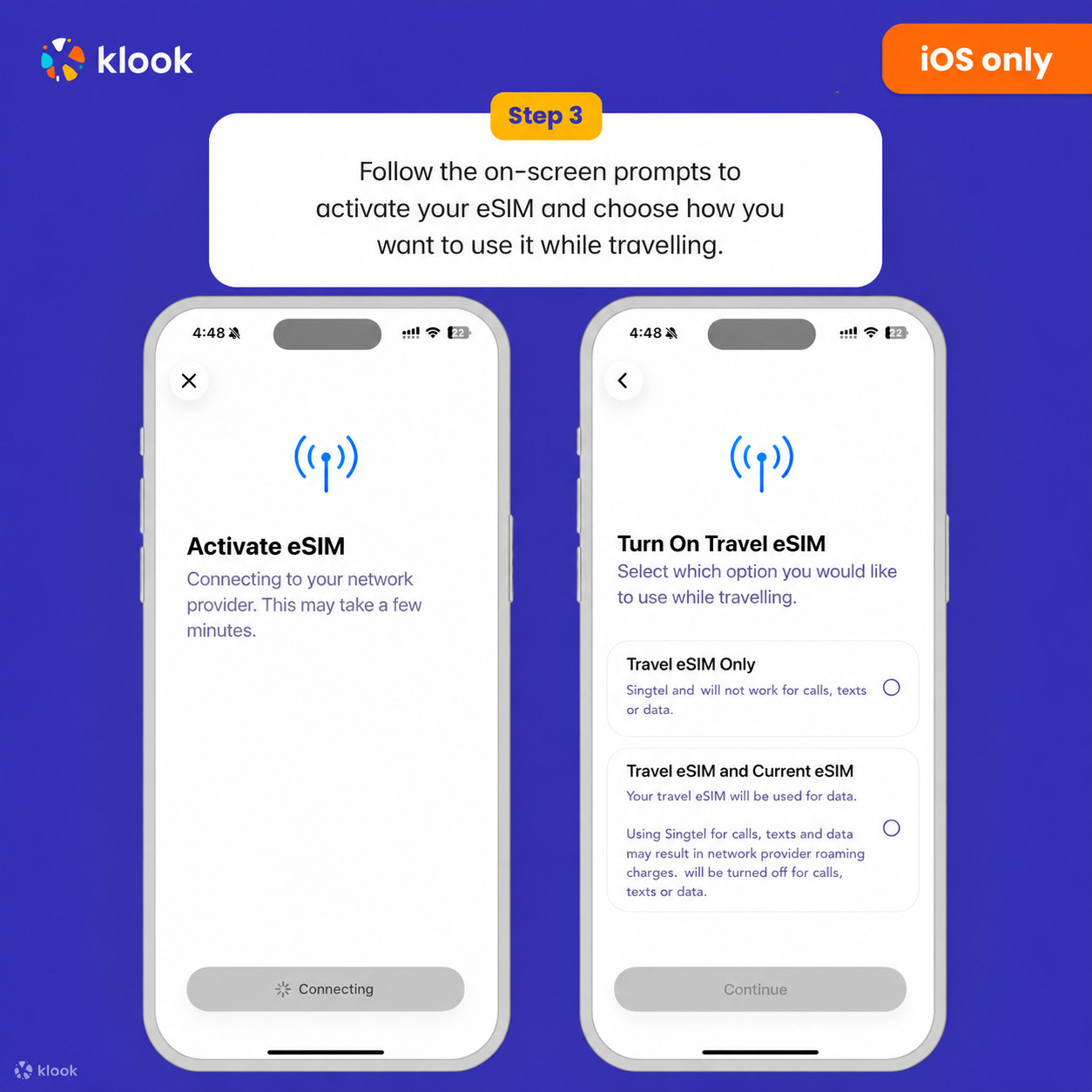
- Klook eSIM iOS o‘rnatilishi
iOS qurilmangizda Klook eSIM-ni safar uchun sozlang
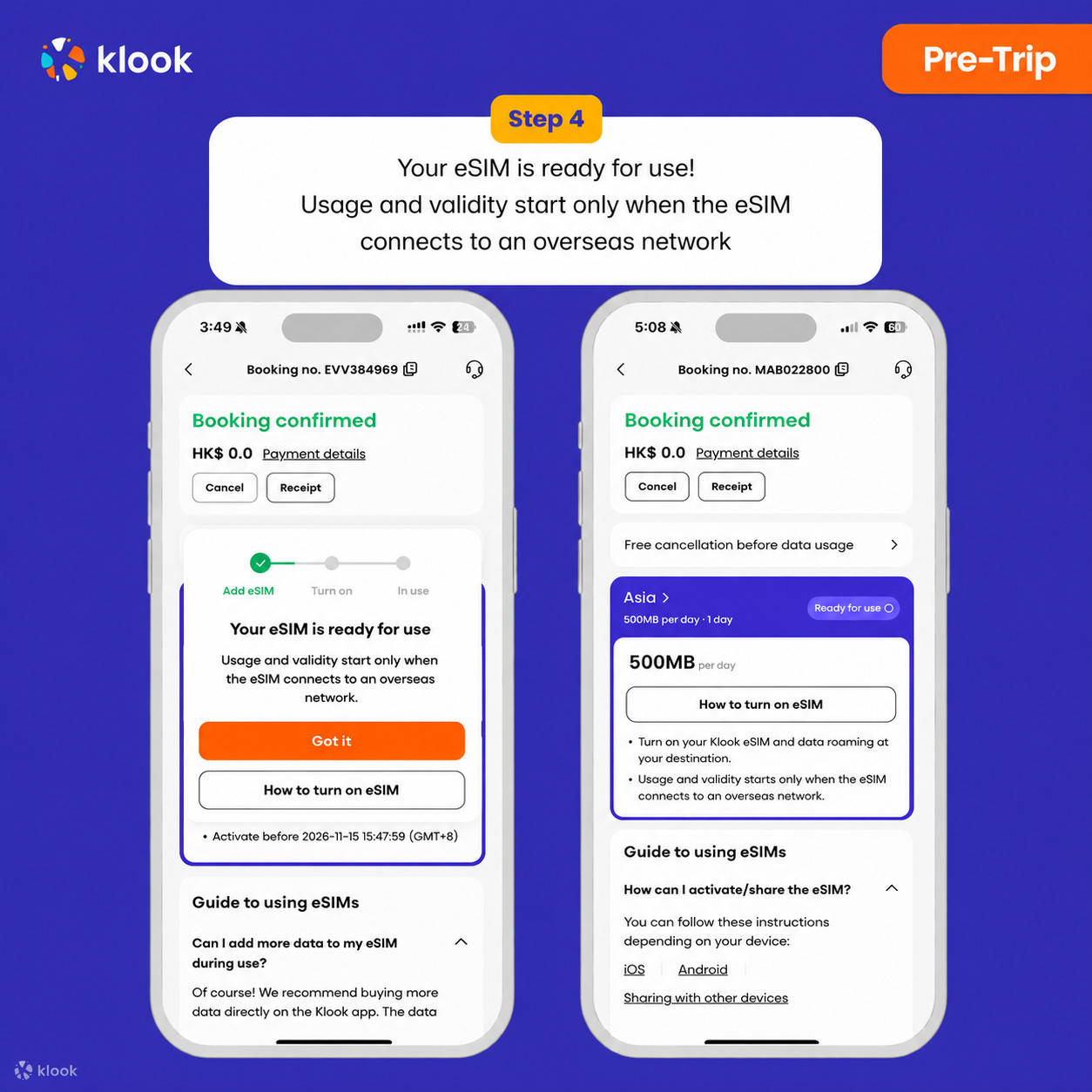
- Klook eSIM o‘rnatildi
ESIM foydalanishga tayyor! Foydalanish va amal qilish muddati faqat eSIM chet el tarmog‘iga ulanganidan so‘ng boshlanadi
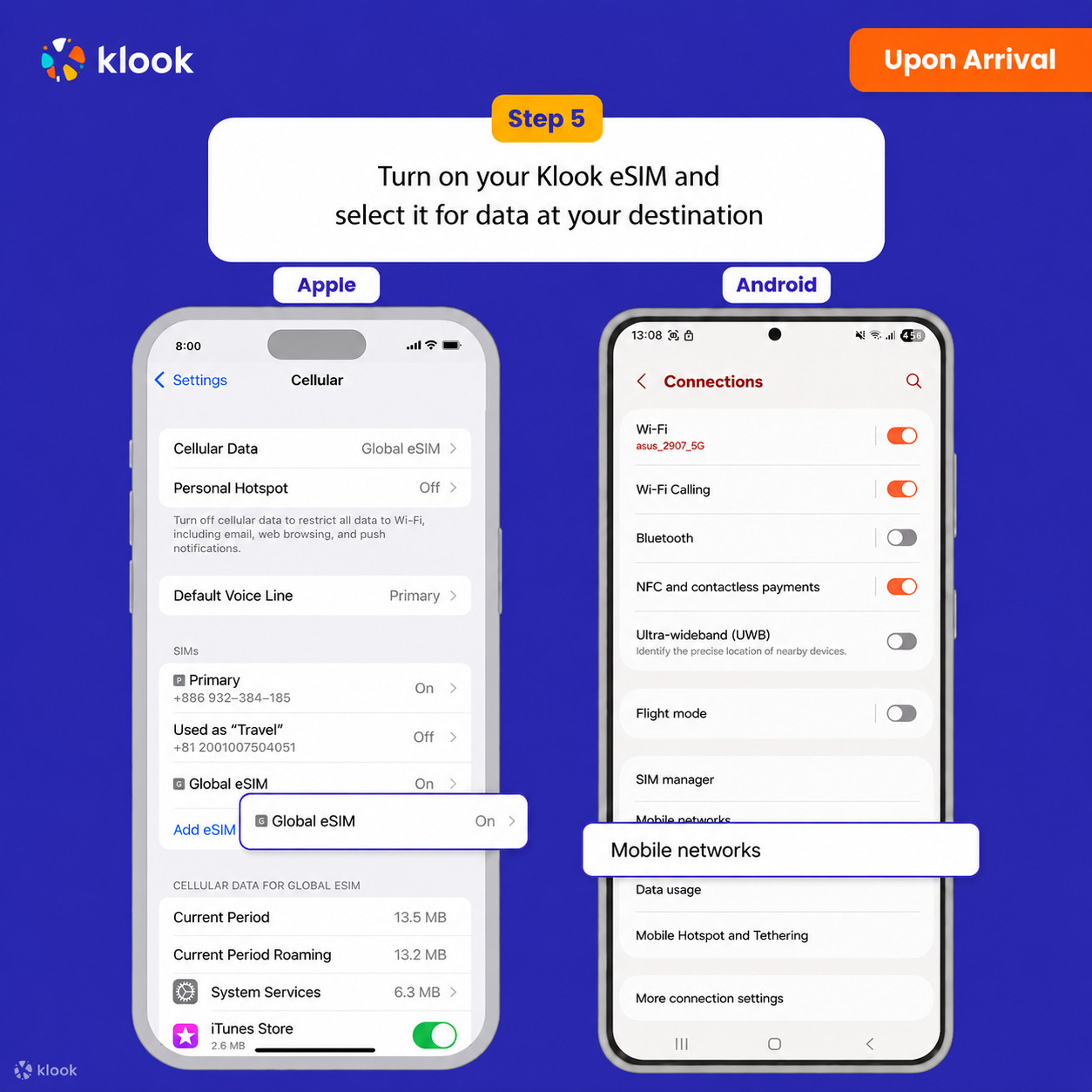
- Klook eSIM-ni yoqing
Klook eSIM-ni yoqing va mobil internet uchun Klook eSIM-ni tanlang
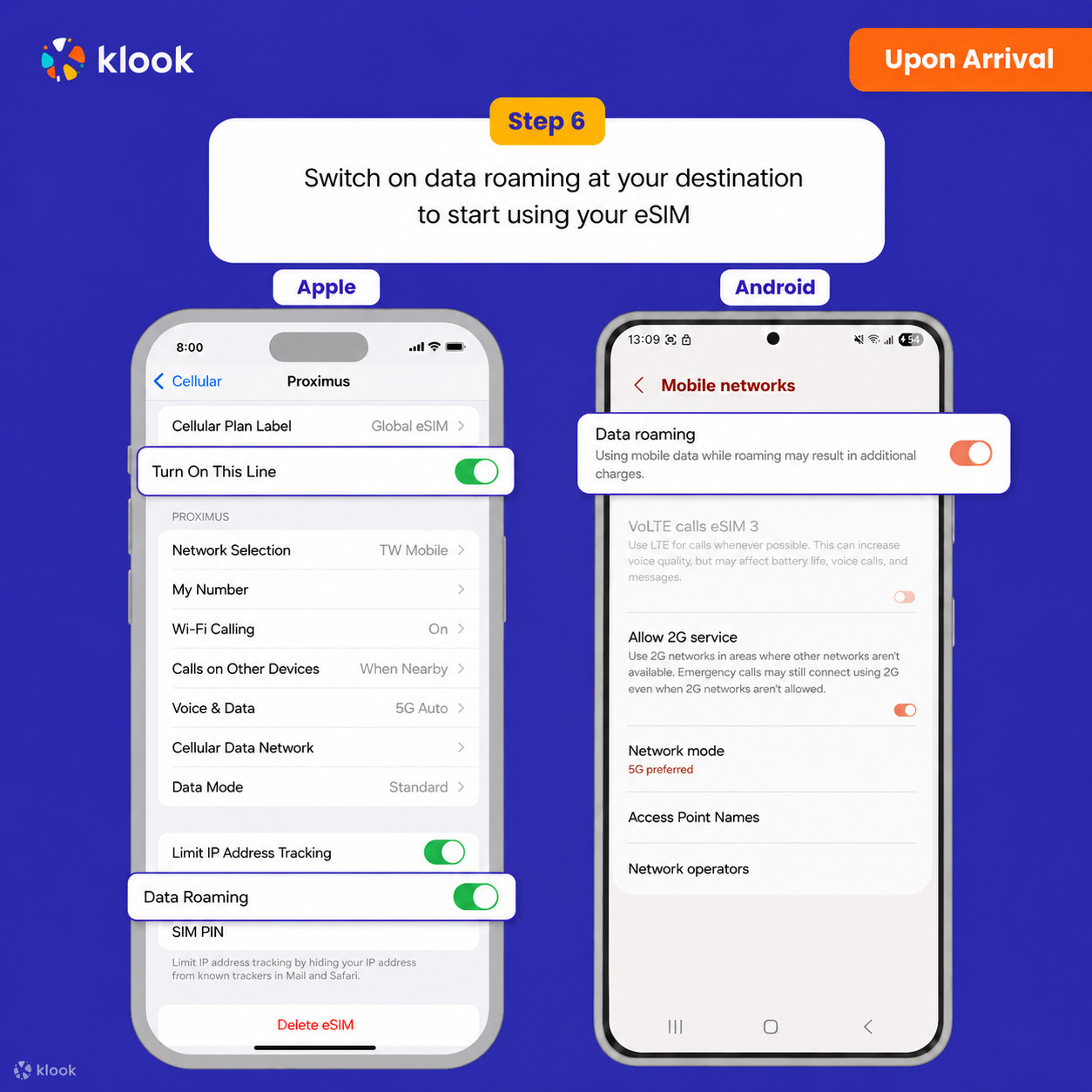
- Data roaming-ni yoqing
Manzilingizda data roaming-ni yoqing va eSIM-dan foydalanishni boshlang
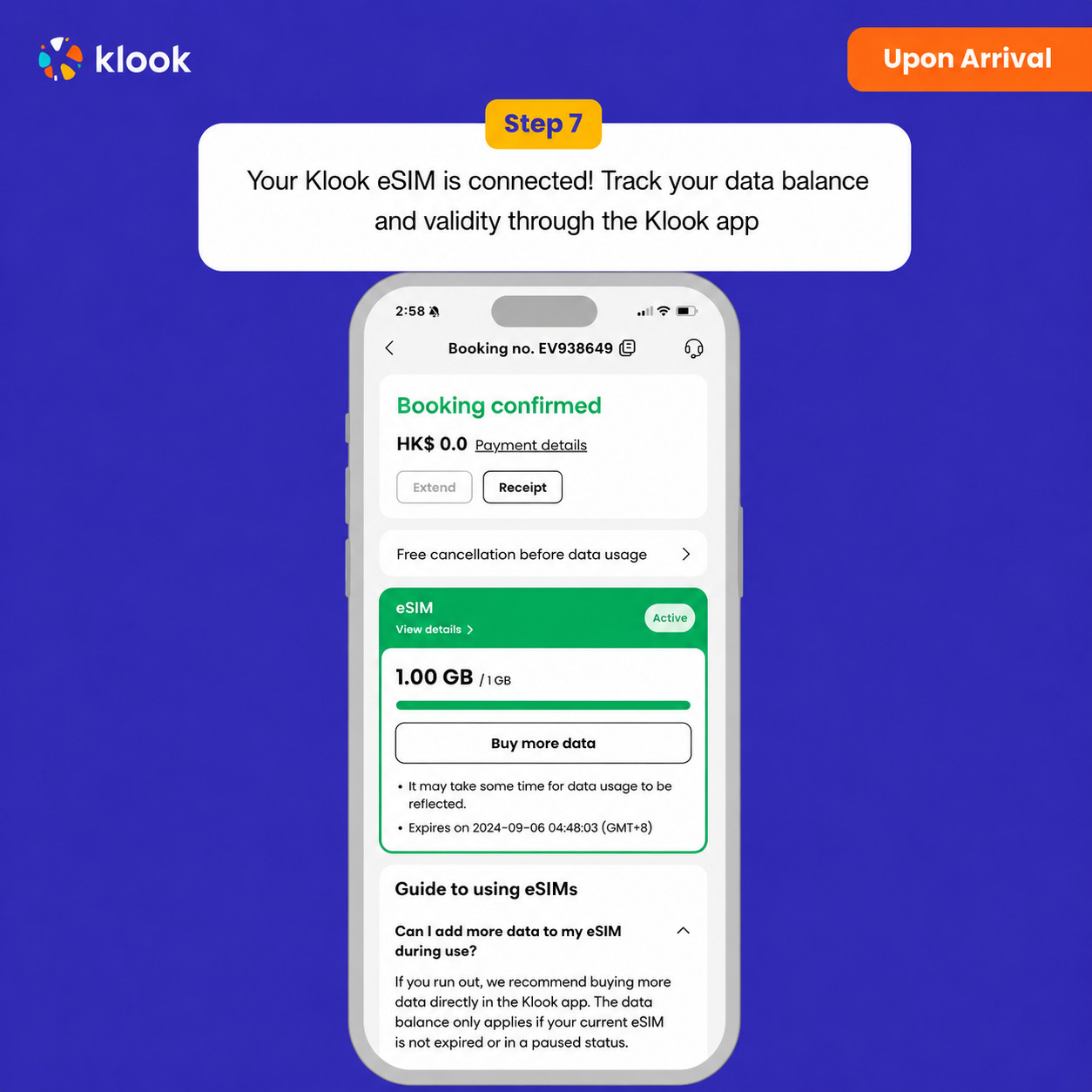
- Klook eSIM ulandi
Klook eSIM ulandi! Ma’lumotlar balansingiz va amal qilish muddatini Klook ilovasi orqali kuzatib boring
Kunlik internet · 2 kun · 3GB · Faqat internet
Tasdiqlash siyosati
- Bir necha daqiqa ichida tasdiq olasiz. Agar tasdiqni ko‘rmasangiz, mijozlarni qo‘llab-quvvatlash xizmatimizga murojaat qiling.
ESIM-ni faollashtiring Android / iOS
- eSIM tarifingiz manzil mobil tarmog‘iga ulangan vaqtdan boshlab ishga tushadi. Masalan, 3 kunlik tarifni soat 10:00 da faollashtirsangiz, u 3 kundan so‘ng soat 10:00 da tugaydi.
- Klook eSIM-ni safarga chiqishdan oldin faollashtiring
ESIM-ni safarga chiqishdan oldin faollashtiring
- Klook eSIM o‘rnatish usullari
ESIM-ni Klook ilovasida faollashtirish, QR kodni skanerlash yoki SMDP+ ma’lumotlarini qo‘lda kiritish orqali faollashtiring
- Klook eSIM ilovada faollashtirish
O‘rnatishni boshlash uchun broningizda Qurilmaga eSIM qo‘shish tugmasini bosing. Havotir olmang, internet va amal qilish muddati faqat manzilingizga yetib borganingizda boshlanadi
- Klook eSIM ilovada faollashtirish
ESIM o‘rnatilishi avtomatik tarzda boshlanadi
- Klook eSIM iOS o‘rnatilishi
iOS qurilmangizda Klook eSIM-ni safar uchun sozlang
- Klook eSIM o‘rnatildi
ESIM foydalanishga tayyor! Foydalanish va amal qilish muddati faqat eSIM chet el tarmog‘iga ulanganidan so‘ng boshlanadi
- Klook eSIM-ni yoqing
Klook eSIM-ni yoqing va mobil internet uchun Klook eSIM-ni tanlang
- Data roaming-ni yoqing
Manzilingizda data roaming-ni yoqing va eSIM-dan foydalanishni boshlang
- Klook eSIM ulandi
Klook eSIM ulandi! Ma’lumotlar balansingiz va amal qilish muddatini Klook ilovasi orqali kuzatib boring
Kunlik internet · 3 kun · 1GB · Faqat internet
- Klook eSIM-ni safarga chiqishdan oldin faollashtiring
ESIM-ni safarga chiqishdan oldin faollashtiring
- Klook eSIM o‘rnatish usullari
ESIM-ni Klook ilovasida faollashtirish, QR kodni skanerlash yoki SMDP+ ma’lumotlarini qo‘lda kiritish orqali faollashtiring
- Klook eSIM ilovada faollashtirish
O‘rnatishni boshlash uchun broningizda Qurilmaga eSIM qo‘shish tugmasini bosing. Havotir olmang, internet va amal qilish muddati faqat manzilingizga yetib borganingizda boshlanadi
- Klook eSIM ilovada faollashtirish
ESIM o‘rnatilishi avtomatik tarzda boshlanadi
- Klook eSIM iOS o‘rnatilishi
iOS qurilmangizda Klook eSIM-ni safar uchun sozlang
- Klook eSIM o‘rnatildi
ESIM foydalanishga tayyor! Foydalanish va amal qilish muddati faqat eSIM chet el tarmog‘iga ulanganidan so‘ng boshlanadi
- Klook eSIM-ni yoqing
Klook eSIM-ni yoqing va mobil internet uchun Klook eSIM-ni tanlang
- Data roaming-ni yoqing
Manzilingizda data roaming-ni yoqing va eSIM-dan foydalanishni boshlang
- Klook eSIM ulandi
Klook eSIM ulandi! Ma’lumotlar balansingiz va amal qilish muddatini Klook ilovasi orqali kuzatib boring
ESIM-ni faollashtiring Android / iOS
- eSIM tarifingiz manzil mobil tarmog‘iga ulangan vaqtdan boshlab ishga tushadi. Masalan, 3 kunlik tarifni soat 10:00 da faollashtirsangiz, u 3 kundan so‘ng soat 10:00 da tugaydi.
Tasdiqlash siyosati
- Bir necha daqiqa ichida tasdiq olasiz. Agar tasdiqni ko‘rmasangiz, mijozlarni qo‘llab-quvvatlash xizmatimizga murojaat qiling.
Kunlik internet · 3 kun · 3GB · Faqat internet
Tasdiqlash siyosati
- Bir necha daqiqa ichida tasdiq olasiz. Agar tasdiqni ko‘rmasangiz, mijozlarni qo‘llab-quvvatlash xizmatimizga murojaat qiling.
ESIM-ni faollashtiring Android / iOS
- eSIM tarifingiz manzil mobil tarmog‘iga ulangan vaqtdan boshlab ishga tushadi. Masalan, 3 kunlik tarifni soat 10:00 da faollashtirsangiz, u 3 kundan so‘ng soat 10:00 da tugaydi.
- Klook eSIM-ni safarga chiqishdan oldin faollashtiring
ESIM-ni safarga chiqishdan oldin faollashtiring
- Klook eSIM o‘rnatish usullari
ESIM-ni Klook ilovasida faollashtirish, QR kodni skanerlash yoki SMDP+ ma’lumotlarini qo‘lda kiritish orqali faollashtiring
- Klook eSIM ilovada faollashtirish
O‘rnatishni boshlash uchun broningizda Qurilmaga eSIM qo‘shish tugmasini bosing. Havotir olmang, internet va amal qilish muddati faqat manzilingizga yetib borganingizda boshlanadi
- Klook eSIM ilovada faollashtirish
ESIM o‘rnatilishi avtomatik tarzda boshlanadi
- Klook eSIM iOS o‘rnatilishi
iOS qurilmangizda Klook eSIM-ni safar uchun sozlang
- Klook eSIM o‘rnatildi
ESIM foydalanishga tayyor! Foydalanish va amal qilish muddati faqat eSIM chet el tarmog‘iga ulanganidan so‘ng boshlanadi
- Klook eSIM-ni yoqing
Klook eSIM-ni yoqing va mobil internet uchun Klook eSIM-ni tanlang
- Data roaming-ni yoqing
Manzilingizda data roaming-ni yoqing va eSIM-dan foydalanishni boshlang
- Klook eSIM ulandi
Klook eSIM ulandi! Ma’lumotlar balansingiz va amal qilish muddatini Klook ilovasi orqali kuzatib boring
Kunlik internet · 3 kun · Cheksiz · Faqat internet
Tasdiqlash siyosati
- Bir necha daqiqa ichida tasdiq olasiz. Agar tasdiqni ko‘rmasangiz, mijozlarni qo‘llab-quvvatlash xizmatimizga murojaat qiling.
- Klook eSIM-ni safarga chiqishdan oldin faollashtiring
ESIM-ni safarga chiqishdan oldin faollashtiring
- Klook eSIM o‘rnatish usullari
ESIM-ni Klook ilovasida faollashtirish, QR kodni skanerlash yoki SMDP+ ma’lumotlarini qo‘lda kiritish orqali faollashtiring
- Klook eSIM ilovada faollashtirish
O‘rnatishni boshlash uchun broningizda Qurilmaga eSIM qo‘shish tugmasini bosing. Havotir olmang, internet va amal qilish muddati faqat manzilingizga yetib borganingizda boshlanadi
- Klook eSIM ilovada faollashtirish
ESIM o‘rnatilishi avtomatik tarzda boshlanadi
- Klook eSIM iOS o‘rnatilishi
iOS qurilmangizda Klook eSIM-ni safar uchun sozlang
- Klook eSIM o‘rnatildi
ESIM foydalanishga tayyor! Foydalanish va amal qilish muddati faqat eSIM chet el tarmog‘iga ulanganidan so‘ng boshlanadi
- Klook eSIM-ni yoqing
Klook eSIM-ni yoqing va mobil internet uchun Klook eSIM-ni tanlang
- Data roaming-ni yoqing
Manzilingizda data roaming-ni yoqing va eSIM-dan foydalanishni boshlang
- Klook eSIM ulandi
Klook eSIM ulandi! Ma’lumotlar balansingiz va amal qilish muddatini Klook ilovasi orqali kuzatib boring
Kunlik internet · 5 kun · 3GB · Faqat internet
Tasdiqlash siyosati
- Bir necha daqiqa ichida tasdiq olasiz. Agar tasdiqni ko‘rmasangiz, mijozlarni qo‘llab-quvvatlash xizmatimizga murojaat qiling.
- Klook eSIM-ni safarga chiqishdan oldin faollashtiring
ESIM-ni safarga chiqishdan oldin faollashtiring
- Klook eSIM o‘rnatish usullari
ESIM-ni Klook ilovasida faollashtirish, QR kodni skanerlash yoki SMDP+ ma’lumotlarini qo‘lda kiritish orqali faollashtiring
- Klook eSIM ilovada faollashtirish
O‘rnatishni boshlash uchun broningizda Qurilmaga eSIM qo‘shish tugmasini bosing. Havotir olmang, internet va amal qilish muddati faqat manzilingizga yetib borganingizda boshlanadi
- Klook eSIM ilovada faollashtirish
ESIM o‘rnatilishi avtomatik tarzda boshlanadi
- Klook eSIM iOS o‘rnatilishi
iOS qurilmangizda Klook eSIM-ni safar uchun sozlang
- Klook eSIM o‘rnatildi
ESIM foydalanishga tayyor! Foydalanish va amal qilish muddati faqat eSIM chet el tarmog‘iga ulanganidan so‘ng boshlanadi
- Klook eSIM-ni yoqing
Klook eSIM-ni yoqing va mobil internet uchun Klook eSIM-ni tanlang
- Data roaming-ni yoqing
Manzilingizda data roaming-ni yoqing va eSIM-dan foydalanishni boshlang
- Klook eSIM ulandi
Klook eSIM ulandi! Ma’lumotlar balansingiz va amal qilish muddatini Klook ilovasi orqali kuzatib boring
Kunlik internet · 5 kun · Cheksiz · Faqat internet
- Klook eSIM-ni safarga chiqishdan oldin faollashtiring
ESIM-ni safarga chiqishdan oldin faollashtiring
- Klook eSIM o‘rnatish usullari
ESIM-ni Klook ilovasida faollashtirish, QR kodni skanerlash yoki SMDP+ ma’lumotlarini qo‘lda kiritish orqali faollashtiring
- Klook eSIM ilovada faollashtirish
O‘rnatishni boshlash uchun broningizda Qurilmaga eSIM qo‘shish tugmasini bosing. Havotir olmang, internet va amal qilish muddati faqat manzilingizga yetib borganingizda boshlanadi
- Klook eSIM ilovada faollashtirish
ESIM o‘rnatilishi avtomatik tarzda boshlanadi
- Klook eSIM iOS o‘rnatilishi
iOS qurilmangizda Klook eSIM-ni safar uchun sozlang
- Klook eSIM o‘rnatildi
ESIM foydalanishga tayyor! Foydalanish va amal qilish muddati faqat eSIM chet el tarmog‘iga ulanganidan so‘ng boshlanadi
- Klook eSIM-ni yoqing
Klook eSIM-ni yoqing va mobil internet uchun Klook eSIM-ni tanlang
- Data roaming-ni yoqing
Manzilingizda data roaming-ni yoqing va eSIM-dan foydalanishni boshlang
- Klook eSIM ulandi
Klook eSIM ulandi! Ma’lumotlar balansingiz va amal qilish muddatini Klook ilovasi orqali kuzatib boring
ESIM-ni faollashtiring Android / iOS
- eSIM tarifingiz manzil mobil tarmog‘iga ulangan vaqtdan boshlab ishga tushadi. Masalan, 3 kunlik tarifni soat 10:00 da faollashtirsangiz, u 3 kundan so‘ng soat 10:00 da tugaydi.
Tasdiqlash siyosati
- Bir necha daqiqa ichida tasdiq olasiz. Agar tasdiqni ko‘rmasangiz, mijozlarni qo‘llab-quvvatlash xizmatimizga murojaat qiling.
Kunlik internet · 7 kun · 1GB · Faqat internet
Tasdiqlash siyosati
- Bir necha daqiqa ichida tasdiq olasiz. Agar tasdiqni ko‘rmasangiz, mijozlarni qo‘llab-quvvatlash xizmatimizga murojaat qiling.
ESIM-ni faollashtiring Android / iOS
- eSIM tarifingiz manzil mobil tarmog‘iga ulangan vaqtdan boshlab ishga tushadi. Masalan, 3 kunlik tarifni soat 10:00 da faollashtirsangiz, u 3 kundan so‘ng soat 10:00 da tugaydi.
- Klook eSIM-ni safarga chiqishdan oldin faollashtiring
ESIM-ni safarga chiqishdan oldin faollashtiring
- Klook eSIM o‘rnatish usullari
ESIM-ni Klook ilovasida faollashtirish, QR kodni skanerlash yoki SMDP+ ma’lumotlarini qo‘lda kiritish orqali faollashtiring
- Klook eSIM ilovada faollashtirish
O‘rnatishni boshlash uchun broningizda Qurilmaga eSIM qo‘shish tugmasini bosing. Havotir olmang, internet va amal qilish muddati faqat manzilingizga yetib borganingizda boshlanadi
- Klook eSIM ilovada faollashtirish
ESIM o‘rnatilishi avtomatik tarzda boshlanadi
- Klook eSIM iOS o‘rnatilishi
iOS qurilmangizda Klook eSIM-ni safar uchun sozlang
- Klook eSIM o‘rnatildi
ESIM foydalanishga tayyor! Foydalanish va amal qilish muddati faqat eSIM chet el tarmog‘iga ulanganidan so‘ng boshlanadi
- Klook eSIM-ni yoqing
Klook eSIM-ni yoqing va mobil internet uchun Klook eSIM-ni tanlang
- Data roaming-ni yoqing
Manzilingizda data roaming-ni yoqing va eSIM-dan foydalanishni boshlang
- Klook eSIM ulandi
Klook eSIM ulandi! Ma’lumotlar balansingiz va amal qilish muddatini Klook ilovasi orqali kuzatib boring
Kunlik internet · 8 kun · 1GB · Faqat internet
ESIM-ni faollashtiring Android / iOS
- eSIM tarifingiz manzil mobil tarmog‘iga ulangan vaqtdan boshlab ishga tushadi. Masalan, 3 kunlik tarifni soat 10:00 da faollashtirsangiz, u 3 kundan so‘ng soat 10:00 da tugaydi.
- Klook eSIM-ni safarga chiqishdan oldin faollashtiring
ESIM-ni safarga chiqishdan oldin faollashtiring
- Klook eSIM o‘rnatish usullari
ESIM-ni Klook ilovasida faollashtirish, QR kodni skanerlash yoki SMDP+ ma’lumotlarini qo‘lda kiritish orqali faollashtiring
- Klook eSIM ilovada faollashtirish
O‘rnatishni boshlash uchun broningizda Qurilmaga eSIM qo‘shish tugmasini bosing. Havotir olmang, internet va amal qilish muddati faqat manzilingizga yetib borganingizda boshlanadi
- Klook eSIM ilovada faollashtirish
ESIM o‘rnatilishi avtomatik tarzda boshlanadi
- Klook eSIM iOS o‘rnatilishi
iOS qurilmangizda Klook eSIM-ni safar uchun sozlang
- Klook eSIM o‘rnatildi
ESIM foydalanishga tayyor! Foydalanish va amal qilish muddati faqat eSIM chet el tarmog‘iga ulanganidan so‘ng boshlanadi
- Klook eSIM-ni yoqing
Klook eSIM-ni yoqing va mobil internet uchun Klook eSIM-ni tanlang
- Data roaming-ni yoqing
Manzilingizda data roaming-ni yoqing va eSIM-dan foydalanishni boshlang
- Klook eSIM ulandi
Klook eSIM ulandi! Ma’lumotlar balansingiz va amal qilish muddatini Klook ilovasi orqali kuzatib boring
Tasdiqlash siyosati
- Bir necha daqiqa ichida tasdiq olasiz. Agar tasdiqni ko‘rmasangiz, mijozlarni qo‘llab-quvvatlash xizmatimizga murojaat qiling.
Kunlik internet · 8 kun · Cheksiz · Faqat internet
Tasdiqlash siyosati
- Bir necha daqiqa ichida tasdiq olasiz. Agar tasdiqni ko‘rmasangiz, mijozlarni qo‘llab-quvvatlash xizmatimizga murojaat qiling.
ESIM-ni faollashtiring Android / iOS
- eSIM tarifingiz manzil mobil tarmog‘iga ulangan vaqtdan boshlab ishga tushadi. Masalan, 3 kunlik tarifni soat 10:00 da faollashtirsangiz, u 3 kundan so‘ng soat 10:00 da tugaydi.
- Klook eSIM-ni safarga chiqishdan oldin faollashtiring
ESIM-ni safarga chiqishdan oldin faollashtiring
- Klook eSIM o‘rnatish usullari
ESIM-ni Klook ilovasida faollashtirish, QR kodni skanerlash yoki SMDP+ ma’lumotlarini qo‘lda kiritish orqali faollashtiring
- Klook eSIM ilovada faollashtirish
O‘rnatishni boshlash uchun broningizda Qurilmaga eSIM qo‘shish tugmasini bosing. Havotir olmang, internet va amal qilish muddati faqat manzilingizga yetib borganingizda boshlanadi
- Klook eSIM ilovada faollashtirish
ESIM o‘rnatilishi avtomatik tarzda boshlanadi
- Klook eSIM iOS o‘rnatilishi
iOS qurilmangizda Klook eSIM-ni safar uchun sozlang
- Klook eSIM o‘rnatildi
ESIM foydalanishga tayyor! Foydalanish va amal qilish muddati faqat eSIM chet el tarmog‘iga ulanganidan so‘ng boshlanadi
- Klook eSIM-ni yoqing
Klook eSIM-ni yoqing va mobil internet uchun Klook eSIM-ni tanlang
- Data roaming-ni yoqing
Manzilingizda data roaming-ni yoqing va eSIM-dan foydalanishni boshlang
- Klook eSIM ulandi
Klook eSIM ulandi! Ma’lumotlar balansingiz va amal qilish muddatini Klook ilovasi orqali kuzatib boring
Kunlik internet · 10 kun · 1GB · Faqat internet
- Klook eSIM-ni safarga chiqishdan oldin faollashtiring
ESIM-ni safarga chiqishdan oldin faollashtiring
- Klook eSIM o‘rnatish usullari
ESIM-ni Klook ilovasida faollashtirish, QR kodni skanerlash yoki SMDP+ ma’lumotlarini qo‘lda kiritish orqali faollashtiring
- Klook eSIM ilovada faollashtirish
O‘rnatishni boshlash uchun broningizda Qurilmaga eSIM qo‘shish tugmasini bosing. Havotir olmang, internet va amal qilish muddati faqat manzilingizga yetib borganingizda boshlanadi
- Klook eSIM ilovada faollashtirish
ESIM o‘rnatilishi avtomatik tarzda boshlanadi
- Klook eSIM iOS o‘rnatilishi
iOS qurilmangizda Klook eSIM-ni safar uchun sozlang
- Klook eSIM o‘rnatildi
ESIM foydalanishga tayyor! Foydalanish va amal qilish muddati faqat eSIM chet el tarmog‘iga ulanganidan so‘ng boshlanadi
- Klook eSIM-ni yoqing
Klook eSIM-ni yoqing va mobil internet uchun Klook eSIM-ni tanlang
- Data roaming-ni yoqing
Manzilingizda data roaming-ni yoqing va eSIM-dan foydalanishni boshlang
- Klook eSIM ulandi
Klook eSIM ulandi! Ma’lumotlar balansingiz va amal qilish muddatini Klook ilovasi orqali kuzatib boring
ESIM-ni faollashtiring Android / iOS
- eSIM tarifingiz manzil mobil tarmog‘iga ulangan vaqtdan boshlab ishga tushadi. Masalan, 3 kunlik tarifni soat 10:00 da faollashtirsangiz, u 3 kundan so‘ng soat 10:00 da tugaydi.
Tasdiqlash siyosati
- Bir necha daqiqa ichida tasdiq olasiz. Agar tasdiqni ko‘rmasangiz, mijozlarni qo‘llab-quvvatlash xizmatimizga murojaat qiling.
Kunlik internet · 10 kun · 3GB · Faqat internet
ESIM-ni faollashtiring Android / iOS
- eSIM tarifingiz manzil mobil tarmog‘iga ulangan vaqtdan boshlab ishga tushadi. Masalan, 3 kunlik tarifni soat 10:00 da faollashtirsangiz, u 3 kundan so‘ng soat 10:00 da tugaydi.
- Klook eSIM-ni safarga chiqishdan oldin faollashtiring
ESIM-ni safarga chiqishdan oldin faollashtiring
- Klook eSIM o‘rnatish usullari
ESIM-ni Klook ilovasida faollashtirish, QR kodni skanerlash yoki SMDP+ ma’lumotlarini qo‘lda kiritish orqali faollashtiring
- Klook eSIM ilovada faollashtirish
O‘rnatishni boshlash uchun broningizda Qurilmaga eSIM qo‘shish tugmasini bosing. Havotir olmang, internet va amal qilish muddati faqat manzilingizga yetib borganingizda boshlanadi
- Klook eSIM ilovada faollashtirish
ESIM o‘rnatilishi avtomatik tarzda boshlanadi
- Klook eSIM iOS o‘rnatilishi
iOS qurilmangizda Klook eSIM-ni safar uchun sozlang
- Klook eSIM o‘rnatildi
ESIM foydalanishga tayyor! Foydalanish va amal qilish muddati faqat eSIM chet el tarmog‘iga ulanganidan so‘ng boshlanadi
- Klook eSIM-ni yoqing
Klook eSIM-ni yoqing va mobil internet uchun Klook eSIM-ni tanlang
- Data roaming-ni yoqing
Manzilingizda data roaming-ni yoqing va eSIM-dan foydalanishni boshlang
- Klook eSIM ulandi
Klook eSIM ulandi! Ma’lumotlar balansingiz va amal qilish muddatini Klook ilovasi orqali kuzatib boring
Tasdiqlash siyosati
- Bir necha daqiqa ichida tasdiq olasiz. Agar tasdiqni ko‘rmasangiz, mijozlarni qo‘llab-quvvatlash xizmatimizga murojaat qiling.
Kunlik internet · 15 kun · 1GB · Faqat internet
Tasdiqlash siyosati
- Bir necha daqiqa ichida tasdiq olasiz. Agar tasdiqni ko‘rmasangiz, mijozlarni qo‘llab-quvvatlash xizmatimizga murojaat qiling.
- Klook eSIM-ni safarga chiqishdan oldin faollashtiring
ESIM-ni safarga chiqishdan oldin faollashtiring
- Klook eSIM o‘rnatish usullari
ESIM-ni Klook ilovasida faollashtirish, QR kodni skanerlash yoki SMDP+ ma’lumotlarini qo‘lda kiritish orqali faollashtiring
- Klook eSIM ilovada faollashtirish
O‘rnatishni boshlash uchun broningizda Qurilmaga eSIM qo‘shish tugmasini bosing. Havotir olmang, internet va amal qilish muddati faqat manzilingizga yetib borganingizda boshlanadi
- Klook eSIM ilovada faollashtirish
ESIM o‘rnatilishi avtomatik tarzda boshlanadi
- Klook eSIM iOS o‘rnatilishi
iOS qurilmangizda Klook eSIM-ni safar uchun sozlang
- Klook eSIM o‘rnatildi
ESIM foydalanishga tayyor! Foydalanish va amal qilish muddati faqat eSIM chet el tarmog‘iga ulanganidan so‘ng boshlanadi
- Klook eSIM-ni yoqing
Klook eSIM-ni yoqing va mobil internet uchun Klook eSIM-ni tanlang
- Data roaming-ni yoqing
Manzilingizda data roaming-ni yoqing va eSIM-dan foydalanishni boshlang
- Klook eSIM ulandi
Klook eSIM ulandi! Ma’lumotlar balansingiz va amal qilish muddatini Klook ilovasi orqali kuzatib boring
Kunlik internet · 15 kun · 3GB · Faqat internet
Tasdiqlash siyosati
- Bir necha daqiqa ichida tasdiq olasiz. Agar tasdiqni ko‘rmasangiz, mijozlarni qo‘llab-quvvatlash xizmatimizga murojaat qiling.
- Klook eSIM-ni safarga chiqishdan oldin faollashtiring
ESIM-ni safarga chiqishdan oldin faollashtiring
- Klook eSIM o‘rnatish usullari
ESIM-ni Klook ilovasida faollashtirish, QR kodni skanerlash yoki SMDP+ ma’lumotlarini qo‘lda kiritish orqali faollashtiring
- Klook eSIM ilovada faollashtirish
O‘rnatishni boshlash uchun broningizda Qurilmaga eSIM qo‘shish tugmasini bosing. Havotir olmang, internet va amal qilish muddati faqat manzilingizga yetib borganingizda boshlanadi
- Klook eSIM ilovada faollashtirish
ESIM o‘rnatilishi avtomatik tarzda boshlanadi
- Klook eSIM iOS o‘rnatilishi
iOS qurilmangizda Klook eSIM-ni safar uchun sozlang
- Klook eSIM o‘rnatildi
ESIM foydalanishga tayyor! Foydalanish va amal qilish muddati faqat eSIM chet el tarmog‘iga ulanganidan so‘ng boshlanadi
- Klook eSIM-ni yoqing
Klook eSIM-ni yoqing va mobil internet uchun Klook eSIM-ni tanlang
- Data roaming-ni yoqing
Manzilingizda data roaming-ni yoqing va eSIM-dan foydalanishni boshlang
- Klook eSIM ulandi
Klook eSIM ulandi! Ma’lumotlar balansingiz va amal qilish muddatini Klook ilovasi orqali kuzatib boring
Kunlik internet · 30 kun · 1GB · Faqat internet
ESIM-ni faollashtiring Android / iOS
- eSIM tarifingiz manzil mobil tarmog‘iga ulangan vaqtdan boshlab ishga tushadi. Masalan, 3 kunlik tarifni soat 10:00 da faollashtirsangiz, u 3 kundan so‘ng soat 10:00 da tugaydi.
- Klook eSIM-ni safarga chiqishdan oldin faollashtiring
ESIM-ni safarga chiqishdan oldin faollashtiring
- Klook eSIM o‘rnatish usullari
ESIM-ni Klook ilovasida faollashtirish, QR kodni skanerlash yoki SMDP+ ma’lumotlarini qo‘lda kiritish orqali faollashtiring
- Klook eSIM ilovada faollashtirish
O‘rnatishni boshlash uchun broningizda Qurilmaga eSIM qo‘shish tugmasini bosing. Havotir olmang, internet va amal qilish muddati faqat manzilingizga yetib borganingizda boshlanadi
- Klook eSIM ilovada faollashtirish
ESIM o‘rnatilishi avtomatik tarzda boshlanadi
- Klook eSIM iOS o‘rnatilishi
iOS qurilmangizda Klook eSIM-ni safar uchun sozlang
- Klook eSIM o‘rnatildi
ESIM foydalanishga tayyor! Foydalanish va amal qilish muddati faqat eSIM chet el tarmog‘iga ulanganidan so‘ng boshlanadi
- Klook eSIM-ni yoqing
Klook eSIM-ni yoqing va mobil internet uchun Klook eSIM-ni tanlang
- Data roaming-ni yoqing
Manzilingizda data roaming-ni yoqing va eSIM-dan foydalanishni boshlang
- Klook eSIM ulandi
Klook eSIM ulandi! Ma’lumotlar balansingiz va amal qilish muddatini Klook ilovasi orqali kuzatib boring
Tasdiqlash siyosati
- Bir necha daqiqa ichida tasdiq olasiz. Agar tasdiqni ko‘rmasangiz, mijozlarni qo‘llab-quvvatlash xizmatimizga murojaat qiling.
Kunlik internet · 30 kun · Cheksiz · Faqat internet
Tasdiqlash siyosati
- Bir necha daqiqa ichida tasdiq olasiz. Agar tasdiqni ko‘rmasangiz, mijozlarni qo‘llab-quvvatlash xizmatimizga murojaat qiling.
- Klook eSIM-ni safarga chiqishdan oldin faollashtiring
ESIM-ni safarga chiqishdan oldin faollashtiring
- Klook eSIM o‘rnatish usullari
ESIM-ni Klook ilovasida faollashtirish, QR kodni skanerlash yoki SMDP+ ma’lumotlarini qo‘lda kiritish orqali faollashtiring
- Klook eSIM ilovada faollashtirish
O‘rnatishni boshlash uchun broningizda Qurilmaga eSIM qo‘shish tugmasini bosing. Havotir olmang, internet va amal qilish muddati faqat manzilingizga yetib borganingizda boshlanadi
- Klook eSIM ilovada faollashtirish
ESIM o‘rnatilishi avtomatik tarzda boshlanadi
- Klook eSIM iOS o‘rnatilishi
iOS qurilmangizda Klook eSIM-ni safar uchun sozlang
- Klook eSIM o‘rnatildi
ESIM foydalanishga tayyor! Foydalanish va amal qilish muddati faqat eSIM chet el tarmog‘iga ulanganidan so‘ng boshlanadi
- Klook eSIM-ni yoqing
Klook eSIM-ni yoqing va mobil internet uchun Klook eSIM-ni tanlang
- Data roaming-ni yoqing
Manzilingizda data roaming-ni yoqing va eSIM-dan foydalanishni boshlang
- Klook eSIM ulandi
Klook eSIM ulandi! Ma’lumotlar balansingiz va amal qilish muddatini Klook ilovasi orqali kuzatib boring
Umumiy internet · 1 kun · 3GB · Faqat internet
ESIM-ni faollashtiring Android / iOS
- eSIM tarifingiz manzil mobil tarmog‘iga ulangan vaqtdan boshlab ishga tushadi. Masalan, 3 kunlik tarifni soat 10:00 da faollashtirsangiz, u 3 kundan so‘ng soat 10:00 da tugaydi.
- Klook eSIM-ni safarga chiqishdan oldin faollashtiring
ESIM-ni safarga chiqishdan oldin faollashtiring
- Klook eSIM o‘rnatish usullari
ESIM-ni Klook ilovasida faollashtirish, QR kodni skanerlash yoki SMDP+ ma’lumotlarini qo‘lda kiritish orqali faollashtiring
- Klook eSIM ilovada faollashtirish
O‘rnatishni boshlash uchun broningizda Qurilmaga eSIM qo‘shish tugmasini bosing. Havotir olmang, internet va amal qilish muddati faqat manzilingizga yetib borganingizda boshlanadi
- Klook eSIM ilovada faollashtirish
ESIM o‘rnatilishi avtomatik tarzda boshlanadi
- Klook eSIM iOS o‘rnatilishi
iOS qurilmangizda Klook eSIM-ni safar uchun sozlang
- Klook eSIM o‘rnatildi
ESIM foydalanishga tayyor! Foydalanish va amal qilish muddati faqat eSIM chet el tarmog‘iga ulanganidan so‘ng boshlanadi
- Klook eSIM-ni yoqing
Klook eSIM-ni yoqing va mobil internet uchun Klook eSIM-ni tanlang
- Data roaming-ni yoqing
Manzilingizda data roaming-ni yoqing va eSIM-dan foydalanishni boshlang
- Klook eSIM ulandi
Klook eSIM ulandi! Ma’lumotlar balansingiz va amal qilish muddatini Klook ilovasi orqali kuzatib boring
Tasdiqlash siyosati
- Bir necha daqiqa ichida tasdiq olasiz. Agar tasdiqni ko‘rmasangiz, mijozlarni qo‘llab-quvvatlash xizmatimizga murojaat qiling.
Umumiy internet · 1 kun · 500MB · Faqat internet
- Klook eSIM-ni safarga chiqishdan oldin faollashtiring
ESIM-ni safarga chiqishdan oldin faollashtiring
- Klook eSIM o‘rnatish usullari
ESIM-ni Klook ilovasida faollashtirish, QR kodni skanerlash yoki SMDP+ ma’lumotlarini qo‘lda kiritish orqali faollashtiring
- Klook eSIM ilovada faollashtirish
O‘rnatishni boshlash uchun broningizda Qurilmaga eSIM qo‘shish tugmasini bosing. Havotir olmang, internet va amal qilish muddati faqat manzilingizga yetib borganingizda boshlanadi
- Klook eSIM ilovada faollashtirish
ESIM o‘rnatilishi avtomatik tarzda boshlanadi
- Klook eSIM iOS o‘rnatilishi
iOS qurilmangizda Klook eSIM-ni safar uchun sozlang
- Klook eSIM o‘rnatildi
ESIM foydalanishga tayyor! Foydalanish va amal qilish muddati faqat eSIM chet el tarmog‘iga ulanganidan so‘ng boshlanadi
- Klook eSIM-ni yoqing
Klook eSIM-ni yoqing va mobil internet uchun Klook eSIM-ni tanlang
- Data roaming-ni yoqing
Manzilingizda data roaming-ni yoqing va eSIM-dan foydalanishni boshlang
- Klook eSIM ulandi
Klook eSIM ulandi! Ma’lumotlar balansingiz va amal qilish muddatini Klook ilovasi orqali kuzatib boring
ESIM-ni faollashtiring Android / iOS
- eSIM tarifingiz manzil mobil tarmog‘iga ulangan vaqtdan boshlab ishga tushadi. Masalan, 3 kunlik tarifni soat 10:00 da faollashtirsangiz, u 3 kundan so‘ng soat 10:00 da tugaydi.
Tasdiqlash siyosati
- Bir necha daqiqa ichida tasdiq olasiz. Agar tasdiqni ko‘rmasangiz, mijozlarni qo‘llab-quvvatlash xizmatimizga murojaat qiling.
Umumiy internet · 3 kun · 1GB · Faqat internet
Tasdiqlash siyosati
- Bir necha daqiqa ichida tasdiq olasiz. Agar tasdiqni ko‘rmasangiz, mijozlarni qo‘llab-quvvatlash xizmatimizga murojaat qiling.
- Klook eSIM-ni safarga chiqishdan oldin faollashtiring
ESIM-ni safarga chiqishdan oldin faollashtiring
- Klook eSIM o‘rnatish usullari
ESIM-ni Klook ilovasida faollashtirish, QR kodni skanerlash yoki SMDP+ ma’lumotlarini qo‘lda kiritish orqali faollashtiring
- Klook eSIM ilovada faollashtirish
O‘rnatishni boshlash uchun broningizda Qurilmaga eSIM qo‘shish tugmasini bosing. Havotir olmang, internet va amal qilish muddati faqat manzilingizga yetib borganingizda boshlanadi
- Klook eSIM ilovada faollashtirish
ESIM o‘rnatilishi avtomatik tarzda boshlanadi
- Klook eSIM iOS o‘rnatilishi
iOS qurilmangizda Klook eSIM-ni safar uchun sozlang
- Klook eSIM o‘rnatildi
ESIM foydalanishga tayyor! Foydalanish va amal qilish muddati faqat eSIM chet el tarmog‘iga ulanganidan so‘ng boshlanadi
- Klook eSIM-ni yoqing
Klook eSIM-ni yoqing va mobil internet uchun Klook eSIM-ni tanlang
- Data roaming-ni yoqing
Manzilingizda data roaming-ni yoqing va eSIM-dan foydalanishni boshlang
- Klook eSIM ulandi
Klook eSIM ulandi! Ma’lumotlar balansingiz va amal qilish muddatini Klook ilovasi orqali kuzatib boring
Umumiy internet · 3 kun · 5GB · Faqat internet
- Klook eSIM-ni safarga chiqishdan oldin faollashtiring
ESIM-ni safarga chiqishdan oldin faollashtiring
- Klook eSIM o‘rnatish usullari
ESIM-ni Klook ilovasida faollashtirish, QR kodni skanerlash yoki SMDP+ ma’lumotlarini qo‘lda kiritish orqali faollashtiring
- Klook eSIM ilovada faollashtirish
O‘rnatishni boshlash uchun broningizda Qurilmaga eSIM qo‘shish tugmasini bosing. Havotir olmang, internet va amal qilish muddati faqat manzilingizga yetib borganingizda boshlanadi
- Klook eSIM ilovada faollashtirish
ESIM o‘rnatilishi avtomatik tarzda boshlanadi
- Klook eSIM iOS o‘rnatilishi
iOS qurilmangizda Klook eSIM-ni safar uchun sozlang
- Klook eSIM o‘rnatildi
ESIM foydalanishga tayyor! Foydalanish va amal qilish muddati faqat eSIM chet el tarmog‘iga ulanganidan so‘ng boshlanadi
- Klook eSIM-ni yoqing
Klook eSIM-ni yoqing va mobil internet uchun Klook eSIM-ni tanlang
- Data roaming-ni yoqing
Manzilingizda data roaming-ni yoqing va eSIM-dan foydalanishni boshlang
- Klook eSIM ulandi
Klook eSIM ulandi! Ma’lumotlar balansingiz va amal qilish muddatini Klook ilovasi orqali kuzatib boring
ESIM-ni faollashtiring Android / iOS
- eSIM tarifingiz manzil mobil tarmog‘iga ulangan vaqtdan boshlab ishga tushadi. Masalan, 3 kunlik tarifni soat 10:00 da faollashtirsangiz, u 3 kundan so‘ng soat 10:00 da tugaydi.
Tasdiqlash siyosati
- Bir necha daqiqa ichida tasdiq olasiz. Agar tasdiqni ko‘rmasangiz, mijozlarni qo‘llab-quvvatlash xizmatimizga murojaat qiling.
Umumiy internet · 7 kun · 1GB · Faqat internet
- Klook eSIM-ni safarga chiqishdan oldin faollashtiring
ESIM-ni safarga chiqishdan oldin faollashtiring
- Klook eSIM o‘rnatish usullari
ESIM-ni Klook ilovasida faollashtirish, QR kodni skanerlash yoki SMDP+ ma’lumotlarini qo‘lda kiritish orqali faollashtiring
- Klook eSIM ilovada faollashtirish
O‘rnatishni boshlash uchun broningizda Qurilmaga eSIM qo‘shish tugmasini bosing. Havotir olmang, internet va amal qilish muddati faqat manzilingizga yetib borganingizda boshlanadi
- Klook eSIM ilovada faollashtirish
ESIM o‘rnatilishi avtomatik tarzda boshlanadi
- Klook eSIM iOS o‘rnatilishi
iOS qurilmangizda Klook eSIM-ni safar uchun sozlang
- Klook eSIM o‘rnatildi
ESIM foydalanishga tayyor! Foydalanish va amal qilish muddati faqat eSIM chet el tarmog‘iga ulanganidan so‘ng boshlanadi
- Klook eSIM-ni yoqing
Klook eSIM-ni yoqing va mobil internet uchun Klook eSIM-ni tanlang
- Data roaming-ni yoqing
Manzilingizda data roaming-ni yoqing va eSIM-dan foydalanishni boshlang
- Klook eSIM ulandi
Klook eSIM ulandi! Ma’lumotlar balansingiz va amal qilish muddatini Klook ilovasi orqali kuzatib boring
ESIM-ni faollashtiring Android / iOS
- eSIM tarifingiz manzil mobil tarmog‘iga ulangan vaqtdan boshlab ishga tushadi. Masalan, 3 kunlik tarifni soat 10:00 da faollashtirsangiz, u 3 kundan so‘ng soat 10:00 da tugaydi.
Tasdiqlash siyosati
- Bir necha daqiqa ichida tasdiq olasiz. Agar tasdiqni ko‘rmasangiz, mijozlarni qo‘llab-quvvatlash xizmatimizga murojaat qiling.
Umumiy internet · 7 kun · 5GB · Faqat internet
Tasdiqlash siyosati
- Bir necha daqiqa ichida tasdiq olasiz. Agar tasdiqni ko‘rmasangiz, mijozlarni qo‘llab-quvvatlash xizmatimizga murojaat qiling.
ESIM-ni faollashtiring Android / iOS
- eSIM tarifingiz manzil mobil tarmog‘iga ulangan vaqtdan boshlab ishga tushadi. Masalan, 3 kunlik tarifni soat 10:00 da faollashtirsangiz, u 3 kundan so‘ng soat 10:00 da tugaydi.
- Klook eSIM-ni safarga chiqishdan oldin faollashtiring
ESIM-ni safarga chiqishdan oldin faollashtiring
- Klook eSIM o‘rnatish usullari
ESIM-ni Klook ilovasida faollashtirish, QR kodni skanerlash yoki SMDP+ ma’lumotlarini qo‘lda kiritish orqali faollashtiring
- Klook eSIM ilovada faollashtirish
O‘rnatishni boshlash uchun broningizda Qurilmaga eSIM qo‘shish tugmasini bosing. Havotir olmang, internet va amal qilish muddati faqat manzilingizga yetib borganingizda boshlanadi
- Klook eSIM ilovada faollashtirish
ESIM o‘rnatilishi avtomatik tarzda boshlanadi
- Klook eSIM iOS o‘rnatilishi
iOS qurilmangizda Klook eSIM-ni safar uchun sozlang
- Klook eSIM o‘rnatildi
ESIM foydalanishga tayyor! Foydalanish va amal qilish muddati faqat eSIM chet el tarmog‘iga ulanganidan so‘ng boshlanadi
- Klook eSIM-ni yoqing
Klook eSIM-ni yoqing va mobil internet uchun Klook eSIM-ni tanlang
- Data roaming-ni yoqing
Manzilingizda data roaming-ni yoqing va eSIM-dan foydalanishni boshlang
- Klook eSIM ulandi
Klook eSIM ulandi! Ma’lumotlar balansingiz va amal qilish muddatini Klook ilovasi orqali kuzatib boring
Umumiy internet · 15 kun · 5GB · Faqat internet
Tasdiqlash siyosati
- Bir necha daqiqa ichida tasdiq olasiz. Agar tasdiqni ko‘rmasangiz, mijozlarni qo‘llab-quvvatlash xizmatimizga murojaat qiling.
- Klook eSIM-ni safarga chiqishdan oldin faollashtiring
ESIM-ni safarga chiqishdan oldin faollashtiring
- Klook eSIM o‘rnatish usullari
ESIM-ni Klook ilovasida faollashtirish, QR kodni skanerlash yoki SMDP+ ma’lumotlarini qo‘lda kiritish orqali faollashtiring
- Klook eSIM ilovada faollashtirish
O‘rnatishni boshlash uchun broningizda Qurilmaga eSIM qo‘shish tugmasini bosing. Havotir olmang, internet va amal qilish muddati faqat manzilingizga yetib borganingizda boshlanadi
- Klook eSIM ilovada faollashtirish
ESIM o‘rnatilishi avtomatik tarzda boshlanadi
- Klook eSIM iOS o‘rnatilishi
iOS qurilmangizda Klook eSIM-ni safar uchun sozlang
- Klook eSIM o‘rnatildi
ESIM foydalanishga tayyor! Foydalanish va amal qilish muddati faqat eSIM chet el tarmog‘iga ulanganidan so‘ng boshlanadi
- Klook eSIM-ni yoqing
Klook eSIM-ni yoqing va mobil internet uchun Klook eSIM-ni tanlang
- Data roaming-ni yoqing
Manzilingizda data roaming-ni yoqing va eSIM-dan foydalanishni boshlang
- Klook eSIM ulandi
Klook eSIM ulandi! Ma’lumotlar balansingiz va amal qilish muddatini Klook ilovasi orqali kuzatib boring
Umumiy internet · 15 kun · 10GB · Faqat internet
- Klook eSIM-ni safarga chiqishdan oldin faollashtiring
ESIM-ni safarga chiqishdan oldin faollashtiring
- Klook eSIM o‘rnatish usullari
ESIM-ni Klook ilovasida faollashtirish, QR kodni skanerlash yoki SMDP+ ma’lumotlarini qo‘lda kiritish orqali faollashtiring
- Klook eSIM ilovada faollashtirish
O‘rnatishni boshlash uchun broningizda Qurilmaga eSIM qo‘shish tugmasini bosing. Havotir olmang, internet va amal qilish muddati faqat manzilingizga yetib borganingizda boshlanadi
- Klook eSIM ilovada faollashtirish
ESIM o‘rnatilishi avtomatik tarzda boshlanadi
- Klook eSIM iOS o‘rnatilishi
iOS qurilmangizda Klook eSIM-ni safar uchun sozlang
- Klook eSIM o‘rnatildi
ESIM foydalanishga tayyor! Foydalanish va amal qilish muddati faqat eSIM chet el tarmog‘iga ulanganidan so‘ng boshlanadi
- Klook eSIM-ni yoqing
Klook eSIM-ni yoqing va mobil internet uchun Klook eSIM-ni tanlang
- Data roaming-ni yoqing
Manzilingizda data roaming-ni yoqing va eSIM-dan foydalanishni boshlang
- Klook eSIM ulandi
Klook eSIM ulandi! Ma’lumotlar balansingiz va amal qilish muddatini Klook ilovasi orqali kuzatib boring
ESIM-ni faollashtiring Android / iOS
- eSIM tarifingiz manzil mobil tarmog‘iga ulangan vaqtdan boshlab ishga tushadi. Masalan, 3 kunlik tarifni soat 10:00 da faollashtirsangiz, u 3 kundan so‘ng soat 10:00 da tugaydi.
Tasdiqlash siyosati
- Bir necha daqiqa ichida tasdiq olasiz. Agar tasdiqni ko‘rmasangiz, mijozlarni qo‘llab-quvvatlash xizmatimizga murojaat qiling.
Umumiy internet · 15 kun · 50GB · Faqat internet
- Klook eSIM-ni safarga chiqishdan oldin faollashtiring
ESIM-ni safarga chiqishdan oldin faollashtiring
- Klook eSIM o‘rnatish usullari
ESIM-ni Klook ilovasida faollashtirish, QR kodni skanerlash yoki SMDP+ ma’lumotlarini qo‘lda kiritish orqali faollashtiring
- Klook eSIM ilovada faollashtirish
O‘rnatishni boshlash uchun broningizda Qurilmaga eSIM qo‘shish tugmasini bosing. Havotir olmang, internet va amal qilish muddati faqat manzilingizga yetib borganingizda boshlanadi
- Klook eSIM ilovada faollashtirish
ESIM o‘rnatilishi avtomatik tarzda boshlanadi
- Klook eSIM iOS o‘rnatilishi
iOS qurilmangizda Klook eSIM-ni safar uchun sozlang
- Klook eSIM o‘rnatildi
ESIM foydalanishga tayyor! Foydalanish va amal qilish muddati faqat eSIM chet el tarmog‘iga ulanganidan so‘ng boshlanadi
- Klook eSIM-ni yoqing
Klook eSIM-ni yoqing va mobil internet uchun Klook eSIM-ni tanlang
- Data roaming-ni yoqing
Manzilingizda data roaming-ni yoqing va eSIM-dan foydalanishni boshlang
- Klook eSIM ulandi
Klook eSIM ulandi! Ma’lumotlar balansingiz va amal qilish muddatini Klook ilovasi orqali kuzatib boring
ESIM-ni faollashtiring Android / iOS
- eSIM tarifingiz manzil mobil tarmog‘iga ulangan vaqtdan boshlab ishga tushadi. Masalan, 3 kunlik tarifni soat 10:00 da faollashtirsangiz, u 3 kundan so‘ng soat 10:00 da tugaydi.
Tasdiqlash siyosati
- Bir necha daqiqa ichida tasdiq olasiz. Agar tasdiqni ko‘rmasangiz, mijozlarni qo‘llab-quvvatlash xizmatimizga murojaat qiling.
Umumiy internet · 30 kun · 5GB · Faqat internet
- Klook eSIM-ni safarga chiqishdan oldin faollashtiring
ESIM-ni safarga chiqishdan oldin faollashtiring
- Klook eSIM o‘rnatish usullari
ESIM-ni Klook ilovasida faollashtirish, QR kodni skanerlash yoki SMDP+ ma’lumotlarini qo‘lda kiritish orqali faollashtiring
- Klook eSIM ilovada faollashtirish
O‘rnatishni boshlash uchun broningizda Qurilmaga eSIM qo‘shish tugmasini bosing. Havotir olmang, internet va amal qilish muddati faqat manzilingizga yetib borganingizda boshlanadi
- Klook eSIM ilovada faollashtirish
ESIM o‘rnatilishi avtomatik tarzda boshlanadi
- Klook eSIM iOS o‘rnatilishi
iOS qurilmangizda Klook eSIM-ni safar uchun sozlang
- Klook eSIM o‘rnatildi
ESIM foydalanishga tayyor! Foydalanish va amal qilish muddati faqat eSIM chet el tarmog‘iga ulanganidan so‘ng boshlanadi
- Klook eSIM-ni yoqing
Klook eSIM-ni yoqing va mobil internet uchun Klook eSIM-ni tanlang
- Data roaming-ni yoqing
Manzilingizda data roaming-ni yoqing va eSIM-dan foydalanishni boshlang
- Klook eSIM ulandi
Klook eSIM ulandi! Ma’lumotlar balansingiz va amal qilish muddatini Klook ilovasi orqali kuzatib boring
ESIM-ni faollashtiring Android / iOS
- eSIM tarifingiz manzil mobil tarmog‘iga ulangan vaqtdan boshlab ishga tushadi. Masalan, 3 kunlik tarifni soat 10:00 da faollashtirsangiz, u 3 kundan so‘ng soat 10:00 da tugaydi.
Tasdiqlash siyosati
- Bir necha daqiqa ichida tasdiq olasiz. Agar tasdiqni ko‘rmasangiz, mijozlarni qo‘llab-quvvatlash xizmatimizga murojaat qiling.
Umumiy internet · 30 kun · 20GB · Faqat internet
Tasdiqlash siyosati
- Bir necha daqiqa ichida tasdiq olasiz. Agar tasdiqni ko‘rmasangiz, mijozlarni qo‘llab-quvvatlash xizmatimizga murojaat qiling.
ESIM-ni faollashtiring Android / iOS
- eSIM tarifingiz manzil mobil tarmog‘iga ulangan vaqtdan boshlab ishga tushadi. Masalan, 3 kunlik tarifni soat 10:00 da faollashtirsangiz, u 3 kundan so‘ng soat 10:00 da tugaydi.
- Klook eSIM-ni safarga chiqishdan oldin faollashtiring
ESIM-ni safarga chiqishdan oldin faollashtiring
- Klook eSIM o‘rnatish usullari
ESIM-ni Klook ilovasida faollashtirish, QR kodni skanerlash yoki SMDP+ ma’lumotlarini qo‘lda kiritish orqali faollashtiring
- Klook eSIM ilovada faollashtirish
O‘rnatishni boshlash uchun broningizda Qurilmaga eSIM qo‘shish tugmasini bosing. Havotir olmang, internet va amal qilish muddati faqat manzilingizga yetib borganingizda boshlanadi
- Klook eSIM ilovada faollashtirish
ESIM o‘rnatilishi avtomatik tarzda boshlanadi
- Klook eSIM iOS o‘rnatilishi
iOS qurilmangizda Klook eSIM-ni safar uchun sozlang
- Klook eSIM o‘rnatildi
ESIM foydalanishga tayyor! Foydalanish va amal qilish muddati faqat eSIM chet el tarmog‘iga ulanganidan so‘ng boshlanadi
- Klook eSIM-ni yoqing
Klook eSIM-ni yoqing va mobil internet uchun Klook eSIM-ni tanlang
- Data roaming-ni yoqing
Manzilingizda data roaming-ni yoqing va eSIM-dan foydalanishni boshlang
- Klook eSIM ulandi
Klook eSIM ulandi! Ma’lumotlar balansingiz va amal qilish muddatini Klook ilovasi orqali kuzatib boring
Umumiy internet · 30 kun · 50GB · Faqat internet
Tasdiqlash siyosati
- Bir necha daqiqa ichida tasdiq olasiz. Agar tasdiqni ko‘rmasangiz, mijozlarni qo‘llab-quvvatlash xizmatimizga murojaat qiling.
- Klook eSIM-ni safarga chiqishdan oldin faollashtiring
ESIM-ni safarga chiqishdan oldin faollashtiring
- Klook eSIM o‘rnatish usullari
ESIM-ni Klook ilovasida faollashtirish, QR kodni skanerlash yoki SMDP+ ma’lumotlarini qo‘lda kiritish orqali faollashtiring
- Klook eSIM ilovada faollashtirish
O‘rnatishni boshlash uchun broningizda Qurilmaga eSIM qo‘shish tugmasini bosing. Havotir olmang, internet va amal qilish muddati faqat manzilingizga yetib borganingizda boshlanadi
- Klook eSIM ilovada faollashtirish
ESIM o‘rnatilishi avtomatik tarzda boshlanadi
- Klook eSIM iOS o‘rnatilishi
iOS qurilmangizda Klook eSIM-ni safar uchun sozlang
- Klook eSIM o‘rnatildi
ESIM foydalanishga tayyor! Foydalanish va amal qilish muddati faqat eSIM chet el tarmog‘iga ulanganidan so‘ng boshlanadi
- Klook eSIM-ni yoqing
Klook eSIM-ni yoqing va mobil internet uchun Klook eSIM-ni tanlang
- Data roaming-ni yoqing
Manzilingizda data roaming-ni yoqing va eSIM-dan foydalanishni boshlang
- Klook eSIM ulandi
Klook eSIM ulandi! Ma’lumotlar balansingiz va amal qilish muddatini Klook ilovasi orqali kuzatib boring
Umumiy internet · 1 kun · 5GB · Faqat internet
- Klook eSIM-ni safarga chiqishdan oldin faollashtiring
ESIM-ni safarga chiqishdan oldin faollashtiring
- Klook eSIM o‘rnatish usullari
ESIM-ni Klook ilovasida faollashtirish, QR kodni skanerlash yoki SMDP+ ma’lumotlarini qo‘lda kiritish orqali faollashtiring
- Klook eSIM ilovada faollashtirish
O‘rnatishni boshlash uchun broningizda Qurilmaga eSIM qo‘shish tugmasini bosing. Havotir olmang, internet va amal qilish muddati faqat manzilingizga yetib borganingizda boshlanadi
- Klook eSIM ilovada faollashtirish
ESIM o‘rnatilishi avtomatik tarzda boshlanadi
- Klook eSIM iOS o‘rnatilishi
iOS qurilmangizda Klook eSIM-ni safar uchun sozlang
- Klook eSIM o‘rnatildi
ESIM foydalanishga tayyor! Foydalanish va amal qilish muddati faqat eSIM chet el tarmog‘iga ulanganidan so‘ng boshlanadi
- Klook eSIM-ni yoqing
Klook eSIM-ni yoqing va mobil internet uchun Klook eSIM-ni tanlang
- Data roaming-ni yoqing
Manzilingizda data roaming-ni yoqing va eSIM-dan foydalanishni boshlang
- Klook eSIM ulandi
Klook eSIM ulandi! Ma’lumotlar balansingiz va amal qilish muddatini Klook ilovasi orqali kuzatib boring
ESIM-ni faollashtiring Android / iOS
- eSIM tarifingiz manzil mobil tarmog‘iga ulangan vaqtdan boshlab ishga tushadi. Masalan, 3 kunlik tarifni soat 10:00 da faollashtirsangiz, u 3 kundan so‘ng soat 10:00 da tugaydi.
Tasdiqlash siyosati
- Bir necha daqiqa ichida tasdiq olasiz. Agar tasdiqni ko‘rmasangiz, mijozlarni qo‘llab-quvvatlash xizmatimizga murojaat qiling.
Umumiy internet · 2 kun · 1GB · Faqat internet
ESIM-ni faollashtiring Android / iOS
- eSIM tarifingiz manzil mobil tarmog‘iga ulangan vaqtdan boshlab ishga tushadi. Masalan, 3 kunlik tarifni soat 10:00 da faollashtirsangiz, u 3 kundan so‘ng soat 10:00 da tugaydi.
- Klook eSIM-ni safarga chiqishdan oldin faollashtiring
ESIM-ni safarga chiqishdan oldin faollashtiring
- Klook eSIM o‘rnatish usullari
ESIM-ni Klook ilovasida faollashtirish, QR kodni skanerlash yoki SMDP+ ma’lumotlarini qo‘lda kiritish orqali faollashtiring
- Klook eSIM ilovada faollashtirish
O‘rnatishni boshlash uchun broningizda Qurilmaga eSIM qo‘shish tugmasini bosing. Havotir olmang, internet va amal qilish muddati faqat manzilingizga yetib borganingizda boshlanadi
- Klook eSIM ilovada faollashtirish
ESIM o‘rnatilishi avtomatik tarzda boshlanadi
- Klook eSIM iOS o‘rnatilishi
iOS qurilmangizda Klook eSIM-ni safar uchun sozlang
- Klook eSIM o‘rnatildi
ESIM foydalanishga tayyor! Foydalanish va amal qilish muddati faqat eSIM chet el tarmog‘iga ulanganidan so‘ng boshlanadi
- Klook eSIM-ni yoqing
Klook eSIM-ni yoqing va mobil internet uchun Klook eSIM-ni tanlang
- Data roaming-ni yoqing
Manzilingizda data roaming-ni yoqing va eSIM-dan foydalanishni boshlang
- Klook eSIM ulandi
Klook eSIM ulandi! Ma’lumotlar balansingiz va amal qilish muddatini Klook ilovasi orqali kuzatib boring
Tasdiqlash siyosati
- Bir necha daqiqa ichida tasdiq olasiz. Agar tasdiqni ko‘rmasangiz, mijozlarni qo‘llab-quvvatlash xizmatimizga murojaat qiling.
Umumiy internet · 2 kun · 3GB · Faqat internet
ESIM-ni faollashtiring Android / iOS
- eSIM tarifingiz manzil mobil tarmog‘iga ulangan vaqtdan boshlab ishga tushadi. Masalan, 3 kunlik tarifni soat 10:00 da faollashtirsangiz, u 3 kundan so‘ng soat 10:00 da tugaydi.
- Klook eSIM-ni safarga chiqishdan oldin faollashtiring
ESIM-ni safarga chiqishdan oldin faollashtiring
- Klook eSIM o‘rnatish usullari
ESIM-ni Klook ilovasida faollashtirish, QR kodni skanerlash yoki SMDP+ ma’lumotlarini qo‘lda kiritish orqali faollashtiring
- Klook eSIM ilovada faollashtirish
O‘rnatishni boshlash uchun broningizda Qurilmaga eSIM qo‘shish tugmasini bosing. Havotir olmang, internet va amal qilish muddati faqat manzilingizga yetib borganingizda boshlanadi
- Klook eSIM ilovada faollashtirish
ESIM o‘rnatilishi avtomatik tarzda boshlanadi
- Klook eSIM iOS o‘rnatilishi
iOS qurilmangizda Klook eSIM-ni safar uchun sozlang
- Klook eSIM o‘rnatildi
ESIM foydalanishga tayyor! Foydalanish va amal qilish muddati faqat eSIM chet el tarmog‘iga ulanganidan so‘ng boshlanadi
- Klook eSIM-ni yoqing
Klook eSIM-ni yoqing va mobil internet uchun Klook eSIM-ni tanlang
- Data roaming-ni yoqing
Manzilingizda data roaming-ni yoqing va eSIM-dan foydalanishni boshlang
- Klook eSIM ulandi
Klook eSIM ulandi! Ma’lumotlar balansingiz va amal qilish muddatini Klook ilovasi orqali kuzatib boring
Tasdiqlash siyosati
- Bir necha daqiqa ichida tasdiq olasiz. Agar tasdiqni ko‘rmasangiz, mijozlarni qo‘llab-quvvatlash xizmatimizga murojaat qiling.
Umumiy internet · 2 kun · 10GB · Faqat internet
- Klook eSIM-ni safarga chiqishdan oldin faollashtiring
ESIM-ni safarga chiqishdan oldin faollashtiring
- Klook eSIM o‘rnatish usullari
ESIM-ni Klook ilovasida faollashtirish, QR kodni skanerlash yoki SMDP+ ma’lumotlarini qo‘lda kiritish orqali faollashtiring
- Klook eSIM ilovada faollashtirish
O‘rnatishni boshlash uchun broningizda Qurilmaga eSIM qo‘shish tugmasini bosing. Havotir olmang, internet va amal qilish muddati faqat manzilingizga yetib borganingizda boshlanadi
- Klook eSIM ilovada faollashtirish
ESIM o‘rnatilishi avtomatik tarzda boshlanadi
- Klook eSIM iOS o‘rnatilishi
iOS qurilmangizda Klook eSIM-ni safar uchun sozlang
- Klook eSIM o‘rnatildi
ESIM foydalanishga tayyor! Foydalanish va amal qilish muddati faqat eSIM chet el tarmog‘iga ulanganidan so‘ng boshlanadi
- Klook eSIM-ni yoqing
Klook eSIM-ni yoqing va mobil internet uchun Klook eSIM-ni tanlang
- Data roaming-ni yoqing
Manzilingizda data roaming-ni yoqing va eSIM-dan foydalanishni boshlang
- Klook eSIM ulandi
Klook eSIM ulandi! Ma’lumotlar balansingiz va amal qilish muddatini Klook ilovasi orqali kuzatib boring
ESIM-ni faollashtiring Android / iOS
- eSIM tarifingiz manzil mobil tarmog‘iga ulangan vaqtdan boshlab ishga tushadi. Masalan, 3 kunlik tarifni soat 10:00 da faollashtirsangiz, u 3 kundan so‘ng soat 10:00 da tugaydi.
Tasdiqlash siyosati
- Bir necha daqiqa ichida tasdiq olasiz. Agar tasdiqni ko‘rmasangiz, mijozlarni qo‘llab-quvvatlash xizmatimizga murojaat qiling.
Umumiy internet · 3 kun · 500MB · Faqat internet
- Klook eSIM-ni safarga chiqishdan oldin faollashtiring
ESIM-ni safarga chiqishdan oldin faollashtiring
- Klook eSIM o‘rnatish usullari
ESIM-ni Klook ilovasida faollashtirish, QR kodni skanerlash yoki SMDP+ ma’lumotlarini qo‘lda kiritish orqali faollashtiring
- Klook eSIM ilovada faollashtirish
O‘rnatishni boshlash uchun broningizda Qurilmaga eSIM qo‘shish tugmasini bosing. Havotir olmang, internet va amal qilish muddati faqat manzilingizga yetib borganingizda boshlanadi
- Klook eSIM ilovada faollashtirish
ESIM o‘rnatilishi avtomatik tarzda boshlanadi
- Klook eSIM iOS o‘rnatilishi
iOS qurilmangizda Klook eSIM-ni safar uchun sozlang
- Klook eSIM o‘rnatildi
ESIM foydalanishga tayyor! Foydalanish va amal qilish muddati faqat eSIM chet el tarmog‘iga ulanganidan so‘ng boshlanadi
- Klook eSIM-ni yoqing
Klook eSIM-ni yoqing va mobil internet uchun Klook eSIM-ni tanlang
- Data roaming-ni yoqing
Manzilingizda data roaming-ni yoqing va eSIM-dan foydalanishni boshlang
- Klook eSIM ulandi
Klook eSIM ulandi! Ma’lumotlar balansingiz va amal qilish muddatini Klook ilovasi orqali kuzatib boring
ESIM-ni faollashtiring Android / iOS
- eSIM tarifingiz manzil mobil tarmog‘iga ulangan vaqtdan boshlab ishga tushadi. Masalan, 3 kunlik tarifni soat 10:00 da faollashtirsangiz, u 3 kundan so‘ng soat 10:00 da tugaydi.
Tasdiqlash siyosati
- Bir necha daqiqa ichida tasdiq olasiz. Agar tasdiqni ko‘rmasangiz, mijozlarni qo‘llab-quvvatlash xizmatimizga murojaat qiling.
Umumiy internet · 3 kun · 10GB · Faqat internet
ESIM-ni faollashtiring Android / iOS
- eSIM tarifingiz manzil mobil tarmog‘iga ulangan vaqtdan boshlab ishga tushadi. Masalan, 3 kunlik tarifni soat 10:00 da faollashtirsangiz, u 3 kundan so‘ng soat 10:00 da tugaydi.
- Klook eSIM-ni safarga chiqishdan oldin faollashtiring
ESIM-ni safarga chiqishdan oldin faollashtiring
- Klook eSIM o‘rnatish usullari
ESIM-ni Klook ilovasida faollashtirish, QR kodni skanerlash yoki SMDP+ ma’lumotlarini qo‘lda kiritish orqali faollashtiring
- Klook eSIM ilovada faollashtirish
O‘rnatishni boshlash uchun broningizda Qurilmaga eSIM qo‘shish tugmasini bosing. Havotir olmang, internet va amal qilish muddati faqat manzilingizga yetib borganingizda boshlanadi
- Klook eSIM ilovada faollashtirish
ESIM o‘rnatilishi avtomatik tarzda boshlanadi
- Klook eSIM iOS o‘rnatilishi
iOS qurilmangizda Klook eSIM-ni safar uchun sozlang
- Klook eSIM o‘rnatildi
ESIM foydalanishga tayyor! Foydalanish va amal qilish muddati faqat eSIM chet el tarmog‘iga ulanganidan so‘ng boshlanadi
- Klook eSIM-ni yoqing
Klook eSIM-ni yoqing va mobil internet uchun Klook eSIM-ni tanlang
- Data roaming-ni yoqing
Manzilingizda data roaming-ni yoqing va eSIM-dan foydalanishni boshlang
- Klook eSIM ulandi
Klook eSIM ulandi! Ma’lumotlar balansingiz va amal qilish muddatini Klook ilovasi orqali kuzatib boring
Tasdiqlash siyosati
- Bir necha daqiqa ichida tasdiq olasiz. Agar tasdiqni ko‘rmasangiz, mijozlarni qo‘llab-quvvatlash xizmatimizga murojaat qiling.
Umumiy internet · 5 kun · 3GB · Faqat internet
Tasdiqlash siyosati
- Bir necha daqiqa ichida tasdiq olasiz. Agar tasdiqni ko‘rmasangiz, mijozlarni qo‘llab-quvvatlash xizmatimizga murojaat qiling.
- Klook eSIM-ni safarga chiqishdan oldin faollashtiring
ESIM-ni safarga chiqishdan oldin faollashtiring
- Klook eSIM o‘rnatish usullari
ESIM-ni Klook ilovasida faollashtirish, QR kodni skanerlash yoki SMDP+ ma’lumotlarini qo‘lda kiritish orqali faollashtiring
- Klook eSIM ilovada faollashtirish
O‘rnatishni boshlash uchun broningizda Qurilmaga eSIM qo‘shish tugmasini bosing. Havotir olmang, internet va amal qilish muddati faqat manzilingizga yetib borganingizda boshlanadi
- Klook eSIM ilovada faollashtirish
ESIM o‘rnatilishi avtomatik tarzda boshlanadi
- Klook eSIM iOS o‘rnatilishi
iOS qurilmangizda Klook eSIM-ni safar uchun sozlang
- Klook eSIM o‘rnatildi
ESIM foydalanishga tayyor! Foydalanish va amal qilish muddati faqat eSIM chet el tarmog‘iga ulanganidan so‘ng boshlanadi
- Klook eSIM-ni yoqing
Klook eSIM-ni yoqing va mobil internet uchun Klook eSIM-ni tanlang
- Data roaming-ni yoqing
Manzilingizda data roaming-ni yoqing va eSIM-dan foydalanishni boshlang
- Klook eSIM ulandi
Klook eSIM ulandi! Ma’lumotlar balansingiz va amal qilish muddatini Klook ilovasi orqali kuzatib boring
Umumiy internet · 5 kun · 5GB · Faqat internet
ESIM-ni faollashtiring Android / iOS
- eSIM tarifingiz manzil mobil tarmog‘iga ulangan vaqtdan boshlab ishga tushadi. Masalan, 3 kunlik tarifni soat 10:00 da faollashtirsangiz, u 3 kundan so‘ng soat 10:00 da tugaydi.
- Klook eSIM-ni safarga chiqishdan oldin faollashtiring
ESIM-ni safarga chiqishdan oldin faollashtiring
- Klook eSIM o‘rnatish usullari
ESIM-ni Klook ilovasida faollashtirish, QR kodni skanerlash yoki SMDP+ ma’lumotlarini qo‘lda kiritish orqali faollashtiring
- Klook eSIM ilovada faollashtirish
O‘rnatishni boshlash uchun broningizda Qurilmaga eSIM qo‘shish tugmasini bosing. Havotir olmang, internet va amal qilish muddati faqat manzilingizga yetib borganingizda boshlanadi
- Klook eSIM ilovada faollashtirish
ESIM o‘rnatilishi avtomatik tarzda boshlanadi
- Klook eSIM iOS o‘rnatilishi
iOS qurilmangizda Klook eSIM-ni safar uchun sozlang
- Klook eSIM o‘rnatildi
ESIM foydalanishga tayyor! Foydalanish va amal qilish muddati faqat eSIM chet el tarmog‘iga ulanganidan so‘ng boshlanadi
- Klook eSIM-ni yoqing
Klook eSIM-ni yoqing va mobil internet uchun Klook eSIM-ni tanlang
- Data roaming-ni yoqing
Manzilingizda data roaming-ni yoqing va eSIM-dan foydalanishni boshlang
- Klook eSIM ulandi
Klook eSIM ulandi! Ma’lumotlar balansingiz va amal qilish muddatini Klook ilovasi orqali kuzatib boring
Tasdiqlash siyosati
- Bir necha daqiqa ichida tasdiq olasiz. Agar tasdiqni ko‘rmasangiz, mijozlarni qo‘llab-quvvatlash xizmatimizga murojaat qiling.
Umumiy internet · 10 kun · 3GB · Faqat internet
ESIM-ni faollashtiring Android / iOS
- eSIM tarifingiz manzil mobil tarmog‘iga ulangan vaqtdan boshlab ishga tushadi. Masalan, 3 kunlik tarifni soat 10:00 da faollashtirsangiz, u 3 kundan so‘ng soat 10:00 da tugaydi.
- Klook eSIM-ni safarga chiqishdan oldin faollashtiring
ESIM-ni safarga chiqishdan oldin faollashtiring
- Klook eSIM o‘rnatish usullari
ESIM-ni Klook ilovasida faollashtirish, QR kodni skanerlash yoki SMDP+ ma’lumotlarini qo‘lda kiritish orqali faollashtiring
- Klook eSIM ilovada faollashtirish
O‘rnatishni boshlash uchun broningizda Qurilmaga eSIM qo‘shish tugmasini bosing. Havotir olmang, internet va amal qilish muddati faqat manzilingizga yetib borganingizda boshlanadi
- Klook eSIM ilovada faollashtirish
ESIM o‘rnatilishi avtomatik tarzda boshlanadi
- Klook eSIM iOS o‘rnatilishi
iOS qurilmangizda Klook eSIM-ni safar uchun sozlang
- Klook eSIM o‘rnatildi
ESIM foydalanishga tayyor! Foydalanish va amal qilish muddati faqat eSIM chet el tarmog‘iga ulanganidan so‘ng boshlanadi
- Klook eSIM-ni yoqing
Klook eSIM-ni yoqing va mobil internet uchun Klook eSIM-ni tanlang
- Data roaming-ni yoqing
Manzilingizda data roaming-ni yoqing va eSIM-dan foydalanishni boshlang
- Klook eSIM ulandi
Klook eSIM ulandi! Ma’lumotlar balansingiz va amal qilish muddatini Klook ilovasi orqali kuzatib boring
Tasdiqlash siyosati
- Bir necha daqiqa ichida tasdiq olasiz. Agar tasdiqni ko‘rmasangiz, mijozlarni qo‘llab-quvvatlash xizmatimizga murojaat qiling.
Umumiy internet · 10 kun · 5GB · Faqat internet
Tasdiqlash siyosati
- Bir necha daqiqa ichida tasdiq olasiz. Agar tasdiqni ko‘rmasangiz, mijozlarni qo‘llab-quvvatlash xizmatimizga murojaat qiling.
ESIM-ni faollashtiring Android / iOS
- eSIM tarifingiz manzil mobil tarmog‘iga ulangan vaqtdan boshlab ishga tushadi. Masalan, 3 kunlik tarifni soat 10:00 da faollashtirsangiz, u 3 kundan so‘ng soat 10:00 da tugaydi.
- Klook eSIM-ni safarga chiqishdan oldin faollashtiring
ESIM-ni safarga chiqishdan oldin faollashtiring
- Klook eSIM o‘rnatish usullari
ESIM-ni Klook ilovasida faollashtirish, QR kodni skanerlash yoki SMDP+ ma’lumotlarini qo‘lda kiritish orqali faollashtiring
- Klook eSIM ilovada faollashtirish
O‘rnatishni boshlash uchun broningizda Qurilmaga eSIM qo‘shish tugmasini bosing. Havotir olmang, internet va amal qilish muddati faqat manzilingizga yetib borganingizda boshlanadi
- Klook eSIM ilovada faollashtirish
ESIM o‘rnatilishi avtomatik tarzda boshlanadi
- Klook eSIM iOS o‘rnatilishi
iOS qurilmangizda Klook eSIM-ni safar uchun sozlang
- Klook eSIM o‘rnatildi
ESIM foydalanishga tayyor! Foydalanish va amal qilish muddati faqat eSIM chet el tarmog‘iga ulanganidan so‘ng boshlanadi
- Klook eSIM-ni yoqing
Klook eSIM-ni yoqing va mobil internet uchun Klook eSIM-ni tanlang
- Data roaming-ni yoqing
Manzilingizda data roaming-ni yoqing va eSIM-dan foydalanishni boshlang
- Klook eSIM ulandi
Klook eSIM ulandi! Ma’lumotlar balansingiz va amal qilish muddatini Klook ilovasi orqali kuzatib boring
Kunlik internet · 4 kun · Cheksiz · Faqat internet
Tasdiqlash siyosati
- Bir necha daqiqa ichida tasdiq olasiz. Agar tasdiqni ko‘rmasangiz, mijozlarni qo‘llab-quvvatlash xizmatimizga murojaat qiling.
- Klook eSIM-ni safarga chiqishdan oldin faollashtiring
ESIM-ni safarga chiqishdan oldin faollashtiring
- Klook eSIM o‘rnatish usullari
ESIM-ni Klook ilovasida faollashtirish, QR kodni skanerlash yoki SMDP+ ma’lumotlarini qo‘lda kiritish orqali faollashtiring
- Klook eSIM ilovada faollashtirish
O‘rnatishni boshlash uchun broningizda Qurilmaga eSIM qo‘shish tugmasini bosing. Havotir olmang, internet va amal qilish muddati faqat manzilingizga yetib borganingizda boshlanadi
- Klook eSIM ilovada faollashtirish
ESIM o‘rnatilishi avtomatik tarzda boshlanadi
- Klook eSIM iOS o‘rnatilishi
iOS qurilmangizda Klook eSIM-ni safar uchun sozlang
- Klook eSIM o‘rnatildi
ESIM foydalanishga tayyor! Foydalanish va amal qilish muddati faqat eSIM chet el tarmog‘iga ulanganidan so‘ng boshlanadi
- Klook eSIM-ni yoqing
Klook eSIM-ni yoqing va mobil internet uchun Klook eSIM-ni tanlang
- Data roaming-ni yoqing
Manzilingizda data roaming-ni yoqing va eSIM-dan foydalanishni boshlang
- Klook eSIM ulandi
Klook eSIM ulandi! Ma’lumotlar balansingiz va amal qilish muddatini Klook ilovasi orqali kuzatib boring
Kunlik internet · 6 kun · Cheksiz · Faqat internet
ESIM-ni faollashtiring Android / iOS
- eSIM tarifingiz manzil mobil tarmog‘iga ulangan vaqtdan boshlab ishga tushadi. Masalan, 3 kunlik tarifni soat 10:00 da faollashtirsangiz, u 3 kundan so‘ng soat 10:00 da tugaydi.
- Klook eSIM-ni safarga chiqishdan oldin faollashtiring
ESIM-ni safarga chiqishdan oldin faollashtiring
- Klook eSIM o‘rnatish usullari
ESIM-ni Klook ilovasida faollashtirish, QR kodni skanerlash yoki SMDP+ ma’lumotlarini qo‘lda kiritish orqali faollashtiring
- Klook eSIM ilovada faollashtirish
O‘rnatishni boshlash uchun broningizda Qurilmaga eSIM qo‘shish tugmasini bosing. Havotir olmang, internet va amal qilish muddati faqat manzilingizga yetib borganingizda boshlanadi
- Klook eSIM ilovada faollashtirish
ESIM o‘rnatilishi avtomatik tarzda boshlanadi
- Klook eSIM iOS o‘rnatilishi
iOS qurilmangizda Klook eSIM-ni safar uchun sozlang
- Klook eSIM o‘rnatildi
ESIM foydalanishga tayyor! Foydalanish va amal qilish muddati faqat eSIM chet el tarmog‘iga ulanganidan so‘ng boshlanadi
- Klook eSIM-ni yoqing
Klook eSIM-ni yoqing va mobil internet uchun Klook eSIM-ni tanlang
- Data roaming-ni yoqing
Manzilingizda data roaming-ni yoqing va eSIM-dan foydalanishni boshlang
- Klook eSIM ulandi
Klook eSIM ulandi! Ma’lumotlar balansingiz va amal qilish muddatini Klook ilovasi orqali kuzatib boring
Tasdiqlash siyosati
- Bir necha daqiqa ichida tasdiq olasiz. Agar tasdiqni ko‘rmasangiz, mijozlarni qo‘llab-quvvatlash xizmatimizga murojaat qiling.
Kunlik internet · 11 kun · Cheksiz · Faqat internet
- Klook eSIM-ni safarga chiqishdan oldin faollashtiring
ESIM-ni safarga chiqishdan oldin faollashtiring
- Klook eSIM o‘rnatish usullari
ESIM-ni Klook ilovasida faollashtirish, QR kodni skanerlash yoki SMDP+ ma’lumotlarini qo‘lda kiritish orqali faollashtiring
- Klook eSIM ilovada faollashtirish
O‘rnatishni boshlash uchun broningizda Qurilmaga eSIM qo‘shish tugmasini bosing. Havotir olmang, internet va amal qilish muddati faqat manzilingizga yetib borganingizda boshlanadi
- Klook eSIM ilovada faollashtirish
ESIM o‘rnatilishi avtomatik tarzda boshlanadi
- Klook eSIM iOS o‘rnatilishi
iOS qurilmangizda Klook eSIM-ni safar uchun sozlang
- Klook eSIM o‘rnatildi
ESIM foydalanishga tayyor! Foydalanish va amal qilish muddati faqat eSIM chet el tarmog‘iga ulanganidan so‘ng boshlanadi
- Klook eSIM-ni yoqing
Klook eSIM-ni yoqing va mobil internet uchun Klook eSIM-ni tanlang
- Data roaming-ni yoqing
Manzilingizda data roaming-ni yoqing va eSIM-dan foydalanishni boshlang
- Klook eSIM ulandi
Klook eSIM ulandi! Ma’lumotlar balansingiz va amal qilish muddatini Klook ilovasi orqali kuzatib boring
ESIM-ni faollashtiring Android / iOS
- eSIM tarifingiz manzil mobil tarmog‘iga ulangan vaqtdan boshlab ishga tushadi. Masalan, 3 kunlik tarifni soat 10:00 da faollashtirsangiz, u 3 kundan so‘ng soat 10:00 da tugaydi.
Tasdiqlash siyosati
- Bir necha daqiqa ichida tasdiq olasiz. Agar tasdiqni ko‘rmasangiz, mijozlarni qo‘llab-quvvatlash xizmatimizga murojaat qiling.
Kunlik internet · 14 kun · Cheksiz · Faqat internet
ESIM-ni faollashtiring Android / iOS
- eSIM tarifingiz manzil mobil tarmog‘iga ulangan vaqtdan boshlab ishga tushadi. Masalan, 3 kunlik tarifni soat 10:00 da faollashtirsangiz, u 3 kundan so‘ng soat 10:00 da tugaydi.
- Klook eSIM-ni safarga chiqishdan oldin faollashtiring
ESIM-ni safarga chiqishdan oldin faollashtiring
- Klook eSIM o‘rnatish usullari
ESIM-ni Klook ilovasida faollashtirish, QR kodni skanerlash yoki SMDP+ ma’lumotlarini qo‘lda kiritish orqali faollashtiring
- Klook eSIM ilovada faollashtirish
O‘rnatishni boshlash uchun broningizda Qurilmaga eSIM qo‘shish tugmasini bosing. Havotir olmang, internet va amal qilish muddati faqat manzilingizga yetib borganingizda boshlanadi
- Klook eSIM ilovada faollashtirish
ESIM o‘rnatilishi avtomatik tarzda boshlanadi
- Klook eSIM iOS o‘rnatilishi
iOS qurilmangizda Klook eSIM-ni safar uchun sozlang
- Klook eSIM o‘rnatildi
ESIM foydalanishga tayyor! Foydalanish va amal qilish muddati faqat eSIM chet el tarmog‘iga ulanganidan so‘ng boshlanadi
- Klook eSIM-ni yoqing
Klook eSIM-ni yoqing va mobil internet uchun Klook eSIM-ni tanlang
- Data roaming-ni yoqing
Manzilingizda data roaming-ni yoqing va eSIM-dan foydalanishni boshlang
- Klook eSIM ulandi
Klook eSIM ulandi! Ma’lumotlar balansingiz va amal qilish muddatini Klook ilovasi orqali kuzatib boring
Tasdiqlash siyosati
- Bir necha daqiqa ichida tasdiq olasiz. Agar tasdiqni ko‘rmasangiz, mijozlarni qo‘llab-quvvatlash xizmatimizga murojaat qiling.
Kunlik internet · 16 kun · Cheksiz · Faqat internet
- Klook eSIM-ni safarga chiqishdan oldin faollashtiring
ESIM-ni safarga chiqishdan oldin faollashtiring
- Klook eSIM o‘rnatish usullari
ESIM-ni Klook ilovasida faollashtirish, QR kodni skanerlash yoki SMDP+ ma’lumotlarini qo‘lda kiritish orqali faollashtiring
- Klook eSIM ilovada faollashtirish
O‘rnatishni boshlash uchun broningizda Qurilmaga eSIM qo‘shish tugmasini bosing. Havotir olmang, internet va amal qilish muddati faqat manzilingizga yetib borganingizda boshlanadi
- Klook eSIM ilovada faollashtirish
ESIM o‘rnatilishi avtomatik tarzda boshlanadi
- Klook eSIM iOS o‘rnatilishi
iOS qurilmangizda Klook eSIM-ni safar uchun sozlang
- Klook eSIM o‘rnatildi
ESIM foydalanishga tayyor! Foydalanish va amal qilish muddati faqat eSIM chet el tarmog‘iga ulanganidan so‘ng boshlanadi
- Klook eSIM-ni yoqing
Klook eSIM-ni yoqing va mobil internet uchun Klook eSIM-ni tanlang
- Data roaming-ni yoqing
Manzilingizda data roaming-ni yoqing va eSIM-dan foydalanishni boshlang
- Klook eSIM ulandi
Klook eSIM ulandi! Ma’lumotlar balansingiz va amal qilish muddatini Klook ilovasi orqali kuzatib boring
ESIM-ni faollashtiring Android / iOS
- eSIM tarifingiz manzil mobil tarmog‘iga ulangan vaqtdan boshlab ishga tushadi. Masalan, 3 kunlik tarifni soat 10:00 da faollashtirsangiz, u 3 kundan so‘ng soat 10:00 da tugaydi.
Tasdiqlash siyosati
- Bir necha daqiqa ichida tasdiq olasiz. Agar tasdiqni ko‘rmasangiz, mijozlarni qo‘llab-quvvatlash xizmatimizga murojaat qiling.
Kunlik internet · 18 kun · Cheksiz · Faqat internet
Tasdiqlash siyosati
- Bir necha daqiqa ichida tasdiq olasiz. Agar tasdiqni ko‘rmasangiz, mijozlarni qo‘llab-quvvatlash xizmatimizga murojaat qiling.
- Klook eSIM-ni safarga chiqishdan oldin faollashtiring
ESIM-ni safarga chiqishdan oldin faollashtiring
- Klook eSIM o‘rnatish usullari
ESIM-ni Klook ilovasida faollashtirish, QR kodni skanerlash yoki SMDP+ ma’lumotlarini qo‘lda kiritish orqali faollashtiring
- Klook eSIM ilovada faollashtirish
O‘rnatishni boshlash uchun broningizda Qurilmaga eSIM qo‘shish tugmasini bosing. Havotir olmang, internet va amal qilish muddati faqat manzilingizga yetib borganingizda boshlanadi
- Klook eSIM ilovada faollashtirish
ESIM o‘rnatilishi avtomatik tarzda boshlanadi
- Klook eSIM iOS o‘rnatilishi
iOS qurilmangizda Klook eSIM-ni safar uchun sozlang
- Klook eSIM o‘rnatildi
ESIM foydalanishga tayyor! Foydalanish va amal qilish muddati faqat eSIM chet el tarmog‘iga ulanganidan so‘ng boshlanadi
- Klook eSIM-ni yoqing
Klook eSIM-ni yoqing va mobil internet uchun Klook eSIM-ni tanlang
- Data roaming-ni yoqing
Manzilingizda data roaming-ni yoqing va eSIM-dan foydalanishni boshlang
- Klook eSIM ulandi
Klook eSIM ulandi! Ma’lumotlar balansingiz va amal qilish muddatini Klook ilovasi orqali kuzatib boring
Kunlik internet · 19 kun · Cheksiz · Faqat internet
Tasdiqlash siyosati
- Bir necha daqiqa ichida tasdiq olasiz. Agar tasdiqni ko‘rmasangiz, mijozlarni qo‘llab-quvvatlash xizmatimizga murojaat qiling.
ESIM-ni faollashtiring Android / iOS
- eSIM tarifingiz manzil mobil tarmog‘iga ulangan vaqtdan boshlab ishga tushadi. Masalan, 3 kunlik tarifni soat 10:00 da faollashtirsangiz, u 3 kundan so‘ng soat 10:00 da tugaydi.
- Klook eSIM-ni safarga chiqishdan oldin faollashtiring
ESIM-ni safarga chiqishdan oldin faollashtiring
- Klook eSIM o‘rnatish usullari
ESIM-ni Klook ilovasida faollashtirish, QR kodni skanerlash yoki SMDP+ ma’lumotlarini qo‘lda kiritish orqali faollashtiring
- Klook eSIM ilovada faollashtirish
O‘rnatishni boshlash uchun broningizda Qurilmaga eSIM qo‘shish tugmasini bosing. Havotir olmang, internet va amal qilish muddati faqat manzilingizga yetib borganingizda boshlanadi
- Klook eSIM ilovada faollashtirish
ESIM o‘rnatilishi avtomatik tarzda boshlanadi
- Klook eSIM iOS o‘rnatilishi
iOS qurilmangizda Klook eSIM-ni safar uchun sozlang
- Klook eSIM o‘rnatildi
ESIM foydalanishga tayyor! Foydalanish va amal qilish muddati faqat eSIM chet el tarmog‘iga ulanganidan so‘ng boshlanadi
- Klook eSIM-ni yoqing
Klook eSIM-ni yoqing va mobil internet uchun Klook eSIM-ni tanlang
- Data roaming-ni yoqing
Manzilingizda data roaming-ni yoqing va eSIM-dan foydalanishni boshlang
- Klook eSIM ulandi
Klook eSIM ulandi! Ma’lumotlar balansingiz va amal qilish muddatini Klook ilovasi orqali kuzatib boring
Kunlik internet · 22 kun · Cheksiz · Faqat internet
Tasdiqlash siyosati
- Bir necha daqiqa ichida tasdiq olasiz. Agar tasdiqni ko‘rmasangiz, mijozlarni qo‘llab-quvvatlash xizmatimizga murojaat qiling.
ESIM-ni faollashtiring Android / iOS
- eSIM tarifingiz manzil mobil tarmog‘iga ulangan vaqtdan boshlab ishga tushadi. Masalan, 3 kunlik tarifni soat 10:00 da faollashtirsangiz, u 3 kundan so‘ng soat 10:00 da tugaydi.
- Klook eSIM-ni safarga chiqishdan oldin faollashtiring
ESIM-ni safarga chiqishdan oldin faollashtiring
- Klook eSIM o‘rnatish usullari
ESIM-ni Klook ilovasida faollashtirish, QR kodni skanerlash yoki SMDP+ ma’lumotlarini qo‘lda kiritish orqali faollashtiring
- Klook eSIM ilovada faollashtirish
O‘rnatishni boshlash uchun broningizda Qurilmaga eSIM qo‘shish tugmasini bosing. Havotir olmang, internet va amal qilish muddati faqat manzilingizga yetib borganingizda boshlanadi
- Klook eSIM ilovada faollashtirish
ESIM o‘rnatilishi avtomatik tarzda boshlanadi
- Klook eSIM iOS o‘rnatilishi
iOS qurilmangizda Klook eSIM-ni safar uchun sozlang
- Klook eSIM o‘rnatildi
ESIM foydalanishga tayyor! Foydalanish va amal qilish muddati faqat eSIM chet el tarmog‘iga ulanganidan so‘ng boshlanadi
- Klook eSIM-ni yoqing
Klook eSIM-ni yoqing va mobil internet uchun Klook eSIM-ni tanlang
- Data roaming-ni yoqing
Manzilingizda data roaming-ni yoqing va eSIM-dan foydalanishni boshlang
- Klook eSIM ulandi
Klook eSIM ulandi! Ma’lumotlar balansingiz va amal qilish muddatini Klook ilovasi orqali kuzatib boring
Kunlik internet · 23 kun · Cheksiz · Faqat internet
Tasdiqlash siyosati
- Bir necha daqiqa ichida tasdiq olasiz. Agar tasdiqni ko‘rmasangiz, mijozlarni qo‘llab-quvvatlash xizmatimizga murojaat qiling.
- Klook eSIM-ni safarga chiqishdan oldin faollashtiring
ESIM-ni safarga chiqishdan oldin faollashtiring
- Klook eSIM o‘rnatish usullari
ESIM-ni Klook ilovasida faollashtirish, QR kodni skanerlash yoki SMDP+ ma’lumotlarini qo‘lda kiritish orqali faollashtiring
- Klook eSIM ilovada faollashtirish
O‘rnatishni boshlash uchun broningizda Qurilmaga eSIM qo‘shish tugmasini bosing. Havotir olmang, internet va amal qilish muddati faqat manzilingizga yetib borganingizda boshlanadi
- Klook eSIM ilovada faollashtirish
ESIM o‘rnatilishi avtomatik tarzda boshlanadi
- Klook eSIM iOS o‘rnatilishi
iOS qurilmangizda Klook eSIM-ni safar uchun sozlang
- Klook eSIM o‘rnatildi
ESIM foydalanishga tayyor! Foydalanish va amal qilish muddati faqat eSIM chet el tarmog‘iga ulanganidan so‘ng boshlanadi
- Klook eSIM-ni yoqing
Klook eSIM-ni yoqing va mobil internet uchun Klook eSIM-ni tanlang
- Data roaming-ni yoqing
Manzilingizda data roaming-ni yoqing va eSIM-dan foydalanishni boshlang
- Klook eSIM ulandi
Klook eSIM ulandi! Ma’lumotlar balansingiz va amal qilish muddatini Klook ilovasi orqali kuzatib boring
Kunlik internet · 25 kun · Cheksiz · Faqat internet
- Klook eSIM-ni safarga chiqishdan oldin faollashtiring
ESIM-ni safarga chiqishdan oldin faollashtiring
- Klook eSIM o‘rnatish usullari
ESIM-ni Klook ilovasida faollashtirish, QR kodni skanerlash yoki SMDP+ ma’lumotlarini qo‘lda kiritish orqali faollashtiring
- Klook eSIM ilovada faollashtirish
O‘rnatishni boshlash uchun broningizda Qurilmaga eSIM qo‘shish tugmasini bosing. Havotir olmang, internet va amal qilish muddati faqat manzilingizga yetib borganingizda boshlanadi
- Klook eSIM ilovada faollashtirish
ESIM o‘rnatilishi avtomatik tarzda boshlanadi
- Klook eSIM iOS o‘rnatilishi
iOS qurilmangizda Klook eSIM-ni safar uchun sozlang
- Klook eSIM o‘rnatildi
ESIM foydalanishga tayyor! Foydalanish va amal qilish muddati faqat eSIM chet el tarmog‘iga ulanganidan so‘ng boshlanadi
- Klook eSIM-ni yoqing
Klook eSIM-ni yoqing va mobil internet uchun Klook eSIM-ni tanlang
- Data roaming-ni yoqing
Manzilingizda data roaming-ni yoqing va eSIM-dan foydalanishni boshlang
- Klook eSIM ulandi
Klook eSIM ulandi! Ma’lumotlar balansingiz va amal qilish muddatini Klook ilovasi orqali kuzatib boring
ESIM-ni faollashtiring Android / iOS
- eSIM tarifingiz manzil mobil tarmog‘iga ulangan vaqtdan boshlab ishga tushadi. Masalan, 3 kunlik tarifni soat 10:00 da faollashtirsangiz, u 3 kundan so‘ng soat 10:00 da tugaydi.
Tasdiqlash siyosati
- Bir necha daqiqa ichida tasdiq olasiz. Agar tasdiqni ko‘rmasangiz, mijozlarni qo‘llab-quvvatlash xizmatimizga murojaat qiling.
Kunlik internet · 26 kun · Cheksiz · Faqat internet
ESIM-ni faollashtiring Android / iOS
- eSIM tarifingiz manzil mobil tarmog‘iga ulangan vaqtdan boshlab ishga tushadi. Masalan, 3 kunlik tarifni soat 10:00 da faollashtirsangiz, u 3 kundan so‘ng soat 10:00 da tugaydi.
- Klook eSIM-ni safarga chiqishdan oldin faollashtiring
ESIM-ni safarga chiqishdan oldin faollashtiring
- Klook eSIM o‘rnatish usullari
ESIM-ni Klook ilovasida faollashtirish, QR kodni skanerlash yoki SMDP+ ma’lumotlarini qo‘lda kiritish orqali faollashtiring
- Klook eSIM ilovada faollashtirish
O‘rnatishni boshlash uchun broningizda Qurilmaga eSIM qo‘shish tugmasini bosing. Havotir olmang, internet va amal qilish muddati faqat manzilingizga yetib borganingizda boshlanadi
- Klook eSIM ilovada faollashtirish
ESIM o‘rnatilishi avtomatik tarzda boshlanadi
- Klook eSIM iOS o‘rnatilishi
iOS qurilmangizda Klook eSIM-ni safar uchun sozlang
- Klook eSIM o‘rnatildi
ESIM foydalanishga tayyor! Foydalanish va amal qilish muddati faqat eSIM chet el tarmog‘iga ulanganidan so‘ng boshlanadi
- Klook eSIM-ni yoqing
Klook eSIM-ni yoqing va mobil internet uchun Klook eSIM-ni tanlang
- Data roaming-ni yoqing
Manzilingizda data roaming-ni yoqing va eSIM-dan foydalanishni boshlang
- Klook eSIM ulandi
Klook eSIM ulandi! Ma’lumotlar balansingiz va amal qilish muddatini Klook ilovasi orqali kuzatib boring
Tasdiqlash siyosati
- Bir necha daqiqa ichida tasdiq olasiz. Agar tasdiqni ko‘rmasangiz, mijozlarni qo‘llab-quvvatlash xizmatimizga murojaat qiling.
Kunlik internet · 28 kun · Cheksiz · Faqat internet
Tasdiqlash siyosati
- Bir necha daqiqa ichida tasdiq olasiz. Agar tasdiqni ko‘rmasangiz, mijozlarni qo‘llab-quvvatlash xizmatimizga murojaat qiling.
- Klook eSIM-ni safarga chiqishdan oldin faollashtiring
ESIM-ni safarga chiqishdan oldin faollashtiring
- Klook eSIM o‘rnatish usullari
ESIM-ni Klook ilovasida faollashtirish, QR kodni skanerlash yoki SMDP+ ma’lumotlarini qo‘lda kiritish orqali faollashtiring
- Klook eSIM ilovada faollashtirish
O‘rnatishni boshlash uchun broningizda Qurilmaga eSIM qo‘shish tugmasini bosing. Havotir olmang, internet va amal qilish muddati faqat manzilingizga yetib borganingizda boshlanadi
- Klook eSIM ilovada faollashtirish
ESIM o‘rnatilishi avtomatik tarzda boshlanadi
- Klook eSIM iOS o‘rnatilishi
iOS qurilmangizda Klook eSIM-ni safar uchun sozlang
- Klook eSIM o‘rnatildi
ESIM foydalanishga tayyor! Foydalanish va amal qilish muddati faqat eSIM chet el tarmog‘iga ulanganidan so‘ng boshlanadi
- Klook eSIM-ni yoqing
Klook eSIM-ni yoqing va mobil internet uchun Klook eSIM-ni tanlang
- Data roaming-ni yoqing
Manzilingizda data roaming-ni yoqing va eSIM-dan foydalanishni boshlang
- Klook eSIM ulandi
Klook eSIM ulandi! Ma’lumotlar balansingiz va amal qilish muddatini Klook ilovasi orqali kuzatib boring
Kunlik internet · 29 kun · Cheksiz · Faqat internet
- Klook eSIM-ni safarga chiqishdan oldin faollashtiring
ESIM-ni safarga chiqishdan oldin faollashtiring
- Klook eSIM o‘rnatish usullari
ESIM-ni Klook ilovasida faollashtirish, QR kodni skanerlash yoki SMDP+ ma’lumotlarini qo‘lda kiritish orqali faollashtiring
- Klook eSIM ilovada faollashtirish
O‘rnatishni boshlash uchun broningizda Qurilmaga eSIM qo‘shish tugmasini bosing. Havotir olmang, internet va amal qilish muddati faqat manzilingizga yetib borganingizda boshlanadi
- Klook eSIM ilovada faollashtirish
ESIM o‘rnatilishi avtomatik tarzda boshlanadi
- Klook eSIM iOS o‘rnatilishi
iOS qurilmangizda Klook eSIM-ni safar uchun sozlang
- Klook eSIM o‘rnatildi
ESIM foydalanishga tayyor! Foydalanish va amal qilish muddati faqat eSIM chet el tarmog‘iga ulanganidan so‘ng boshlanadi
- Klook eSIM-ni yoqing
Klook eSIM-ni yoqing va mobil internet uchun Klook eSIM-ni tanlang
- Data roaming-ni yoqing
Manzilingizda data roaming-ni yoqing va eSIM-dan foydalanishni boshlang
- Klook eSIM ulandi
Klook eSIM ulandi! Ma’lumotlar balansingiz va amal qilish muddatini Klook ilovasi orqali kuzatib boring
ESIM-ni faollashtiring Android / iOS
- eSIM tarifingiz manzil mobil tarmog‘iga ulangan vaqtdan boshlab ishga tushadi. Masalan, 3 kunlik tarifni soat 10:00 da faollashtirsangiz, u 3 kundan so‘ng soat 10:00 da tugaydi.
Tasdiqlash siyosati
- Bir necha daqiqa ichida tasdiq olasiz. Agar tasdiqni ko‘rmasangiz, mijozlarni qo‘llab-quvvatlash xizmatimizga murojaat qiling.
Kunlik internet · 4 kun · 1GB · Faqat internet
ESIM-ni faollashtiring Android / iOS
- eSIM tarifingiz manzil mobil tarmog‘iga ulangan vaqtdan boshlab ishga tushadi. Masalan, 3 kunlik tarifni soat 10:00 da faollashtirsangiz, u 3 kundan so‘ng soat 10:00 da tugaydi.
- Klook eSIM-ni safarga chiqishdan oldin faollashtiring
ESIM-ni safarga chiqishdan oldin faollashtiring
- Klook eSIM o‘rnatish usullari
ESIM-ni Klook ilovasida faollashtirish, QR kodni skanerlash yoki SMDP+ ma’lumotlarini qo‘lda kiritish orqali faollashtiring
- Klook eSIM ilovada faollashtirish
O‘rnatishni boshlash uchun broningizda Qurilmaga eSIM qo‘shish tugmasini bosing. Havotir olmang, internet va amal qilish muddati faqat manzilingizga yetib borganingizda boshlanadi
- Klook eSIM ilovada faollashtirish
ESIM o‘rnatilishi avtomatik tarzda boshlanadi
- Klook eSIM iOS o‘rnatilishi
iOS qurilmangizda Klook eSIM-ni safar uchun sozlang
- Klook eSIM o‘rnatildi
ESIM foydalanishga tayyor! Foydalanish va amal qilish muddati faqat eSIM chet el tarmog‘iga ulanganidan so‘ng boshlanadi
- Klook eSIM-ni yoqing
Klook eSIM-ni yoqing va mobil internet uchun Klook eSIM-ni tanlang
- Data roaming-ni yoqing
Manzilingizda data roaming-ni yoqing va eSIM-dan foydalanishni boshlang
- Klook eSIM ulandi
Klook eSIM ulandi! Ma’lumotlar balansingiz va amal qilish muddatini Klook ilovasi orqali kuzatib boring
Tasdiqlash siyosati
- Bir necha daqiqa ichida tasdiq olasiz. Agar tasdiqni ko‘rmasangiz, mijozlarni qo‘llab-quvvatlash xizmatimizga murojaat qiling.
Kunlik internet · 6 kun · 1GB · Faqat internet
- Klook eSIM-ni safarga chiqishdan oldin faollashtiring
ESIM-ni safarga chiqishdan oldin faollashtiring
- Klook eSIM o‘rnatish usullari
ESIM-ni Klook ilovasida faollashtirish, QR kodni skanerlash yoki SMDP+ ma’lumotlarini qo‘lda kiritish orqali faollashtiring
- Klook eSIM ilovada faollashtirish
O‘rnatishni boshlash uchun broningizda Qurilmaga eSIM qo‘shish tugmasini bosing. Havotir olmang, internet va amal qilish muddati faqat manzilingizga yetib borganingizda boshlanadi
- Klook eSIM ilovada faollashtirish
ESIM o‘rnatilishi avtomatik tarzda boshlanadi
- Klook eSIM iOS o‘rnatilishi
iOS qurilmangizda Klook eSIM-ni safar uchun sozlang
- Klook eSIM o‘rnatildi
ESIM foydalanishga tayyor! Foydalanish va amal qilish muddati faqat eSIM chet el tarmog‘iga ulanganidan so‘ng boshlanadi
- Klook eSIM-ni yoqing
Klook eSIM-ni yoqing va mobil internet uchun Klook eSIM-ni tanlang
- Data roaming-ni yoqing
Manzilingizda data roaming-ni yoqing va eSIM-dan foydalanishni boshlang
- Klook eSIM ulandi
Klook eSIM ulandi! Ma’lumotlar balansingiz va amal qilish muddatini Klook ilovasi orqali kuzatib boring
ESIM-ni faollashtiring Android / iOS
- eSIM tarifingiz manzil mobil tarmog‘iga ulangan vaqtdan boshlab ishga tushadi. Masalan, 3 kunlik tarifni soat 10:00 da faollashtirsangiz, u 3 kundan so‘ng soat 10:00 da tugaydi.
Tasdiqlash siyosati
- Bir necha daqiqa ichida tasdiq olasiz. Agar tasdiqni ko‘rmasangiz, mijozlarni qo‘llab-quvvatlash xizmatimizga murojaat qiling.
Kunlik internet · 9 kun · 1GB · Faqat internet
Tasdiqlash siyosati
- Bir necha daqiqa ichida tasdiq olasiz. Agar tasdiqni ko‘rmasangiz, mijozlarni qo‘llab-quvvatlash xizmatimizga murojaat qiling.
ESIM-ni faollashtiring Android / iOS
- eSIM tarifingiz manzil mobil tarmog‘iga ulangan vaqtdan boshlab ishga tushadi. Masalan, 3 kunlik tarifni soat 10:00 da faollashtirsangiz, u 3 kundan so‘ng soat 10:00 da tugaydi.
- Klook eSIM-ni safarga chiqishdan oldin faollashtiring
ESIM-ni safarga chiqishdan oldin faollashtiring
- Klook eSIM o‘rnatish usullari
ESIM-ni Klook ilovasida faollashtirish, QR kodni skanerlash yoki SMDP+ ma’lumotlarini qo‘lda kiritish orqali faollashtiring
- Klook eSIM ilovada faollashtirish
O‘rnatishni boshlash uchun broningizda Qurilmaga eSIM qo‘shish tugmasini bosing. Havotir olmang, internet va amal qilish muddati faqat manzilingizga yetib borganingizda boshlanadi
- Klook eSIM ilovada faollashtirish
ESIM o‘rnatilishi avtomatik tarzda boshlanadi
- Klook eSIM iOS o‘rnatilishi
iOS qurilmangizda Klook eSIM-ni safar uchun sozlang
- Klook eSIM o‘rnatildi
ESIM foydalanishga tayyor! Foydalanish va amal qilish muddati faqat eSIM chet el tarmog‘iga ulanganidan so‘ng boshlanadi
- Klook eSIM-ni yoqing
Klook eSIM-ni yoqing va mobil internet uchun Klook eSIM-ni tanlang
- Data roaming-ni yoqing
Manzilingizda data roaming-ni yoqing va eSIM-dan foydalanishni boshlang
- Klook eSIM ulandi
Klook eSIM ulandi! Ma’lumotlar balansingiz va amal qilish muddatini Klook ilovasi orqali kuzatib boring
Kunlik internet · 11 kun · 1GB · Faqat internet
- Klook eSIM-ni safarga chiqishdan oldin faollashtiring
ESIM-ni safarga chiqishdan oldin faollashtiring
- Klook eSIM o‘rnatish usullari
ESIM-ni Klook ilovasida faollashtirish, QR kodni skanerlash yoki SMDP+ ma’lumotlarini qo‘lda kiritish orqali faollashtiring
- Klook eSIM ilovada faollashtirish
O‘rnatishni boshlash uchun broningizda Qurilmaga eSIM qo‘shish tugmasini bosing. Havotir olmang, internet va amal qilish muddati faqat manzilingizga yetib borganingizda boshlanadi
- Klook eSIM ilovada faollashtirish
ESIM o‘rnatilishi avtomatik tarzda boshlanadi
- Klook eSIM iOS o‘rnatilishi
iOS qurilmangizda Klook eSIM-ni safar uchun sozlang
- Klook eSIM o‘rnatildi
ESIM foydalanishga tayyor! Foydalanish va amal qilish muddati faqat eSIM chet el tarmog‘iga ulanganidan so‘ng boshlanadi
- Klook eSIM-ni yoqing
Klook eSIM-ni yoqing va mobil internet uchun Klook eSIM-ni tanlang
- Data roaming-ni yoqing
Manzilingizda data roaming-ni yoqing va eSIM-dan foydalanishni boshlang
- Klook eSIM ulandi
Klook eSIM ulandi! Ma’lumotlar balansingiz va amal qilish muddatini Klook ilovasi orqali kuzatib boring
ESIM-ni faollashtiring Android / iOS
- eSIM tarifingiz manzil mobil tarmog‘iga ulangan vaqtdan boshlab ishga tushadi. Masalan, 3 kunlik tarifni soat 10:00 da faollashtirsangiz, u 3 kundan so‘ng soat 10:00 da tugaydi.
Tasdiqlash siyosati
- Bir necha daqiqa ichida tasdiq olasiz. Agar tasdiqni ko‘rmasangiz, mijozlarni qo‘llab-quvvatlash xizmatimizga murojaat qiling.
Kunlik internet · 11 kun · 3GB · Faqat internet
Tasdiqlash siyosati
- Bir necha daqiqa ichida tasdiq olasiz. Agar tasdiqni ko‘rmasangiz, mijozlarni qo‘llab-quvvatlash xizmatimizga murojaat qiling.
ESIM-ni faollashtiring Android / iOS
- eSIM tarifingiz manzil mobil tarmog‘iga ulangan vaqtdan boshlab ishga tushadi. Masalan, 3 kunlik tarifni soat 10:00 da faollashtirsangiz, u 3 kundan so‘ng soat 10:00 da tugaydi.
- Klook eSIM-ni safarga chiqishdan oldin faollashtiring
ESIM-ni safarga chiqishdan oldin faollashtiring
- Klook eSIM o‘rnatish usullari
ESIM-ni Klook ilovasida faollashtirish, QR kodni skanerlash yoki SMDP+ ma’lumotlarini qo‘lda kiritish orqali faollashtiring
- Klook eSIM ilovada faollashtirish
O‘rnatishni boshlash uchun broningizda Qurilmaga eSIM qo‘shish tugmasini bosing. Havotir olmang, internet va amal qilish muddati faqat manzilingizga yetib borganingizda boshlanadi
- Klook eSIM ilovada faollashtirish
ESIM o‘rnatilishi avtomatik tarzda boshlanadi
- Klook eSIM iOS o‘rnatilishi
iOS qurilmangizda Klook eSIM-ni safar uchun sozlang
- Klook eSIM o‘rnatildi
ESIM foydalanishga tayyor! Foydalanish va amal qilish muddati faqat eSIM chet el tarmog‘iga ulanganidan so‘ng boshlanadi
- Klook eSIM-ni yoqing
Klook eSIM-ni yoqing va mobil internet uchun Klook eSIM-ni tanlang
- Data roaming-ni yoqing
Manzilingizda data roaming-ni yoqing va eSIM-dan foydalanishni boshlang
- Klook eSIM ulandi
Klook eSIM ulandi! Ma’lumotlar balansingiz va amal qilish muddatini Klook ilovasi orqali kuzatib boring
Kunlik internet · 12 kun · 1GB · Faqat internet
Tasdiqlash siyosati
- Bir necha daqiqa ichida tasdiq olasiz. Agar tasdiqni ko‘rmasangiz, mijozlarni qo‘llab-quvvatlash xizmatimizga murojaat qiling.
- Klook eSIM-ni safarga chiqishdan oldin faollashtiring
ESIM-ni safarga chiqishdan oldin faollashtiring
- Klook eSIM o‘rnatish usullari
ESIM-ni Klook ilovasida faollashtirish, QR kodni skanerlash yoki SMDP+ ma’lumotlarini qo‘lda kiritish orqali faollashtiring
- Klook eSIM ilovada faollashtirish
O‘rnatishni boshlash uchun broningizda Qurilmaga eSIM qo‘shish tugmasini bosing. Havotir olmang, internet va amal qilish muddati faqat manzilingizga yetib borganingizda boshlanadi
- Klook eSIM ilovada faollashtirish
ESIM o‘rnatilishi avtomatik tarzda boshlanadi
- Klook eSIM iOS o‘rnatilishi
iOS qurilmangizda Klook eSIM-ni safar uchun sozlang
- Klook eSIM o‘rnatildi
ESIM foydalanishga tayyor! Foydalanish va amal qilish muddati faqat eSIM chet el tarmog‘iga ulanganidan so‘ng boshlanadi
- Klook eSIM-ni yoqing
Klook eSIM-ni yoqing va mobil internet uchun Klook eSIM-ni tanlang
- Data roaming-ni yoqing
Manzilingizda data roaming-ni yoqing va eSIM-dan foydalanishni boshlang
- Klook eSIM ulandi
Klook eSIM ulandi! Ma’lumotlar balansingiz va amal qilish muddatini Klook ilovasi orqali kuzatib boring
Kunlik internet · 13 kun · 1GB · Faqat internet
ESIM-ni faollashtiring Android / iOS
- eSIM tarifingiz manzil mobil tarmog‘iga ulangan vaqtdan boshlab ishga tushadi. Masalan, 3 kunlik tarifni soat 10:00 da faollashtirsangiz, u 3 kundan so‘ng soat 10:00 da tugaydi.
- Klook eSIM-ni safarga chiqishdan oldin faollashtiring
ESIM-ni safarga chiqishdan oldin faollashtiring
- Klook eSIM o‘rnatish usullari
ESIM-ni Klook ilovasida faollashtirish, QR kodni skanerlash yoki SMDP+ ma’lumotlarini qo‘lda kiritish orqali faollashtiring
- Klook eSIM ilovada faollashtirish
O‘rnatishni boshlash uchun broningizda Qurilmaga eSIM qo‘shish tugmasini bosing. Havotir olmang, internet va amal qilish muddati faqat manzilingizga yetib borganingizda boshlanadi
- Klook eSIM ilovada faollashtirish
ESIM o‘rnatilishi avtomatik tarzda boshlanadi
- Klook eSIM iOS o‘rnatilishi
iOS qurilmangizda Klook eSIM-ni safar uchun sozlang
- Klook eSIM o‘rnatildi
ESIM foydalanishga tayyor! Foydalanish va amal qilish muddati faqat eSIM chet el tarmog‘iga ulanganidan so‘ng boshlanadi
- Klook eSIM-ni yoqing
Klook eSIM-ni yoqing va mobil internet uchun Klook eSIM-ni tanlang
- Data roaming-ni yoqing
Manzilingizda data roaming-ni yoqing va eSIM-dan foydalanishni boshlang
- Klook eSIM ulandi
Klook eSIM ulandi! Ma’lumotlar balansingiz va amal qilish muddatini Klook ilovasi orqali kuzatib boring
Tasdiqlash siyosati
- Bir necha daqiqa ichida tasdiq olasiz. Agar tasdiqni ko‘rmasangiz, mijozlarni qo‘llab-quvvatlash xizmatimizga murojaat qiling.
Kunlik internet · 13 kun · 3GB · Faqat internet
Tasdiqlash siyosati
- Bir necha daqiqa ichida tasdiq olasiz. Agar tasdiqni ko‘rmasangiz, mijozlarni qo‘llab-quvvatlash xizmatimizga murojaat qiling.
- Klook eSIM-ni safarga chiqishdan oldin faollashtiring
ESIM-ni safarga chiqishdan oldin faollashtiring
- Klook eSIM o‘rnatish usullari
ESIM-ni Klook ilovasida faollashtirish, QR kodni skanerlash yoki SMDP+ ma’lumotlarini qo‘lda kiritish orqali faollashtiring
- Klook eSIM ilovada faollashtirish
O‘rnatishni boshlash uchun broningizda Qurilmaga eSIM qo‘shish tugmasini bosing. Havotir olmang, internet va amal qilish muddati faqat manzilingizga yetib borganingizda boshlanadi
- Klook eSIM ilovada faollashtirish
ESIM o‘rnatilishi avtomatik tarzda boshlanadi
- Klook eSIM iOS o‘rnatilishi
iOS qurilmangizda Klook eSIM-ni safar uchun sozlang
- Klook eSIM o‘rnatildi
ESIM foydalanishga tayyor! Foydalanish va amal qilish muddati faqat eSIM chet el tarmog‘iga ulanganidan so‘ng boshlanadi
- Klook eSIM-ni yoqing
Klook eSIM-ni yoqing va mobil internet uchun Klook eSIM-ni tanlang
- Data roaming-ni yoqing
Manzilingizda data roaming-ni yoqing va eSIM-dan foydalanishni boshlang
- Klook eSIM ulandi
Klook eSIM ulandi! Ma’lumotlar balansingiz va amal qilish muddatini Klook ilovasi orqali kuzatib boring
Kunlik internet · 14 kun · 3GB · Faqat internet
Tasdiqlash siyosati
- Bir necha daqiqa ichida tasdiq olasiz. Agar tasdiqni ko‘rmasangiz, mijozlarni qo‘llab-quvvatlash xizmatimizga murojaat qiling.
- Klook eSIM-ni safarga chiqishdan oldin faollashtiring
ESIM-ni safarga chiqishdan oldin faollashtiring
- Klook eSIM o‘rnatish usullari
ESIM-ni Klook ilovasida faollashtirish, QR kodni skanerlash yoki SMDP+ ma’lumotlarini qo‘lda kiritish orqali faollashtiring
- Klook eSIM ilovada faollashtirish
O‘rnatishni boshlash uchun broningizda Qurilmaga eSIM qo‘shish tugmasini bosing. Havotir olmang, internet va amal qilish muddati faqat manzilingizga yetib borganingizda boshlanadi
- Klook eSIM ilovada faollashtirish
ESIM o‘rnatilishi avtomatik tarzda boshlanadi
- Klook eSIM iOS o‘rnatilishi
iOS qurilmangizda Klook eSIM-ni safar uchun sozlang
- Klook eSIM o‘rnatildi
ESIM foydalanishga tayyor! Foydalanish va amal qilish muddati faqat eSIM chet el tarmog‘iga ulanganidan so‘ng boshlanadi
- Klook eSIM-ni yoqing
Klook eSIM-ni yoqing va mobil internet uchun Klook eSIM-ni tanlang
- Data roaming-ni yoqing
Manzilingizda data roaming-ni yoqing va eSIM-dan foydalanishni boshlang
- Klook eSIM ulandi
Klook eSIM ulandi! Ma’lumotlar balansingiz va amal qilish muddatini Klook ilovasi orqali kuzatib boring
Kunlik internet · 16 kun · 3GB · Faqat internet
ESIM-ni faollashtiring Android / iOS
- eSIM tarifingiz manzil mobil tarmog‘iga ulangan vaqtdan boshlab ishga tushadi. Masalan, 3 kunlik tarifni soat 10:00 da faollashtirsangiz, u 3 kundan so‘ng soat 10:00 da tugaydi.
- Klook eSIM-ni safarga chiqishdan oldin faollashtiring
ESIM-ni safarga chiqishdan oldin faollashtiring
- Klook eSIM o‘rnatish usullari
ESIM-ni Klook ilovasida faollashtirish, QR kodni skanerlash yoki SMDP+ ma’lumotlarini qo‘lda kiritish orqali faollashtiring
- Klook eSIM ilovada faollashtirish
O‘rnatishni boshlash uchun broningizda Qurilmaga eSIM qo‘shish tugmasini bosing. Havotir olmang, internet va amal qilish muddati faqat manzilingizga yetib borganingizda boshlanadi
- Klook eSIM ilovada faollashtirish
ESIM o‘rnatilishi avtomatik tarzda boshlanadi
- Klook eSIM iOS o‘rnatilishi
iOS qurilmangizda Klook eSIM-ni safar uchun sozlang
- Klook eSIM o‘rnatildi
ESIM foydalanishga tayyor! Foydalanish va amal qilish muddati faqat eSIM chet el tarmog‘iga ulanganidan so‘ng boshlanadi
- Klook eSIM-ni yoqing
Klook eSIM-ni yoqing va mobil internet uchun Klook eSIM-ni tanlang
- Data roaming-ni yoqing
Manzilingizda data roaming-ni yoqing va eSIM-dan foydalanishni boshlang
- Klook eSIM ulandi
Klook eSIM ulandi! Ma’lumotlar balansingiz va amal qilish muddatini Klook ilovasi orqali kuzatib boring
Tasdiqlash siyosati
- Bir necha daqiqa ichida tasdiq olasiz. Agar tasdiqni ko‘rmasangiz, mijozlarni qo‘llab-quvvatlash xizmatimizga murojaat qiling.
Kunlik internet · 18 kun · 3GB · Faqat internet
ESIM-ni faollashtiring Android / iOS
- eSIM tarifingiz manzil mobil tarmog‘iga ulangan vaqtdan boshlab ishga tushadi. Masalan, 3 kunlik tarifni soat 10:00 da faollashtirsangiz, u 3 kundan so‘ng soat 10:00 da tugaydi.
- Klook eSIM-ni safarga chiqishdan oldin faollashtiring
ESIM-ni safarga chiqishdan oldin faollashtiring
- Klook eSIM o‘rnatish usullari
ESIM-ni Klook ilovasida faollashtirish, QR kodni skanerlash yoki SMDP+ ma’lumotlarini qo‘lda kiritish orqali faollashtiring
- Klook eSIM ilovada faollashtirish
O‘rnatishni boshlash uchun broningizda Qurilmaga eSIM qo‘shish tugmasini bosing. Havotir olmang, internet va amal qilish muddati faqat manzilingizga yetib borganingizda boshlanadi
- Klook eSIM ilovada faollashtirish
ESIM o‘rnatilishi avtomatik tarzda boshlanadi
- Klook eSIM iOS o‘rnatilishi
iOS qurilmangizda Klook eSIM-ni safar uchun sozlang
- Klook eSIM o‘rnatildi
ESIM foydalanishga tayyor! Foydalanish va amal qilish muddati faqat eSIM chet el tarmog‘iga ulanganidan so‘ng boshlanadi
- Klook eSIM-ni yoqing
Klook eSIM-ni yoqing va mobil internet uchun Klook eSIM-ni tanlang
- Data roaming-ni yoqing
Manzilingizda data roaming-ni yoqing va eSIM-dan foydalanishni boshlang
- Klook eSIM ulandi
Klook eSIM ulandi! Ma’lumotlar balansingiz va amal qilish muddatini Klook ilovasi orqali kuzatib boring
Tasdiqlash siyosati
- Bir necha daqiqa ichida tasdiq olasiz. Agar tasdiqni ko‘rmasangiz, mijozlarni qo‘llab-quvvatlash xizmatimizga murojaat qiling.
Kunlik internet · 19 kun · 1GB · Faqat internet
Tasdiqlash siyosati
- Bir necha daqiqa ichida tasdiq olasiz. Agar tasdiqni ko‘rmasangiz, mijozlarni qo‘llab-quvvatlash xizmatimizga murojaat qiling.
ESIM-ni faollashtiring Android / iOS
- eSIM tarifingiz manzil mobil tarmog‘iga ulangan vaqtdan boshlab ishga tushadi. Masalan, 3 kunlik tarifni soat 10:00 da faollashtirsangiz, u 3 kundan so‘ng soat 10:00 da tugaydi.
- Klook eSIM-ni safarga chiqishdan oldin faollashtiring
ESIM-ni safarga chiqishdan oldin faollashtiring
- Klook eSIM o‘rnatish usullari
ESIM-ni Klook ilovasida faollashtirish, QR kodni skanerlash yoki SMDP+ ma’lumotlarini qo‘lda kiritish orqali faollashtiring
- Klook eSIM ilovada faollashtirish
O‘rnatishni boshlash uchun broningizda Qurilmaga eSIM qo‘shish tugmasini bosing. Havotir olmang, internet va amal qilish muddati faqat manzilingizga yetib borganingizda boshlanadi
- Klook eSIM ilovada faollashtirish
ESIM o‘rnatilishi avtomatik tarzda boshlanadi
- Klook eSIM iOS o‘rnatilishi
iOS qurilmangizda Klook eSIM-ni safar uchun sozlang
- Klook eSIM o‘rnatildi
ESIM foydalanishga tayyor! Foydalanish va amal qilish muddati faqat eSIM chet el tarmog‘iga ulanganidan so‘ng boshlanadi
- Klook eSIM-ni yoqing
Klook eSIM-ni yoqing va mobil internet uchun Klook eSIM-ni tanlang
- Data roaming-ni yoqing
Manzilingizda data roaming-ni yoqing va eSIM-dan foydalanishni boshlang
- Klook eSIM ulandi
Klook eSIM ulandi! Ma’lumotlar balansingiz va amal qilish muddatini Klook ilovasi orqali kuzatib boring
Kunlik internet · 20 kun · 3GB · Faqat internet
- Klook eSIM-ni safarga chiqishdan oldin faollashtiring
ESIM-ni safarga chiqishdan oldin faollashtiring
- Klook eSIM o‘rnatish usullari
ESIM-ni Klook ilovasida faollashtirish, QR kodni skanerlash yoki SMDP+ ma’lumotlarini qo‘lda kiritish orqali faollashtiring
- Klook eSIM ilovada faollashtirish
O‘rnatishni boshlash uchun broningizda Qurilmaga eSIM qo‘shish tugmasini bosing. Havotir olmang, internet va amal qilish muddati faqat manzilingizga yetib borganingizda boshlanadi
- Klook eSIM ilovada faollashtirish
ESIM o‘rnatilishi avtomatik tarzda boshlanadi
- Klook eSIM iOS o‘rnatilishi
iOS qurilmangizda Klook eSIM-ni safar uchun sozlang
- Klook eSIM o‘rnatildi
ESIM foydalanishga tayyor! Foydalanish va amal qilish muddati faqat eSIM chet el tarmog‘iga ulanganidan so‘ng boshlanadi
- Klook eSIM-ni yoqing
Klook eSIM-ni yoqing va mobil internet uchun Klook eSIM-ni tanlang
- Data roaming-ni yoqing
Manzilingizda data roaming-ni yoqing va eSIM-dan foydalanishni boshlang
- Klook eSIM ulandi
Klook eSIM ulandi! Ma’lumotlar balansingiz va amal qilish muddatini Klook ilovasi orqali kuzatib boring
ESIM-ni faollashtiring Android / iOS
- eSIM tarifingiz manzil mobil tarmog‘iga ulangan vaqtdan boshlab ishga tushadi. Masalan, 3 kunlik tarifni soat 10:00 da faollashtirsangiz, u 3 kundan so‘ng soat 10:00 da tugaydi.
Tasdiqlash siyosati
- Bir necha daqiqa ichida tasdiq olasiz. Agar tasdiqni ko‘rmasangiz, mijozlarni qo‘llab-quvvatlash xizmatimizga murojaat qiling.
Kunlik internet · 21 kun · 1GB · Faqat internet
- Klook eSIM-ni safarga chiqishdan oldin faollashtiring
ESIM-ni safarga chiqishdan oldin faollashtiring
- Klook eSIM o‘rnatish usullari
ESIM-ni Klook ilovasida faollashtirish, QR kodni skanerlash yoki SMDP+ ma’lumotlarini qo‘lda kiritish orqali faollashtiring
- Klook eSIM ilovada faollashtirish
O‘rnatishni boshlash uchun broningizda Qurilmaga eSIM qo‘shish tugmasini bosing. Havotir olmang, internet va amal qilish muddati faqat manzilingizga yetib borganingizda boshlanadi
- Klook eSIM ilovada faollashtirish
ESIM o‘rnatilishi avtomatik tarzda boshlanadi
- Klook eSIM iOS o‘rnatilishi
iOS qurilmangizda Klook eSIM-ni safar uchun sozlang
- Klook eSIM o‘rnatildi
ESIM foydalanishga tayyor! Foydalanish va amal qilish muddati faqat eSIM chet el tarmog‘iga ulanganidan so‘ng boshlanadi
- Klook eSIM-ni yoqing
Klook eSIM-ni yoqing va mobil internet uchun Klook eSIM-ni tanlang
- Data roaming-ni yoqing
Manzilingizda data roaming-ni yoqing va eSIM-dan foydalanishni boshlang
- Klook eSIM ulandi
Klook eSIM ulandi! Ma’lumotlar balansingiz va amal qilish muddatini Klook ilovasi orqali kuzatib boring
ESIM-ni faollashtiring Android / iOS
- eSIM tarifingiz manzil mobil tarmog‘iga ulangan vaqtdan boshlab ishga tushadi. Masalan, 3 kunlik tarifni soat 10:00 da faollashtirsangiz, u 3 kundan so‘ng soat 10:00 da tugaydi.
Tasdiqlash siyosati
- Bir necha daqiqa ichida tasdiq olasiz. Agar tasdiqni ko‘rmasangiz, mijozlarni qo‘llab-quvvatlash xizmatimizga murojaat qiling.
Kunlik internet · 22 kun · 1GB · Faqat internet
Tasdiqlash siyosati
- Bir necha daqiqa ichida tasdiq olasiz. Agar tasdiqni ko‘rmasangiz, mijozlarni qo‘llab-quvvatlash xizmatimizga murojaat qiling.
ESIM-ni faollashtiring Android / iOS
- eSIM tarifingiz manzil mobil tarmog‘iga ulangan vaqtdan boshlab ishga tushadi. Masalan, 3 kunlik tarifni soat 10:00 da faollashtirsangiz, u 3 kundan so‘ng soat 10:00 da tugaydi.
- Klook eSIM-ni safarga chiqishdan oldin faollashtiring
ESIM-ni safarga chiqishdan oldin faollashtiring
- Klook eSIM o‘rnatish usullari
ESIM-ni Klook ilovasida faollashtirish, QR kodni skanerlash yoki SMDP+ ma’lumotlarini qo‘lda kiritish orqali faollashtiring
- Klook eSIM ilovada faollashtirish
O‘rnatishni boshlash uchun broningizda Qurilmaga eSIM qo‘shish tugmasini bosing. Havotir olmang, internet va amal qilish muddati faqat manzilingizga yetib borganingizda boshlanadi
- Klook eSIM ilovada faollashtirish
ESIM o‘rnatilishi avtomatik tarzda boshlanadi
- Klook eSIM iOS o‘rnatilishi
iOS qurilmangizda Klook eSIM-ni safar uchun sozlang
- Klook eSIM o‘rnatildi
ESIM foydalanishga tayyor! Foydalanish va amal qilish muddati faqat eSIM chet el tarmog‘iga ulanganidan so‘ng boshlanadi
- Klook eSIM-ni yoqing
Klook eSIM-ni yoqing va mobil internet uchun Klook eSIM-ni tanlang
- Data roaming-ni yoqing
Manzilingizda data roaming-ni yoqing va eSIM-dan foydalanishni boshlang
- Klook eSIM ulandi
Klook eSIM ulandi! Ma’lumotlar balansingiz va amal qilish muddatini Klook ilovasi orqali kuzatib boring
Kunlik internet · 22 kun · 3GB · Faqat internet
Tasdiqlash siyosati
- Bir necha daqiqa ichida tasdiq olasiz. Agar tasdiqni ko‘rmasangiz, mijozlarni qo‘llab-quvvatlash xizmatimizga murojaat qiling.
ESIM-ni faollashtiring Android / iOS
- eSIM tarifingiz manzil mobil tarmog‘iga ulangan vaqtdan boshlab ishga tushadi. Masalan, 3 kunlik tarifni soat 10:00 da faollashtirsangiz, u 3 kundan so‘ng soat 10:00 da tugaydi.
- Klook eSIM-ni safarga chiqishdan oldin faollashtiring
ESIM-ni safarga chiqishdan oldin faollashtiring
- Klook eSIM o‘rnatish usullari
ESIM-ni Klook ilovasida faollashtirish, QR kodni skanerlash yoki SMDP+ ma’lumotlarini qo‘lda kiritish orqali faollashtiring
- Klook eSIM ilovada faollashtirish
O‘rnatishni boshlash uchun broningizda Qurilmaga eSIM qo‘shish tugmasini bosing. Havotir olmang, internet va amal qilish muddati faqat manzilingizga yetib borganingizda boshlanadi
- Klook eSIM ilovada faollashtirish
ESIM o‘rnatilishi avtomatik tarzda boshlanadi
- Klook eSIM iOS o‘rnatilishi
iOS qurilmangizda Klook eSIM-ni safar uchun sozlang
- Klook eSIM o‘rnatildi
ESIM foydalanishga tayyor! Foydalanish va amal qilish muddati faqat eSIM chet el tarmog‘iga ulanganidan so‘ng boshlanadi
- Klook eSIM-ni yoqing
Klook eSIM-ni yoqing va mobil internet uchun Klook eSIM-ni tanlang
- Data roaming-ni yoqing
Manzilingizda data roaming-ni yoqing va eSIM-dan foydalanishni boshlang
- Klook eSIM ulandi
Klook eSIM ulandi! Ma’lumotlar balansingiz va amal qilish muddatini Klook ilovasi orqali kuzatib boring
Kunlik internet · 23 kun · 1GB · Faqat internet
Tasdiqlash siyosati
- Bir necha daqiqa ichida tasdiq olasiz. Agar tasdiqni ko‘rmasangiz, mijozlarni qo‘llab-quvvatlash xizmatimizga murojaat qiling.
ESIM-ni faollashtiring Android / iOS
- eSIM tarifingiz manzil mobil tarmog‘iga ulangan vaqtdan boshlab ishga tushadi. Masalan, 3 kunlik tarifni soat 10:00 da faollashtirsangiz, u 3 kundan so‘ng soat 10:00 da tugaydi.
- Klook eSIM-ni safarga chiqishdan oldin faollashtiring
ESIM-ni safarga chiqishdan oldin faollashtiring
- Klook eSIM o‘rnatish usullari
ESIM-ni Klook ilovasida faollashtirish, QR kodni skanerlash yoki SMDP+ ma’lumotlarini qo‘lda kiritish orqali faollashtiring
- Klook eSIM ilovada faollashtirish
O‘rnatishni boshlash uchun broningizda Qurilmaga eSIM qo‘shish tugmasini bosing. Havotir olmang, internet va amal qilish muddati faqat manzilingizga yetib borganingizda boshlanadi
- Klook eSIM ilovada faollashtirish
ESIM o‘rnatilishi avtomatik tarzda boshlanadi
- Klook eSIM iOS o‘rnatilishi
iOS qurilmangizda Klook eSIM-ni safar uchun sozlang
- Klook eSIM o‘rnatildi
ESIM foydalanishga tayyor! Foydalanish va amal qilish muddati faqat eSIM chet el tarmog‘iga ulanganidan so‘ng boshlanadi
- Klook eSIM-ni yoqing
Klook eSIM-ni yoqing va mobil internet uchun Klook eSIM-ni tanlang
- Data roaming-ni yoqing
Manzilingizda data roaming-ni yoqing va eSIM-dan foydalanishni boshlang
- Klook eSIM ulandi
Klook eSIM ulandi! Ma’lumotlar balansingiz va amal qilish muddatini Klook ilovasi orqali kuzatib boring
Kunlik internet · 24 kun · 1GB · Faqat internet
Tasdiqlash siyosati
- Bir necha daqiqa ichida tasdiq olasiz. Agar tasdiqni ko‘rmasangiz, mijozlarni qo‘llab-quvvatlash xizmatimizga murojaat qiling.
ESIM-ni faollashtiring Android / iOS
- eSIM tarifingiz manzil mobil tarmog‘iga ulangan vaqtdan boshlab ishga tushadi. Masalan, 3 kunlik tarifni soat 10:00 da faollashtirsangiz, u 3 kundan so‘ng soat 10:00 da tugaydi.
- Klook eSIM-ni safarga chiqishdan oldin faollashtiring
ESIM-ni safarga chiqishdan oldin faollashtiring
- Klook eSIM o‘rnatish usullari
ESIM-ni Klook ilovasida faollashtirish, QR kodni skanerlash yoki SMDP+ ma’lumotlarini qo‘lda kiritish orqali faollashtiring
- Klook eSIM ilovada faollashtirish
O‘rnatishni boshlash uchun broningizda Qurilmaga eSIM qo‘shish tugmasini bosing. Havotir olmang, internet va amal qilish muddati faqat manzilingizga yetib borganingizda boshlanadi
- Klook eSIM ilovada faollashtirish
ESIM o‘rnatilishi avtomatik tarzda boshlanadi
- Klook eSIM iOS o‘rnatilishi
iOS qurilmangizda Klook eSIM-ni safar uchun sozlang
- Klook eSIM o‘rnatildi
ESIM foydalanishga tayyor! Foydalanish va amal qilish muddati faqat eSIM chet el tarmog‘iga ulanganidan so‘ng boshlanadi
- Klook eSIM-ni yoqing
Klook eSIM-ni yoqing va mobil internet uchun Klook eSIM-ni tanlang
- Data roaming-ni yoqing
Manzilingizda data roaming-ni yoqing va eSIM-dan foydalanishni boshlang
- Klook eSIM ulandi
Klook eSIM ulandi! Ma’lumotlar balansingiz va amal qilish muddatini Klook ilovasi orqali kuzatib boring
Kunlik internet · 24 kun · 3GB · Faqat internet
Tasdiqlash siyosati
- Bir necha daqiqa ichida tasdiq olasiz. Agar tasdiqni ko‘rmasangiz, mijozlarni qo‘llab-quvvatlash xizmatimizga murojaat qiling.
- Klook eSIM-ni safarga chiqishdan oldin faollashtiring
ESIM-ni safarga chiqishdan oldin faollashtiring
- Klook eSIM o‘rnatish usullari
ESIM-ni Klook ilovasida faollashtirish, QR kodni skanerlash yoki SMDP+ ma’lumotlarini qo‘lda kiritish orqali faollashtiring
- Klook eSIM ilovada faollashtirish
O‘rnatishni boshlash uchun broningizda Qurilmaga eSIM qo‘shish tugmasini bosing. Havotir olmang, internet va amal qilish muddati faqat manzilingizga yetib borganingizda boshlanadi
- Klook eSIM ilovada faollashtirish
ESIM o‘rnatilishi avtomatik tarzda boshlanadi
- Klook eSIM iOS o‘rnatilishi
iOS qurilmangizda Klook eSIM-ni safar uchun sozlang
- Klook eSIM o‘rnatildi
ESIM foydalanishga tayyor! Foydalanish va amal qilish muddati faqat eSIM chet el tarmog‘iga ulanganidan so‘ng boshlanadi
- Klook eSIM-ni yoqing
Klook eSIM-ni yoqing va mobil internet uchun Klook eSIM-ni tanlang
- Data roaming-ni yoqing
Manzilingizda data roaming-ni yoqing va eSIM-dan foydalanishni boshlang
- Klook eSIM ulandi
Klook eSIM ulandi! Ma’lumotlar balansingiz va amal qilish muddatini Klook ilovasi orqali kuzatib boring
Kunlik internet · 26 kun · 1GB · Faqat internet
ESIM-ni faollashtiring Android / iOS
- eSIM tarifingiz manzil mobil tarmog‘iga ulangan vaqtdan boshlab ishga tushadi. Masalan, 3 kunlik tarifni soat 10:00 da faollashtirsangiz, u 3 kundan so‘ng soat 10:00 da tugaydi.
- Klook eSIM-ni safarga chiqishdan oldin faollashtiring
ESIM-ni safarga chiqishdan oldin faollashtiring
- Klook eSIM o‘rnatish usullari
ESIM-ni Klook ilovasida faollashtirish, QR kodni skanerlash yoki SMDP+ ma’lumotlarini qo‘lda kiritish orqali faollashtiring
- Klook eSIM ilovada faollashtirish
O‘rnatishni boshlash uchun broningizda Qurilmaga eSIM qo‘shish tugmasini bosing. Havotir olmang, internet va amal qilish muddati faqat manzilingizga yetib borganingizda boshlanadi
- Klook eSIM ilovada faollashtirish
ESIM o‘rnatilishi avtomatik tarzda boshlanadi
- Klook eSIM iOS o‘rnatilishi
iOS qurilmangizda Klook eSIM-ni safar uchun sozlang
- Klook eSIM o‘rnatildi
ESIM foydalanishga tayyor! Foydalanish va amal qilish muddati faqat eSIM chet el tarmog‘iga ulanganidan so‘ng boshlanadi
- Klook eSIM-ni yoqing
Klook eSIM-ni yoqing va mobil internet uchun Klook eSIM-ni tanlang
- Data roaming-ni yoqing
Manzilingizda data roaming-ni yoqing va eSIM-dan foydalanishni boshlang
- Klook eSIM ulandi
Klook eSIM ulandi! Ma’lumotlar balansingiz va amal qilish muddatini Klook ilovasi orqali kuzatib boring
Tasdiqlash siyosati
- Bir necha daqiqa ichida tasdiq olasiz. Agar tasdiqni ko‘rmasangiz, mijozlarni qo‘llab-quvvatlash xizmatimizga murojaat qiling.
Kunlik internet · 26 kun · 3GB · Faqat internet
Tasdiqlash siyosati
- Bir necha daqiqa ichida tasdiq olasiz. Agar tasdiqni ko‘rmasangiz, mijozlarni qo‘llab-quvvatlash xizmatimizga murojaat qiling.
- Klook eSIM-ni safarga chiqishdan oldin faollashtiring
ESIM-ni safarga chiqishdan oldin faollashtiring
- Klook eSIM o‘rnatish usullari
ESIM-ni Klook ilovasida faollashtirish, QR kodni skanerlash yoki SMDP+ ma’lumotlarini qo‘lda kiritish orqali faollashtiring
- Klook eSIM ilovada faollashtirish
O‘rnatishni boshlash uchun broningizda Qurilmaga eSIM qo‘shish tugmasini bosing. Havotir olmang, internet va amal qilish muddati faqat manzilingizga yetib borganingizda boshlanadi
- Klook eSIM ilovada faollashtirish
ESIM o‘rnatilishi avtomatik tarzda boshlanadi
- Klook eSIM iOS o‘rnatilishi
iOS qurilmangizda Klook eSIM-ni safar uchun sozlang
- Klook eSIM o‘rnatildi
ESIM foydalanishga tayyor! Foydalanish va amal qilish muddati faqat eSIM chet el tarmog‘iga ulanganidan so‘ng boshlanadi
- Klook eSIM-ni yoqing
Klook eSIM-ni yoqing va mobil internet uchun Klook eSIM-ni tanlang
- Data roaming-ni yoqing
Manzilingizda data roaming-ni yoqing va eSIM-dan foydalanishni boshlang
- Klook eSIM ulandi
Klook eSIM ulandi! Ma’lumotlar balansingiz va amal qilish muddatini Klook ilovasi orqali kuzatib boring
Kunlik internet · 27 kun · 1GB · Faqat internet
- Klook eSIM-ni safarga chiqishdan oldin faollashtiring
ESIM-ni safarga chiqishdan oldin faollashtiring
- Klook eSIM o‘rnatish usullari
ESIM-ni Klook ilovasida faollashtirish, QR kodni skanerlash yoki SMDP+ ma’lumotlarini qo‘lda kiritish orqali faollashtiring
- Klook eSIM ilovada faollashtirish
O‘rnatishni boshlash uchun broningizda Qurilmaga eSIM qo‘shish tugmasini bosing. Havotir olmang, internet va amal qilish muddati faqat manzilingizga yetib borganingizda boshlanadi
- Klook eSIM ilovada faollashtirish
ESIM o‘rnatilishi avtomatik tarzda boshlanadi
- Klook eSIM iOS o‘rnatilishi
iOS qurilmangizda Klook eSIM-ni safar uchun sozlang
- Klook eSIM o‘rnatildi
ESIM foydalanishga tayyor! Foydalanish va amal qilish muddati faqat eSIM chet el tarmog‘iga ulanganidan so‘ng boshlanadi
- Klook eSIM-ni yoqing
Klook eSIM-ni yoqing va mobil internet uchun Klook eSIM-ni tanlang
- Data roaming-ni yoqing
Manzilingizda data roaming-ni yoqing va eSIM-dan foydalanishni boshlang
- Klook eSIM ulandi
Klook eSIM ulandi! Ma’lumotlar balansingiz va amal qilish muddatini Klook ilovasi orqali kuzatib boring
ESIM-ni faollashtiring Android / iOS
- eSIM tarifingiz manzil mobil tarmog‘iga ulangan vaqtdan boshlab ishga tushadi. Masalan, 3 kunlik tarifni soat 10:00 da faollashtirsangiz, u 3 kundan so‘ng soat 10:00 da tugaydi.
Tasdiqlash siyosati
- Bir necha daqiqa ichida tasdiq olasiz. Agar tasdiqni ko‘rmasangiz, mijozlarni qo‘llab-quvvatlash xizmatimizga murojaat qiling.
Kunlik internet · 28 kun · 1GB · Faqat internet
- Klook eSIM-ni safarga chiqishdan oldin faollashtiring
ESIM-ni safarga chiqishdan oldin faollashtiring
- Klook eSIM o‘rnatish usullari
ESIM-ni Klook ilovasida faollashtirish, QR kodni skanerlash yoki SMDP+ ma’lumotlarini qo‘lda kiritish orqali faollashtiring
- Klook eSIM ilovada faollashtirish
O‘rnatishni boshlash uchun broningizda Qurilmaga eSIM qo‘shish tugmasini bosing. Havotir olmang, internet va amal qilish muddati faqat manzilingizga yetib borganingizda boshlanadi
- Klook eSIM ilovada faollashtirish
ESIM o‘rnatilishi avtomatik tarzda boshlanadi
- Klook eSIM iOS o‘rnatilishi
iOS qurilmangizda Klook eSIM-ni safar uchun sozlang
- Klook eSIM o‘rnatildi
ESIM foydalanishga tayyor! Foydalanish va amal qilish muddati faqat eSIM chet el tarmog‘iga ulanganidan so‘ng boshlanadi
- Klook eSIM-ni yoqing
Klook eSIM-ni yoqing va mobil internet uchun Klook eSIM-ni tanlang
- Data roaming-ni yoqing
Manzilingizda data roaming-ni yoqing va eSIM-dan foydalanishni boshlang
- Klook eSIM ulandi
Klook eSIM ulandi! Ma’lumotlar balansingiz va amal qilish muddatini Klook ilovasi orqali kuzatib boring
ESIM-ni faollashtiring Android / iOS
- eSIM tarifingiz manzil mobil tarmog‘iga ulangan vaqtdan boshlab ishga tushadi. Masalan, 3 kunlik tarifni soat 10:00 da faollashtirsangiz, u 3 kundan so‘ng soat 10:00 da tugaydi.
Tasdiqlash siyosati
- Bir necha daqiqa ichida tasdiq olasiz. Agar tasdiqni ko‘rmasangiz, mijozlarni qo‘llab-quvvatlash xizmatimizga murojaat qiling.
Kunlik internet · 28 kun · 3GB · Faqat internet
Tasdiqlash siyosati
- Bir necha daqiqa ichida tasdiq olasiz. Agar tasdiqni ko‘rmasangiz, mijozlarni qo‘llab-quvvatlash xizmatimizga murojaat qiling.
ESIM-ni faollashtiring Android / iOS
- eSIM tarifingiz manzil mobil tarmog‘iga ulangan vaqtdan boshlab ishga tushadi. Masalan, 3 kunlik tarifni soat 10:00 da faollashtirsangiz, u 3 kundan so‘ng soat 10:00 da tugaydi.
- Klook eSIM-ni safarga chiqishdan oldin faollashtiring
ESIM-ni safarga chiqishdan oldin faollashtiring
- Klook eSIM o‘rnatish usullari
ESIM-ni Klook ilovasida faollashtirish, QR kodni skanerlash yoki SMDP+ ma’lumotlarini qo‘lda kiritish orqali faollashtiring
- Klook eSIM ilovada faollashtirish
O‘rnatishni boshlash uchun broningizda Qurilmaga eSIM qo‘shish tugmasini bosing. Havotir olmang, internet va amal qilish muddati faqat manzilingizga yetib borganingizda boshlanadi
- Klook eSIM ilovada faollashtirish
ESIM o‘rnatilishi avtomatik tarzda boshlanadi
- Klook eSIM iOS o‘rnatilishi
iOS qurilmangizda Klook eSIM-ni safar uchun sozlang
- Klook eSIM o‘rnatildi
ESIM foydalanishga tayyor! Foydalanish va amal qilish muddati faqat eSIM chet el tarmog‘iga ulanganidan so‘ng boshlanadi
- Klook eSIM-ni yoqing
Klook eSIM-ni yoqing va mobil internet uchun Klook eSIM-ni tanlang
- Data roaming-ni yoqing
Manzilingizda data roaming-ni yoqing va eSIM-dan foydalanishni boshlang
- Klook eSIM ulandi
Klook eSIM ulandi! Ma’lumotlar balansingiz va amal qilish muddatini Klook ilovasi orqali kuzatib boring
Kunlik internet · 29 kun · 3GB · Faqat internet
Tasdiqlash siyosati
- Bir necha daqiqa ichida tasdiq olasiz. Agar tasdiqni ko‘rmasangiz, mijozlarni qo‘llab-quvvatlash xizmatimizga murojaat qiling.
- Klook eSIM-ni safarga chiqishdan oldin faollashtiring
ESIM-ni safarga chiqishdan oldin faollashtiring
- Klook eSIM o‘rnatish usullari
ESIM-ni Klook ilovasida faollashtirish, QR kodni skanerlash yoki SMDP+ ma’lumotlarini qo‘lda kiritish orqali faollashtiring
- Klook eSIM ilovada faollashtirish
O‘rnatishni boshlash uchun broningizda Qurilmaga eSIM qo‘shish tugmasini bosing. Havotir olmang, internet va amal qilish muddati faqat manzilingizga yetib borganingizda boshlanadi
- Klook eSIM ilovada faollashtirish
ESIM o‘rnatilishi avtomatik tarzda boshlanadi
- Klook eSIM iOS o‘rnatilishi
iOS qurilmangizda Klook eSIM-ni safar uchun sozlang
- Klook eSIM o‘rnatildi
ESIM foydalanishga tayyor! Foydalanish va amal qilish muddati faqat eSIM chet el tarmog‘iga ulanganidan so‘ng boshlanadi
- Klook eSIM-ni yoqing
Klook eSIM-ni yoqing va mobil internet uchun Klook eSIM-ni tanlang
- Data roaming-ni yoqing
Manzilingizda data roaming-ni yoqing va eSIM-dan foydalanishni boshlang
- Klook eSIM ulandi
Klook eSIM ulandi! Ma’lumotlar balansingiz va amal qilish muddatini Klook ilovasi orqali kuzatib boring
Umumiy internet · 20 kun · 10GB · Faqat internet
- Klook eSIM-ni safarga chiqishdan oldin faollashtiring
ESIM-ni safarga chiqishdan oldin faollashtiring
- Klook eSIM o‘rnatish usullari
ESIM-ni Klook ilovasida faollashtirish, QR kodni skanerlash yoki SMDP+ ma’lumotlarini qo‘lda kiritish orqali faollashtiring
- Klook eSIM ilovada faollashtirish
O‘rnatishni boshlash uchun broningizda Qurilmaga eSIM qo‘shish tugmasini bosing. Havotir olmang, internet va amal qilish muddati faqat manzilingizga yetib borganingizda boshlanadi
- Klook eSIM ilovada faollashtirish
ESIM o‘rnatilishi avtomatik tarzda boshlanadi
- Klook eSIM iOS o‘rnatilishi
iOS qurilmangizda Klook eSIM-ni safar uchun sozlang
- Klook eSIM o‘rnatildi
ESIM foydalanishga tayyor! Foydalanish va amal qilish muddati faqat eSIM chet el tarmog‘iga ulanganidan so‘ng boshlanadi
- Klook eSIM-ni yoqing
Klook eSIM-ni yoqing va mobil internet uchun Klook eSIM-ni tanlang
- Data roaming-ni yoqing
Manzilingizda data roaming-ni yoqing va eSIM-dan foydalanishni boshlang
- Klook eSIM ulandi
Klook eSIM ulandi! Ma’lumotlar balansingiz va amal qilish muddatini Klook ilovasi orqali kuzatib boring
ESIM-ni faollashtiring Android / iOS
- eSIM tarifingiz manzil mobil tarmog‘iga ulangan vaqtdan boshlab ishga tushadi. Masalan, 3 kunlik tarifni soat 10:00 da faollashtirsangiz, u 3 kundan so‘ng soat 10:00 da tugaydi.
Tasdiqlash siyosati
- Bir necha daqiqa ichida tasdiq olasiz. Agar tasdiqni ko‘rmasangiz, mijozlarni qo‘llab-quvvatlash xizmatimizga murojaat qiling.
Umumiy internet · 20 kun · 50GB · Faqat internet
Tasdiqlash siyosati
- Bir necha daqiqa ichida tasdiq olasiz. Agar tasdiqni ko‘rmasangiz, mijozlarni qo‘llab-quvvatlash xizmatimizga murojaat qiling.
ESIM-ni faollashtiring Android / iOS
- eSIM tarifingiz manzil mobil tarmog‘iga ulangan vaqtdan boshlab ishga tushadi. Masalan, 3 kunlik tarifni soat 10:00 da faollashtirsangiz, u 3 kundan so‘ng soat 10:00 da tugaydi.
- Klook eSIM-ni safarga chiqishdan oldin faollashtiring
ESIM-ni safarga chiqishdan oldin faollashtiring
- Klook eSIM o‘rnatish usullari
ESIM-ni Klook ilovasida faollashtirish, QR kodni skanerlash yoki SMDP+ ma’lumotlarini qo‘lda kiritish orqali faollashtiring
- Klook eSIM ilovada faollashtirish
O‘rnatishni boshlash uchun broningizda Qurilmaga eSIM qo‘shish tugmasini bosing. Havotir olmang, internet va amal qilish muddati faqat manzilingizga yetib borganingizda boshlanadi
- Klook eSIM ilovada faollashtirish
ESIM o‘rnatilishi avtomatik tarzda boshlanadi
- Klook eSIM iOS o‘rnatilishi
iOS qurilmangizda Klook eSIM-ni safar uchun sozlang
- Klook eSIM o‘rnatildi
ESIM foydalanishga tayyor! Foydalanish va amal qilish muddati faqat eSIM chet el tarmog‘iga ulanganidan so‘ng boshlanadi
- Klook eSIM-ni yoqing
Klook eSIM-ni yoqing va mobil internet uchun Klook eSIM-ni tanlang
- Data roaming-ni yoqing
Manzilingizda data roaming-ni yoqing va eSIM-dan foydalanishni boshlang
- Klook eSIM ulandi
Klook eSIM ulandi! Ma’lumotlar balansingiz va amal qilish muddatini Klook ilovasi orqali kuzatib boring
Umumiy internet · 25 kun · 5GB · Faqat internet
ESIM-ni faollashtiring Android / iOS
- eSIM tarifingiz manzil mobil tarmog‘iga ulangan vaqtdan boshlab ishga tushadi. Masalan, 3 kunlik tarifni soat 10:00 da faollashtirsangiz, u 3 kundan so‘ng soat 10:00 da tugaydi.
- Klook eSIM-ni safarga chiqishdan oldin faollashtiring
ESIM-ni safarga chiqishdan oldin faollashtiring
- Klook eSIM o‘rnatish usullari
ESIM-ni Klook ilovasida faollashtirish, QR kodni skanerlash yoki SMDP+ ma’lumotlarini qo‘lda kiritish orqali faollashtiring
- Klook eSIM ilovada faollashtirish
O‘rnatishni boshlash uchun broningizda Qurilmaga eSIM qo‘shish tugmasini bosing. Havotir olmang, internet va amal qilish muddati faqat manzilingizga yetib borganingizda boshlanadi
- Klook eSIM ilovada faollashtirish
ESIM o‘rnatilishi avtomatik tarzda boshlanadi
- Klook eSIM iOS o‘rnatilishi
iOS qurilmangizda Klook eSIM-ni safar uchun sozlang
- Klook eSIM o‘rnatildi
ESIM foydalanishga tayyor! Foydalanish va amal qilish muddati faqat eSIM chet el tarmog‘iga ulanganidan so‘ng boshlanadi
- Klook eSIM-ni yoqing
Klook eSIM-ni yoqing va mobil internet uchun Klook eSIM-ni tanlang
- Data roaming-ni yoqing
Manzilingizda data roaming-ni yoqing va eSIM-dan foydalanishni boshlang
- Klook eSIM ulandi
Klook eSIM ulandi! Ma’lumotlar balansingiz va amal qilish muddatini Klook ilovasi orqali kuzatib boring
Tasdiqlash siyosati
- Bir necha daqiqa ichida tasdiq olasiz. Agar tasdiqni ko‘rmasangiz, mijozlarni qo‘llab-quvvatlash xizmatimizga murojaat qiling.
Umumiy internet · 25 kun · 10GB · Faqat internet
Tasdiqlash siyosati
- Bir necha daqiqa ichida tasdiq olasiz. Agar tasdiqni ko‘rmasangiz, mijozlarni qo‘llab-quvvatlash xizmatimizga murojaat qiling.
- Klook eSIM-ni safarga chiqishdan oldin faollashtiring
ESIM-ni safarga chiqishdan oldin faollashtiring
- Klook eSIM o‘rnatish usullari
ESIM-ni Klook ilovasida faollashtirish, QR kodni skanerlash yoki SMDP+ ma’lumotlarini qo‘lda kiritish orqali faollashtiring
- Klook eSIM ilovada faollashtirish
O‘rnatishni boshlash uchun broningizda Qurilmaga eSIM qo‘shish tugmasini bosing. Havotir olmang, internet va amal qilish muddati faqat manzilingizga yetib borganingizda boshlanadi
- Klook eSIM ilovada faollashtirish
ESIM o‘rnatilishi avtomatik tarzda boshlanadi
- Klook eSIM iOS o‘rnatilishi
iOS qurilmangizda Klook eSIM-ni safar uchun sozlang
- Klook eSIM o‘rnatildi
ESIM foydalanishga tayyor! Foydalanish va amal qilish muddati faqat eSIM chet el tarmog‘iga ulanganidan so‘ng boshlanadi
- Klook eSIM-ni yoqing
Klook eSIM-ni yoqing va mobil internet uchun Klook eSIM-ni tanlang
- Data roaming-ni yoqing
Manzilingizda data roaming-ni yoqing va eSIM-dan foydalanishni boshlang
- Klook eSIM ulandi
Klook eSIM ulandi! Ma’lumotlar balansingiz va amal qilish muddatini Klook ilovasi orqali kuzatib boring
Umumiy internet · 25 kun · 50GB · Faqat internet
Tasdiqlash siyosati
- Bir necha daqiqa ichida tasdiq olasiz. Agar tasdiqni ko‘rmasangiz, mijozlarni qo‘llab-quvvatlash xizmatimizga murojaat qiling.
- Klook eSIM-ni safarga chiqishdan oldin faollashtiring
ESIM-ni safarga chiqishdan oldin faollashtiring
- Klook eSIM o‘rnatish usullari
ESIM-ni Klook ilovasida faollashtirish, QR kodni skanerlash yoki SMDP+ ma’lumotlarini qo‘lda kiritish orqali faollashtiring
- Klook eSIM ilovada faollashtirish
O‘rnatishni boshlash uchun broningizda Qurilmaga eSIM qo‘shish tugmasini bosing. Havotir olmang, internet va amal qilish muddati faqat manzilingizga yetib borganingizda boshlanadi
- Klook eSIM ilovada faollashtirish
ESIM o‘rnatilishi avtomatik tarzda boshlanadi
- Klook eSIM iOS o‘rnatilishi
iOS qurilmangizda Klook eSIM-ni safar uchun sozlang
- Klook eSIM o‘rnatildi
ESIM foydalanishga tayyor! Foydalanish va amal qilish muddati faqat eSIM chet el tarmog‘iga ulanganidan so‘ng boshlanadi
- Klook eSIM-ni yoqing
Klook eSIM-ni yoqing va mobil internet uchun Klook eSIM-ni tanlang
- Data roaming-ni yoqing
Manzilingizda data roaming-ni yoqing va eSIM-dan foydalanishni boshlang
- Klook eSIM ulandi
Klook eSIM ulandi! Ma’lumotlar balansingiz va amal qilish muddatini Klook ilovasi orqali kuzatib boring
Kunlik internet · 1 kun · 1GB · Faqat internet
ESIM-ni faollashtiring Android / iOS
- eSIM tarifingiz manzil mobil tarmog‘iga ulangan vaqtdan boshlab ishga tushadi. Masalan, 3 kunlik tarifni soat 10:00 da faollashtirsangiz, u 3 kundan so‘ng soat 10:00 da tugaydi.
- Klook eSIM-ni safarga chiqishdan oldin faollashtiring
ESIM-ni safarga chiqishdan oldin faollashtiring
- Klook eSIM o‘rnatish usullari
ESIM-ni Klook ilovasida faollashtirish, QR kodni skanerlash yoki SMDP+ ma’lumotlarini qo‘lda kiritish orqali faollashtiring
- Klook eSIM ilovada faollashtirish
O‘rnatishni boshlash uchun broningizda Qurilmaga eSIM qo‘shish tugmasini bosing. Havotir olmang, internet va amal qilish muddati faqat manzilingizga yetib borganingizda boshlanadi
- Klook eSIM ilovada faollashtirish
ESIM o‘rnatilishi avtomatik tarzda boshlanadi
- Klook eSIM iOS o‘rnatilishi
iOS qurilmangizda Klook eSIM-ni safar uchun sozlang
- Klook eSIM o‘rnatildi
ESIM foydalanishga tayyor! Foydalanish va amal qilish muddati faqat eSIM chet el tarmog‘iga ulanganidan so‘ng boshlanadi
- Klook eSIM-ni yoqing
Klook eSIM-ni yoqing va mobil internet uchun Klook eSIM-ni tanlang
- Data roaming-ni yoqing
Manzilingizda data roaming-ni yoqing va eSIM-dan foydalanishni boshlang
- Klook eSIM ulandi
Klook eSIM ulandi! Ma’lumotlar balansingiz va amal qilish muddatini Klook ilovasi orqali kuzatib boring
Tasdiqlash siyosati
- Bir necha daqiqa ichida tasdiq olasiz. Agar tasdiqni ko‘rmasangiz, mijozlarni qo‘llab-quvvatlash xizmatimizga murojaat qiling.
Kunlik internet · 1 kun · 3GB · Faqat internet
- Klook eSIM-ni safarga chiqishdan oldin faollashtiring
ESIM-ni safarga chiqishdan oldin faollashtiring
- Klook eSIM o‘rnatish usullari
ESIM-ni Klook ilovasida faollashtirish, QR kodni skanerlash yoki SMDP+ ma’lumotlarini qo‘lda kiritish orqali faollashtiring
- Klook eSIM ilovada faollashtirish
O‘rnatishni boshlash uchun broningizda Qurilmaga eSIM qo‘shish tugmasini bosing. Havotir olmang, internet va amal qilish muddati faqat manzilingizga yetib borganingizda boshlanadi
- Klook eSIM ilovada faollashtirish
ESIM o‘rnatilishi avtomatik tarzda boshlanadi
- Klook eSIM iOS o‘rnatilishi
iOS qurilmangizda Klook eSIM-ni safar uchun sozlang
- Klook eSIM o‘rnatildi
ESIM foydalanishga tayyor! Foydalanish va amal qilish muddati faqat eSIM chet el tarmog‘iga ulanganidan so‘ng boshlanadi
- Klook eSIM-ni yoqing
Klook eSIM-ni yoqing va mobil internet uchun Klook eSIM-ni tanlang
- Data roaming-ni yoqing
Manzilingizda data roaming-ni yoqing va eSIM-dan foydalanishni boshlang
- Klook eSIM ulandi
Klook eSIM ulandi! Ma’lumotlar balansingiz va amal qilish muddatini Klook ilovasi orqali kuzatib boring
ESIM-ni faollashtiring Android / iOS
- eSIM tarifingiz manzil mobil tarmog‘iga ulangan vaqtdan boshlab ishga tushadi. Masalan, 3 kunlik tarifni soat 10:00 da faollashtirsangiz, u 3 kundan so‘ng soat 10:00 da tugaydi.
Tasdiqlash siyosati
- Bir necha daqiqa ichida tasdiq olasiz. Agar tasdiqni ko‘rmasangiz, mijozlarni qo‘llab-quvvatlash xizmatimizga murojaat qiling.
Kunlik internet · 2 kun · Cheksiz · Faqat internet
- Klook eSIM-ni safarga chiqishdan oldin faollashtiring
ESIM-ni safarga chiqishdan oldin faollashtiring
- Klook eSIM o‘rnatish usullari
ESIM-ni Klook ilovasida faollashtirish, QR kodni skanerlash yoki SMDP+ ma’lumotlarini qo‘lda kiritish orqali faollashtiring
- Klook eSIM ilovada faollashtirish
O‘rnatishni boshlash uchun broningizda Qurilmaga eSIM qo‘shish tugmasini bosing. Havotir olmang, internet va amal qilish muddati faqat manzilingizga yetib borganingizda boshlanadi
- Klook eSIM ilovada faollashtirish
ESIM o‘rnatilishi avtomatik tarzda boshlanadi
- Klook eSIM iOS o‘rnatilishi
iOS qurilmangizda Klook eSIM-ni safar uchun sozlang
- Klook eSIM o‘rnatildi
ESIM foydalanishga tayyor! Foydalanish va amal qilish muddati faqat eSIM chet el tarmog‘iga ulanganidan so‘ng boshlanadi
- Klook eSIM-ni yoqing
Klook eSIM-ni yoqing va mobil internet uchun Klook eSIM-ni tanlang
- Data roaming-ni yoqing
Manzilingizda data roaming-ni yoqing va eSIM-dan foydalanishni boshlang
- Klook eSIM ulandi
Klook eSIM ulandi! Ma’lumotlar balansingiz va amal qilish muddatini Klook ilovasi orqali kuzatib boring
ESIM-ni faollashtiring Android / iOS
- eSIM tarifingiz manzil mobil tarmog‘iga ulangan vaqtdan boshlab ishga tushadi. Masalan, 3 kunlik tarifni soat 10:00 da faollashtirsangiz, u 3 kundan so‘ng soat 10:00 da tugaydi.
Tasdiqlash siyosati
- Bir necha daqiqa ichida tasdiq olasiz. Agar tasdiqni ko‘rmasangiz, mijozlarni qo‘llab-quvvatlash xizmatimizga murojaat qiling.
Kunlik internet · 5 kun · 1GB · Faqat internet
ESIM-ni faollashtiring Android / iOS
- eSIM tarifingiz manzil mobil tarmog‘iga ulangan vaqtdan boshlab ishga tushadi. Masalan, 3 kunlik tarifni soat 10:00 da faollashtirsangiz, u 3 kundan so‘ng soat 10:00 da tugaydi.
- Klook eSIM-ni safarga chiqishdan oldin faollashtiring
ESIM-ni safarga chiqishdan oldin faollashtiring
- Klook eSIM o‘rnatish usullari
ESIM-ni Klook ilovasida faollashtirish, QR kodni skanerlash yoki SMDP+ ma’lumotlarini qo‘lda kiritish orqali faollashtiring
- Klook eSIM ilovada faollashtirish
O‘rnatishni boshlash uchun broningizda Qurilmaga eSIM qo‘shish tugmasini bosing. Havotir olmang, internet va amal qilish muddati faqat manzilingizga yetib borganingizda boshlanadi
- Klook eSIM ilovada faollashtirish
ESIM o‘rnatilishi avtomatik tarzda boshlanadi
- Klook eSIM iOS o‘rnatilishi
iOS qurilmangizda Klook eSIM-ni safar uchun sozlang
- Klook eSIM o‘rnatildi
ESIM foydalanishga tayyor! Foydalanish va amal qilish muddati faqat eSIM chet el tarmog‘iga ulanganidan so‘ng boshlanadi
- Klook eSIM-ni yoqing
Klook eSIM-ni yoqing va mobil internet uchun Klook eSIM-ni tanlang
- Data roaming-ni yoqing
Manzilingizda data roaming-ni yoqing va eSIM-dan foydalanishni boshlang
- Klook eSIM ulandi
Klook eSIM ulandi! Ma’lumotlar balansingiz va amal qilish muddatini Klook ilovasi orqali kuzatib boring
Tasdiqlash siyosati
- Bir necha daqiqa ichida tasdiq olasiz. Agar tasdiqni ko‘rmasangiz, mijozlarni qo‘llab-quvvatlash xizmatimizga murojaat qiling.
Kunlik internet · 7 kun · 3GB · Faqat internet
Tasdiqlash siyosati
- Bir necha daqiqa ichida tasdiq olasiz. Agar tasdiqni ko‘rmasangiz, mijozlarni qo‘llab-quvvatlash xizmatimizga murojaat qiling.
- Klook eSIM-ni safarga chiqishdan oldin faollashtiring
ESIM-ni safarga chiqishdan oldin faollashtiring
- Klook eSIM o‘rnatish usullari
ESIM-ni Klook ilovasida faollashtirish, QR kodni skanerlash yoki SMDP+ ma’lumotlarini qo‘lda kiritish orqali faollashtiring
- Klook eSIM ilovada faollashtirish
O‘rnatishni boshlash uchun broningizda Qurilmaga eSIM qo‘shish tugmasini bosing. Havotir olmang, internet va amal qilish muddati faqat manzilingizga yetib borganingizda boshlanadi
- Klook eSIM ilovada faollashtirish
ESIM o‘rnatilishi avtomatik tarzda boshlanadi
- Klook eSIM iOS o‘rnatilishi
iOS qurilmangizda Klook eSIM-ni safar uchun sozlang
- Klook eSIM o‘rnatildi
ESIM foydalanishga tayyor! Foydalanish va amal qilish muddati faqat eSIM chet el tarmog‘iga ulanganidan so‘ng boshlanadi
- Klook eSIM-ni yoqing
Klook eSIM-ni yoqing va mobil internet uchun Klook eSIM-ni tanlang
- Data roaming-ni yoqing
Manzilingizda data roaming-ni yoqing va eSIM-dan foydalanishni boshlang
- Klook eSIM ulandi
Klook eSIM ulandi! Ma’lumotlar balansingiz va amal qilish muddatini Klook ilovasi orqali kuzatib boring
Kunlik internet · 8 kun · 3GB · Faqat internet
Tasdiqlash siyosati
- Bir necha daqiqa ichida tasdiq olasiz. Agar tasdiqni ko‘rmasangiz, mijozlarni qo‘llab-quvvatlash xizmatimizga murojaat qiling.
ESIM-ni faollashtiring Android / iOS
- eSIM tarifingiz manzil mobil tarmog‘iga ulangan vaqtdan boshlab ishga tushadi. Masalan, 3 kunlik tarifni soat 10:00 da faollashtirsangiz, u 3 kundan so‘ng soat 10:00 da tugaydi.
- Klook eSIM-ni safarga chiqishdan oldin faollashtiring
ESIM-ni safarga chiqishdan oldin faollashtiring
- Klook eSIM o‘rnatish usullari
ESIM-ni Klook ilovasida faollashtirish, QR kodni skanerlash yoki SMDP+ ma’lumotlarini qo‘lda kiritish orqali faollashtiring
- Klook eSIM ilovada faollashtirish
O‘rnatishni boshlash uchun broningizda Qurilmaga eSIM qo‘shish tugmasini bosing. Havotir olmang, internet va amal qilish muddati faqat manzilingizga yetib borganingizda boshlanadi
- Klook eSIM ilovada faollashtirish
ESIM o‘rnatilishi avtomatik tarzda boshlanadi
- Klook eSIM iOS o‘rnatilishi
iOS qurilmangizda Klook eSIM-ni safar uchun sozlang
- Klook eSIM o‘rnatildi
ESIM foydalanishga tayyor! Foydalanish va amal qilish muddati faqat eSIM chet el tarmog‘iga ulanganidan so‘ng boshlanadi
- Klook eSIM-ni yoqing
Klook eSIM-ni yoqing va mobil internet uchun Klook eSIM-ni tanlang
- Data roaming-ni yoqing
Manzilingizda data roaming-ni yoqing va eSIM-dan foydalanishni boshlang
- Klook eSIM ulandi
Klook eSIM ulandi! Ma’lumotlar balansingiz va amal qilish muddatini Klook ilovasi orqali kuzatib boring
Kunlik internet · 10 kun · Cheksiz · Faqat internet
Tasdiqlash siyosati
- Bir necha daqiqa ichida tasdiq olasiz. Agar tasdiqni ko‘rmasangiz, mijozlarni qo‘llab-quvvatlash xizmatimizga murojaat qiling.
- Klook eSIM-ni safarga chiqishdan oldin faollashtiring
ESIM-ni safarga chiqishdan oldin faollashtiring
- Klook eSIM o‘rnatish usullari
ESIM-ni Klook ilovasida faollashtirish, QR kodni skanerlash yoki SMDP+ ma’lumotlarini qo‘lda kiritish orqali faollashtiring
- Klook eSIM ilovada faollashtirish
O‘rnatishni boshlash uchun broningizda Qurilmaga eSIM qo‘shish tugmasini bosing. Havotir olmang, internet va amal qilish muddati faqat manzilingizga yetib borganingizda boshlanadi
- Klook eSIM ilovada faollashtirish
ESIM o‘rnatilishi avtomatik tarzda boshlanadi
- Klook eSIM iOS o‘rnatilishi
iOS qurilmangizda Klook eSIM-ni safar uchun sozlang
- Klook eSIM o‘rnatildi
ESIM foydalanishga tayyor! Foydalanish va amal qilish muddati faqat eSIM chet el tarmog‘iga ulanganidan so‘ng boshlanadi
- Klook eSIM-ni yoqing
Klook eSIM-ni yoqing va mobil internet uchun Klook eSIM-ni tanlang
- Data roaming-ni yoqing
Manzilingizda data roaming-ni yoqing va eSIM-dan foydalanishni boshlang
- Klook eSIM ulandi
Klook eSIM ulandi! Ma’lumotlar balansingiz va amal qilish muddatini Klook ilovasi orqali kuzatib boring
Kunlik internet · 15 kun · Cheksiz · Faqat internet
- Klook eSIM-ni safarga chiqishdan oldin faollashtiring
ESIM-ni safarga chiqishdan oldin faollashtiring
- Klook eSIM o‘rnatish usullari
ESIM-ni Klook ilovasida faollashtirish, QR kodni skanerlash yoki SMDP+ ma’lumotlarini qo‘lda kiritish orqali faollashtiring
- Klook eSIM ilovada faollashtirish
O‘rnatishni boshlash uchun broningizda Qurilmaga eSIM qo‘shish tugmasini bosing. Havotir olmang, internet va amal qilish muddati faqat manzilingizga yetib borganingizda boshlanadi
- Klook eSIM ilovada faollashtirish
ESIM o‘rnatilishi avtomatik tarzda boshlanadi
- Klook eSIM iOS o‘rnatilishi
iOS qurilmangizda Klook eSIM-ni safar uchun sozlang
- Klook eSIM o‘rnatildi
ESIM foydalanishga tayyor! Foydalanish va amal qilish muddati faqat eSIM chet el tarmog‘iga ulanganidan so‘ng boshlanadi
- Klook eSIM-ni yoqing
Klook eSIM-ni yoqing va mobil internet uchun Klook eSIM-ni tanlang
- Data roaming-ni yoqing
Manzilingizda data roaming-ni yoqing va eSIM-dan foydalanishni boshlang
- Klook eSIM ulandi
Klook eSIM ulandi! Ma’lumotlar balansingiz va amal qilish muddatini Klook ilovasi orqali kuzatib boring
ESIM-ni faollashtiring Android / iOS
- eSIM tarifingiz manzil mobil tarmog‘iga ulangan vaqtdan boshlab ishga tushadi. Masalan, 3 kunlik tarifni soat 10:00 da faollashtirsangiz, u 3 kundan so‘ng soat 10:00 da tugaydi.
Tasdiqlash siyosati
- Bir necha daqiqa ichida tasdiq olasiz. Agar tasdiqni ko‘rmasangiz, mijozlarni qo‘llab-quvvatlash xizmatimizga murojaat qiling.
Umumiy internet · 1 kun · 1GB · Faqat internet
- Klook eSIM-ni safarga chiqishdan oldin faollashtiring
ESIM-ni safarga chiqishdan oldin faollashtiring
- Klook eSIM o‘rnatish usullari
ESIM-ni Klook ilovasida faollashtirish, QR kodni skanerlash yoki SMDP+ ma’lumotlarini qo‘lda kiritish orqali faollashtiring
- Klook eSIM ilovada faollashtirish
O‘rnatishni boshlash uchun broningizda Qurilmaga eSIM qo‘shish tugmasini bosing. Havotir olmang, internet va amal qilish muddati faqat manzilingizga yetib borganingizda boshlanadi
- Klook eSIM ilovada faollashtirish
ESIM o‘rnatilishi avtomatik tarzda boshlanadi
- Klook eSIM iOS o‘rnatilishi
iOS qurilmangizda Klook eSIM-ni safar uchun sozlang
- Klook eSIM o‘rnatildi
ESIM foydalanishga tayyor! Foydalanish va amal qilish muddati faqat eSIM chet el tarmog‘iga ulanganidan so‘ng boshlanadi
- Klook eSIM-ni yoqing
Klook eSIM-ni yoqing va mobil internet uchun Klook eSIM-ni tanlang
- Data roaming-ni yoqing
Manzilingizda data roaming-ni yoqing va eSIM-dan foydalanishni boshlang
- Klook eSIM ulandi
Klook eSIM ulandi! Ma’lumotlar balansingiz va amal qilish muddatini Klook ilovasi orqali kuzatib boring
ESIM-ni faollashtiring Android / iOS
- eSIM tarifingiz manzil mobil tarmog‘iga ulangan vaqtdan boshlab ishga tushadi. Masalan, 3 kunlik tarifni soat 10:00 da faollashtirsangiz, u 3 kundan so‘ng soat 10:00 da tugaydi.
Tasdiqlash siyosati
- Bir necha daqiqa ichida tasdiq olasiz. Agar tasdiqni ko‘rmasangiz, mijozlarni qo‘llab-quvvatlash xizmatimizga murojaat qiling.
Umumiy internet · 3 kun · 3GB · Faqat internet
Tasdiqlash siyosati
- Bir necha daqiqa ichida tasdiq olasiz. Agar tasdiqni ko‘rmasangiz, mijozlarni qo‘llab-quvvatlash xizmatimizga murojaat qiling.
- Klook eSIM-ni safarga chiqishdan oldin faollashtiring
ESIM-ni safarga chiqishdan oldin faollashtiring
- Klook eSIM o‘rnatish usullari
ESIM-ni Klook ilovasida faollashtirish, QR kodni skanerlash yoki SMDP+ ma’lumotlarini qo‘lda kiritish orqali faollashtiring
- Klook eSIM ilovada faollashtirish
O‘rnatishni boshlash uchun broningizda Qurilmaga eSIM qo‘shish tugmasini bosing. Havotir olmang, internet va amal qilish muddati faqat manzilingizga yetib borganingizda boshlanadi
- Klook eSIM ilovada faollashtirish
ESIM o‘rnatilishi avtomatik tarzda boshlanadi
- Klook eSIM iOS o‘rnatilishi
iOS qurilmangizda Klook eSIM-ni safar uchun sozlang
- Klook eSIM o‘rnatildi
ESIM foydalanishga tayyor! Foydalanish va amal qilish muddati faqat eSIM chet el tarmog‘iga ulanganidan so‘ng boshlanadi
- Klook eSIM-ni yoqing
Klook eSIM-ni yoqing va mobil internet uchun Klook eSIM-ni tanlang
- Data roaming-ni yoqing
Manzilingizda data roaming-ni yoqing va eSIM-dan foydalanishni boshlang
- Klook eSIM ulandi
Klook eSIM ulandi! Ma’lumotlar balansingiz va amal qilish muddatini Klook ilovasi orqali kuzatib boring
Umumiy internet · 7 kun · 10GB · Faqat internet
Tasdiqlash siyosati
- Bir necha daqiqa ichida tasdiq olasiz. Agar tasdiqni ko‘rmasangiz, mijozlarni qo‘llab-quvvatlash xizmatimizga murojaat qiling.
- Klook eSIM-ni safarga chiqishdan oldin faollashtiring
ESIM-ni safarga chiqishdan oldin faollashtiring
- Klook eSIM o‘rnatish usullari
ESIM-ni Klook ilovasida faollashtirish, QR kodni skanerlash yoki SMDP+ ma’lumotlarini qo‘lda kiritish orqali faollashtiring
- Klook eSIM ilovada faollashtirish
O‘rnatishni boshlash uchun broningizda Qurilmaga eSIM qo‘shish tugmasini bosing. Havotir olmang, internet va amal qilish muddati faqat manzilingizga yetib borganingizda boshlanadi
- Klook eSIM ilovada faollashtirish
ESIM o‘rnatilishi avtomatik tarzda boshlanadi
- Klook eSIM iOS o‘rnatilishi
iOS qurilmangizda Klook eSIM-ni safar uchun sozlang
- Klook eSIM o‘rnatildi
ESIM foydalanishga tayyor! Foydalanish va amal qilish muddati faqat eSIM chet el tarmog‘iga ulanganidan so‘ng boshlanadi
- Klook eSIM-ni yoqing
Klook eSIM-ni yoqing va mobil internet uchun Klook eSIM-ni tanlang
- Data roaming-ni yoqing
Manzilingizda data roaming-ni yoqing va eSIM-dan foydalanishni boshlang
- Klook eSIM ulandi
Klook eSIM ulandi! Ma’lumotlar balansingiz va amal qilish muddatini Klook ilovasi orqali kuzatib boring
Umumiy internet · 30 kun · 10GB · Faqat internet
Tasdiqlash siyosati
- Bir necha daqiqa ichida tasdiq olasiz. Agar tasdiqni ko‘rmasangiz, mijozlarni qo‘llab-quvvatlash xizmatimizga murojaat qiling.
- Klook eSIM-ni safarga chiqishdan oldin faollashtiring
ESIM-ni safarga chiqishdan oldin faollashtiring
- Klook eSIM o‘rnatish usullari
ESIM-ni Klook ilovasida faollashtirish, QR kodni skanerlash yoki SMDP+ ma’lumotlarini qo‘lda kiritish orqali faollashtiring
- Klook eSIM ilovada faollashtirish
O‘rnatishni boshlash uchun broningizda Qurilmaga eSIM qo‘shish tugmasini bosing. Havotir olmang, internet va amal qilish muddati faqat manzilingizga yetib borganingizda boshlanadi
- Klook eSIM ilovada faollashtirish
ESIM o‘rnatilishi avtomatik tarzda boshlanadi
- Klook eSIM iOS o‘rnatilishi
iOS qurilmangizda Klook eSIM-ni safar uchun sozlang
- Klook eSIM o‘rnatildi
ESIM foydalanishga tayyor! Foydalanish va amal qilish muddati faqat eSIM chet el tarmog‘iga ulanganidan so‘ng boshlanadi
- Klook eSIM-ni yoqing
Klook eSIM-ni yoqing va mobil internet uchun Klook eSIM-ni tanlang
- Data roaming-ni yoqing
Manzilingizda data roaming-ni yoqing va eSIM-dan foydalanishni boshlang
- Klook eSIM ulandi
Klook eSIM ulandi! Ma’lumotlar balansingiz va amal qilish muddatini Klook ilovasi orqali kuzatib boring
Umumiy internet · 1 kun · 10GB · Faqat internet
Tasdiqlash siyosati
- Bir necha daqiqa ichida tasdiq olasiz. Agar tasdiqni ko‘rmasangiz, mijozlarni qo‘llab-quvvatlash xizmatimizga murojaat qiling.
- Klook eSIM-ni safarga chiqishdan oldin faollashtiring
ESIM-ni safarga chiqishdan oldin faollashtiring
- Klook eSIM o‘rnatish usullari
ESIM-ni Klook ilovasida faollashtirish, QR kodni skanerlash yoki SMDP+ ma’lumotlarini qo‘lda kiritish orqali faollashtiring
- Klook eSIM ilovada faollashtirish
O‘rnatishni boshlash uchun broningizda Qurilmaga eSIM qo‘shish tugmasini bosing. Havotir olmang, internet va amal qilish muddati faqat manzilingizga yetib borganingizda boshlanadi
- Klook eSIM ilovada faollashtirish
ESIM o‘rnatilishi avtomatik tarzda boshlanadi
- Klook eSIM iOS o‘rnatilishi
iOS qurilmangizda Klook eSIM-ni safar uchun sozlang
- Klook eSIM o‘rnatildi
ESIM foydalanishga tayyor! Foydalanish va amal qilish muddati faqat eSIM chet el tarmog‘iga ulanganidan so‘ng boshlanadi
- Klook eSIM-ni yoqing
Klook eSIM-ni yoqing va mobil internet uchun Klook eSIM-ni tanlang
- Data roaming-ni yoqing
Manzilingizda data roaming-ni yoqing va eSIM-dan foydalanishni boshlang
- Klook eSIM ulandi
Klook eSIM ulandi! Ma’lumotlar balansingiz va amal qilish muddatini Klook ilovasi orqali kuzatib boring
Umumiy internet · 2 kun · 5GB · Faqat internet
Tasdiqlash siyosati
- Bir necha daqiqa ichida tasdiq olasiz. Agar tasdiqni ko‘rmasangiz, mijozlarni qo‘llab-quvvatlash xizmatimizga murojaat qiling.
ESIM-ni faollashtiring Android / iOS
- eSIM tarifingiz manzil mobil tarmog‘iga ulangan vaqtdan boshlab ishga tushadi. Masalan, 3 kunlik tarifni soat 10:00 da faollashtirsangiz, u 3 kundan so‘ng soat 10:00 da tugaydi.
- Klook eSIM-ni safarga chiqishdan oldin faollashtiring
ESIM-ni safarga chiqishdan oldin faollashtiring
- Klook eSIM o‘rnatish usullari
ESIM-ni Klook ilovasida faollashtirish, QR kodni skanerlash yoki SMDP+ ma’lumotlarini qo‘lda kiritish orqali faollashtiring
- Klook eSIM ilovada faollashtirish
O‘rnatishni boshlash uchun broningizda Qurilmaga eSIM qo‘shish tugmasini bosing. Havotir olmang, internet va amal qilish muddati faqat manzilingizga yetib borganingizda boshlanadi
- Klook eSIM ilovada faollashtirish
ESIM o‘rnatilishi avtomatik tarzda boshlanadi
- Klook eSIM iOS o‘rnatilishi
iOS qurilmangizda Klook eSIM-ni safar uchun sozlang
- Klook eSIM o‘rnatildi
ESIM foydalanishga tayyor! Foydalanish va amal qilish muddati faqat eSIM chet el tarmog‘iga ulanganidan so‘ng boshlanadi
- Klook eSIM-ni yoqing
Klook eSIM-ni yoqing va mobil internet uchun Klook eSIM-ni tanlang
- Data roaming-ni yoqing
Manzilingizda data roaming-ni yoqing va eSIM-dan foydalanishni boshlang
- Klook eSIM ulandi
Klook eSIM ulandi! Ma’lumotlar balansingiz va amal qilish muddatini Klook ilovasi orqali kuzatib boring
Umumiy internet · 5 kun · 1GB · Faqat internet
Tasdiqlash siyosati
- Bir necha daqiqa ichida tasdiq olasiz. Agar tasdiqni ko‘rmasangiz, mijozlarni qo‘llab-quvvatlash xizmatimizga murojaat qiling.
ESIM-ni faollashtiring Android / iOS
- eSIM tarifingiz manzil mobil tarmog‘iga ulangan vaqtdan boshlab ishga tushadi. Masalan, 3 kunlik tarifni soat 10:00 da faollashtirsangiz, u 3 kundan so‘ng soat 10:00 da tugaydi.
- Klook eSIM-ni safarga chiqishdan oldin faollashtiring
ESIM-ni safarga chiqishdan oldin faollashtiring
- Klook eSIM o‘rnatish usullari
ESIM-ni Klook ilovasida faollashtirish, QR kodni skanerlash yoki SMDP+ ma’lumotlarini qo‘lda kiritish orqali faollashtiring
- Klook eSIM ilovada faollashtirish
O‘rnatishni boshlash uchun broningizda Qurilmaga eSIM qo‘shish tugmasini bosing. Havotir olmang, internet va amal qilish muddati faqat manzilingizga yetib borganingizda boshlanadi
- Klook eSIM ilovada faollashtirish
ESIM o‘rnatilishi avtomatik tarzda boshlanadi
- Klook eSIM iOS o‘rnatilishi
iOS qurilmangizda Klook eSIM-ni safar uchun sozlang
- Klook eSIM o‘rnatildi
ESIM foydalanishga tayyor! Foydalanish va amal qilish muddati faqat eSIM chet el tarmog‘iga ulanganidan so‘ng boshlanadi
- Klook eSIM-ni yoqing
Klook eSIM-ni yoqing va mobil internet uchun Klook eSIM-ni tanlang
- Data roaming-ni yoqing
Manzilingizda data roaming-ni yoqing va eSIM-dan foydalanishni boshlang
- Klook eSIM ulandi
Klook eSIM ulandi! Ma’lumotlar balansingiz va amal qilish muddatini Klook ilovasi orqali kuzatib boring
Umumiy internet · 5 kun · 10GB · Faqat internet
- Klook eSIM-ni safarga chiqishdan oldin faollashtiring
ESIM-ni safarga chiqishdan oldin faollashtiring
- Klook eSIM o‘rnatish usullari
ESIM-ni Klook ilovasida faollashtirish, QR kodni skanerlash yoki SMDP+ ma’lumotlarini qo‘lda kiritish orqali faollashtiring
- Klook eSIM ilovada faollashtirish
O‘rnatishni boshlash uchun broningizda Qurilmaga eSIM qo‘shish tugmasini bosing. Havotir olmang, internet va amal qilish muddati faqat manzilingizga yetib borganingizda boshlanadi
- Klook eSIM ilovada faollashtirish
ESIM o‘rnatilishi avtomatik tarzda boshlanadi
- Klook eSIM iOS o‘rnatilishi
iOS qurilmangizda Klook eSIM-ni safar uchun sozlang
- Klook eSIM o‘rnatildi
ESIM foydalanishga tayyor! Foydalanish va amal qilish muddati faqat eSIM chet el tarmog‘iga ulanganidan so‘ng boshlanadi
- Klook eSIM-ni yoqing
Klook eSIM-ni yoqing va mobil internet uchun Klook eSIM-ni tanlang
- Data roaming-ni yoqing
Manzilingizda data roaming-ni yoqing va eSIM-dan foydalanishni boshlang
- Klook eSIM ulandi
Klook eSIM ulandi! Ma’lumotlar balansingiz va amal qilish muddatini Klook ilovasi orqali kuzatib boring
ESIM-ni faollashtiring Android / iOS
- eSIM tarifingiz manzil mobil tarmog‘iga ulangan vaqtdan boshlab ishga tushadi. Masalan, 3 kunlik tarifni soat 10:00 da faollashtirsangiz, u 3 kundan so‘ng soat 10:00 da tugaydi.
Tasdiqlash siyosati
- Bir necha daqiqa ichida tasdiq olasiz. Agar tasdiqni ko‘rmasangiz, mijozlarni qo‘llab-quvvatlash xizmatimizga murojaat qiling.
Umumiy internet · 10 kun · 10GB · Faqat internet
ESIM-ni faollashtiring Android / iOS
- eSIM tarifingiz manzil mobil tarmog‘iga ulangan vaqtdan boshlab ishga tushadi. Masalan, 3 kunlik tarifni soat 10:00 da faollashtirsangiz, u 3 kundan so‘ng soat 10:00 da tugaydi.
- Klook eSIM-ni safarga chiqishdan oldin faollashtiring
ESIM-ni safarga chiqishdan oldin faollashtiring
- Klook eSIM o‘rnatish usullari
ESIM-ni Klook ilovasida faollashtirish, QR kodni skanerlash yoki SMDP+ ma’lumotlarini qo‘lda kiritish orqali faollashtiring
- Klook eSIM ilovada faollashtirish
O‘rnatishni boshlash uchun broningizda Qurilmaga eSIM qo‘shish tugmasini bosing. Havotir olmang, internet va amal qilish muddati faqat manzilingizga yetib borganingizda boshlanadi
- Klook eSIM ilovada faollashtirish
ESIM o‘rnatilishi avtomatik tarzda boshlanadi
- Klook eSIM iOS o‘rnatilishi
iOS qurilmangizda Klook eSIM-ni safar uchun sozlang
- Klook eSIM o‘rnatildi
ESIM foydalanishga tayyor! Foydalanish va amal qilish muddati faqat eSIM chet el tarmog‘iga ulanganidan so‘ng boshlanadi
- Klook eSIM-ni yoqing
Klook eSIM-ni yoqing va mobil internet uchun Klook eSIM-ni tanlang
- Data roaming-ni yoqing
Manzilingizda data roaming-ni yoqing va eSIM-dan foydalanishni boshlang
- Klook eSIM ulandi
Klook eSIM ulandi! Ma’lumotlar balansingiz va amal qilish muddatini Klook ilovasi orqali kuzatib boring
Tasdiqlash siyosati
- Bir necha daqiqa ichida tasdiq olasiz. Agar tasdiqni ko‘rmasangiz, mijozlarni qo‘llab-quvvatlash xizmatimizga murojaat qiling.
Kunlik internet · 9 kun · Cheksiz · Faqat internet
ESIM-ni faollashtiring Android / iOS
- eSIM tarifingiz manzil mobil tarmog‘iga ulangan vaqtdan boshlab ishga tushadi. Masalan, 3 kunlik tarifni soat 10:00 da faollashtirsangiz, u 3 kundan so‘ng soat 10:00 da tugaydi.
- Klook eSIM-ni safarga chiqishdan oldin faollashtiring
ESIM-ni safarga chiqishdan oldin faollashtiring
- Klook eSIM o‘rnatish usullari
ESIM-ni Klook ilovasida faollashtirish, QR kodni skanerlash yoki SMDP+ ma’lumotlarini qo‘lda kiritish orqali faollashtiring
- Klook eSIM ilovada faollashtirish
O‘rnatishni boshlash uchun broningizda Qurilmaga eSIM qo‘shish tugmasini bosing. Havotir olmang, internet va amal qilish muddati faqat manzilingizga yetib borganingizda boshlanadi
- Klook eSIM ilovada faollashtirish
ESIM o‘rnatilishi avtomatik tarzda boshlanadi
- Klook eSIM iOS o‘rnatilishi
iOS qurilmangizda Klook eSIM-ni safar uchun sozlang
- Klook eSIM o‘rnatildi
ESIM foydalanishga tayyor! Foydalanish va amal qilish muddati faqat eSIM chet el tarmog‘iga ulanganidan so‘ng boshlanadi
- Klook eSIM-ni yoqing
Klook eSIM-ni yoqing va mobil internet uchun Klook eSIM-ni tanlang
- Data roaming-ni yoqing
Manzilingizda data roaming-ni yoqing va eSIM-dan foydalanishni boshlang
- Klook eSIM ulandi
Klook eSIM ulandi! Ma’lumotlar balansingiz va amal qilish muddatini Klook ilovasi orqali kuzatib boring
Tasdiqlash siyosati
- Bir necha daqiqa ichida tasdiq olasiz. Agar tasdiqni ko‘rmasangiz, mijozlarni qo‘llab-quvvatlash xizmatimizga murojaat qiling.
Kunlik internet · 13 kun · Cheksiz · Faqat internet
Tasdiqlash siyosati
- Bir necha daqiqa ichida tasdiq olasiz. Agar tasdiqni ko‘rmasangiz, mijozlarni qo‘llab-quvvatlash xizmatimizga murojaat qiling.
ESIM-ni faollashtiring Android / iOS
- eSIM tarifingiz manzil mobil tarmog‘iga ulangan vaqtdan boshlab ishga tushadi. Masalan, 3 kunlik tarifni soat 10:00 da faollashtirsangiz, u 3 kundan so‘ng soat 10:00 da tugaydi.
- Klook eSIM-ni safarga chiqishdan oldin faollashtiring
ESIM-ni safarga chiqishdan oldin faollashtiring
- Klook eSIM o‘rnatish usullari
ESIM-ni Klook ilovasida faollashtirish, QR kodni skanerlash yoki SMDP+ ma’lumotlarini qo‘lda kiritish orqali faollashtiring
- Klook eSIM ilovada faollashtirish
O‘rnatishni boshlash uchun broningizda Qurilmaga eSIM qo‘shish tugmasini bosing. Havotir olmang, internet va amal qilish muddati faqat manzilingizga yetib borganingizda boshlanadi
- Klook eSIM ilovada faollashtirish
ESIM o‘rnatilishi avtomatik tarzda boshlanadi
- Klook eSIM iOS o‘rnatilishi
iOS qurilmangizda Klook eSIM-ni safar uchun sozlang
- Klook eSIM o‘rnatildi
ESIM foydalanishga tayyor! Foydalanish va amal qilish muddati faqat eSIM chet el tarmog‘iga ulanganidan so‘ng boshlanadi
- Klook eSIM-ni yoqing
Klook eSIM-ni yoqing va mobil internet uchun Klook eSIM-ni tanlang
- Data roaming-ni yoqing
Manzilingizda data roaming-ni yoqing va eSIM-dan foydalanishni boshlang
- Klook eSIM ulandi
Klook eSIM ulandi! Ma’lumotlar balansingiz va amal qilish muddatini Klook ilovasi orqali kuzatib boring
Kunlik internet · 17 kun · Cheksiz · Faqat internet
ESIM-ni faollashtiring Android / iOS
- eSIM tarifingiz manzil mobil tarmog‘iga ulangan vaqtdan boshlab ishga tushadi. Masalan, 3 kunlik tarifni soat 10:00 da faollashtirsangiz, u 3 kundan so‘ng soat 10:00 da tugaydi.
- Klook eSIM-ni safarga chiqishdan oldin faollashtiring
ESIM-ni safarga chiqishdan oldin faollashtiring
- Klook eSIM o‘rnatish usullari
ESIM-ni Klook ilovasida faollashtirish, QR kodni skanerlash yoki SMDP+ ma’lumotlarini qo‘lda kiritish orqali faollashtiring
- Klook eSIM ilovada faollashtirish
O‘rnatishni boshlash uchun broningizda Qurilmaga eSIM qo‘shish tugmasini bosing. Havotir olmang, internet va amal qilish muddati faqat manzilingizga yetib borganingizda boshlanadi
- Klook eSIM ilovada faollashtirish
ESIM o‘rnatilishi avtomatik tarzda boshlanadi
- Klook eSIM iOS o‘rnatilishi
iOS qurilmangizda Klook eSIM-ni safar uchun sozlang
- Klook eSIM o‘rnatildi
ESIM foydalanishga tayyor! Foydalanish va amal qilish muddati faqat eSIM chet el tarmog‘iga ulanganidan so‘ng boshlanadi
- Klook eSIM-ni yoqing
Klook eSIM-ni yoqing va mobil internet uchun Klook eSIM-ni tanlang
- Data roaming-ni yoqing
Manzilingizda data roaming-ni yoqing va eSIM-dan foydalanishni boshlang
- Klook eSIM ulandi
Klook eSIM ulandi! Ma’lumotlar balansingiz va amal qilish muddatini Klook ilovasi orqali kuzatib boring
Tasdiqlash siyosati
- Bir necha daqiqa ichida tasdiq olasiz. Agar tasdiqni ko‘rmasangiz, mijozlarni qo‘llab-quvvatlash xizmatimizga murojaat qiling.
Kunlik internet · 20 kun · Cheksiz · Faqat internet
Tasdiqlash siyosati
- Bir necha daqiqa ichida tasdiq olasiz. Agar tasdiqni ko‘rmasangiz, mijozlarni qo‘llab-quvvatlash xizmatimizga murojaat qiling.
- Klook eSIM-ni safarga chiqishdan oldin faollashtiring
ESIM-ni safarga chiqishdan oldin faollashtiring
- Klook eSIM o‘rnatish usullari
ESIM-ni Klook ilovasida faollashtirish, QR kodni skanerlash yoki SMDP+ ma’lumotlarini qo‘lda kiritish orqali faollashtiring
- Klook eSIM ilovada faollashtirish
O‘rnatishni boshlash uchun broningizda Qurilmaga eSIM qo‘shish tugmasini bosing. Havotir olmang, internet va amal qilish muddati faqat manzilingizga yetib borganingizda boshlanadi
- Klook eSIM ilovada faollashtirish
ESIM o‘rnatilishi avtomatik tarzda boshlanadi
- Klook eSIM iOS o‘rnatilishi
iOS qurilmangizda Klook eSIM-ni safar uchun sozlang
- Klook eSIM o‘rnatildi
ESIM foydalanishga tayyor! Foydalanish va amal qilish muddati faqat eSIM chet el tarmog‘iga ulanganidan so‘ng boshlanadi
- Klook eSIM-ni yoqing
Klook eSIM-ni yoqing va mobil internet uchun Klook eSIM-ni tanlang
- Data roaming-ni yoqing
Manzilingizda data roaming-ni yoqing va eSIM-dan foydalanishni boshlang
- Klook eSIM ulandi
Klook eSIM ulandi! Ma’lumotlar balansingiz va amal qilish muddatini Klook ilovasi orqali kuzatib boring
Kunlik internet · 24 kun · Cheksiz · Faqat internet
ESIM-ni faollashtiring Android / iOS
- eSIM tarifingiz manzil mobil tarmog‘iga ulangan vaqtdan boshlab ishga tushadi. Masalan, 3 kunlik tarifni soat 10:00 da faollashtirsangiz, u 3 kundan so‘ng soat 10:00 da tugaydi.
- Klook eSIM-ni safarga chiqishdan oldin faollashtiring
ESIM-ni safarga chiqishdan oldin faollashtiring
- Klook eSIM o‘rnatish usullari
ESIM-ni Klook ilovasida faollashtirish, QR kodni skanerlash yoki SMDP+ ma’lumotlarini qo‘lda kiritish orqali faollashtiring
- Klook eSIM ilovada faollashtirish
O‘rnatishni boshlash uchun broningizda Qurilmaga eSIM qo‘shish tugmasini bosing. Havotir olmang, internet va amal qilish muddati faqat manzilingizga yetib borganingizda boshlanadi
- Klook eSIM ilovada faollashtirish
ESIM o‘rnatilishi avtomatik tarzda boshlanadi
- Klook eSIM iOS o‘rnatilishi
iOS qurilmangizda Klook eSIM-ni safar uchun sozlang
- Klook eSIM o‘rnatildi
ESIM foydalanishga tayyor! Foydalanish va amal qilish muddati faqat eSIM chet el tarmog‘iga ulanganidan so‘ng boshlanadi
- Klook eSIM-ni yoqing
Klook eSIM-ni yoqing va mobil internet uchun Klook eSIM-ni tanlang
- Data roaming-ni yoqing
Manzilingizda data roaming-ni yoqing va eSIM-dan foydalanishni boshlang
- Klook eSIM ulandi
Klook eSIM ulandi! Ma’lumotlar balansingiz va amal qilish muddatini Klook ilovasi orqali kuzatib boring
Tasdiqlash siyosati
- Bir necha daqiqa ichida tasdiq olasiz. Agar tasdiqni ko‘rmasangiz, mijozlarni qo‘llab-quvvatlash xizmatimizga murojaat qiling.
Kunlik internet · 27 kun · Cheksiz · Faqat internet
Tasdiqlash siyosati
- Bir necha daqiqa ichida tasdiq olasiz. Agar tasdiqni ko‘rmasangiz, mijozlarni qo‘llab-quvvatlash xizmatimizga murojaat qiling.
ESIM-ni faollashtiring Android / iOS
- eSIM tarifingiz manzil mobil tarmog‘iga ulangan vaqtdan boshlab ishga tushadi. Masalan, 3 kunlik tarifni soat 10:00 da faollashtirsangiz, u 3 kundan so‘ng soat 10:00 da tugaydi.
- Klook eSIM-ni safarga chiqishdan oldin faollashtiring
ESIM-ni safarga chiqishdan oldin faollashtiring
- Klook eSIM o‘rnatish usullari
ESIM-ni Klook ilovasida faollashtirish, QR kodni skanerlash yoki SMDP+ ma’lumotlarini qo‘lda kiritish orqali faollashtiring
- Klook eSIM ilovada faollashtirish
O‘rnatishni boshlash uchun broningizda Qurilmaga eSIM qo‘shish tugmasini bosing. Havotir olmang, internet va amal qilish muddati faqat manzilingizga yetib borganingizda boshlanadi
- Klook eSIM ilovada faollashtirish
ESIM o‘rnatilishi avtomatik tarzda boshlanadi
- Klook eSIM iOS o‘rnatilishi
iOS qurilmangizda Klook eSIM-ni safar uchun sozlang
- Klook eSIM o‘rnatildi
ESIM foydalanishga tayyor! Foydalanish va amal qilish muddati faqat eSIM chet el tarmog‘iga ulanganidan so‘ng boshlanadi
- Klook eSIM-ni yoqing
Klook eSIM-ni yoqing va mobil internet uchun Klook eSIM-ni tanlang
- Data roaming-ni yoqing
Manzilingizda data roaming-ni yoqing va eSIM-dan foydalanishni boshlang
- Klook eSIM ulandi
Klook eSIM ulandi! Ma’lumotlar balansingiz va amal qilish muddatini Klook ilovasi orqali kuzatib boring
Kunlik internet · 4 kun · 3GB · Faqat internet
ESIM-ni faollashtiring Android / iOS
- eSIM tarifingiz manzil mobil tarmog‘iga ulangan vaqtdan boshlab ishga tushadi. Masalan, 3 kunlik tarifni soat 10:00 da faollashtirsangiz, u 3 kundan so‘ng soat 10:00 da tugaydi.
- Klook eSIM-ni safarga chiqishdan oldin faollashtiring
ESIM-ni safarga chiqishdan oldin faollashtiring
- Klook eSIM o‘rnatish usullari
ESIM-ni Klook ilovasida faollashtirish, QR kodni skanerlash yoki SMDP+ ma’lumotlarini qo‘lda kiritish orqali faollashtiring
- Klook eSIM ilovada faollashtirish
O‘rnatishni boshlash uchun broningizda Qurilmaga eSIM qo‘shish tugmasini bosing. Havotir olmang, internet va amal qilish muddati faqat manzilingizga yetib borganingizda boshlanadi
- Klook eSIM ilovada faollashtirish
ESIM o‘rnatilishi avtomatik tarzda boshlanadi
- Klook eSIM iOS o‘rnatilishi
iOS qurilmangizda Klook eSIM-ni safar uchun sozlang
- Klook eSIM o‘rnatildi
ESIM foydalanishga tayyor! Foydalanish va amal qilish muddati faqat eSIM chet el tarmog‘iga ulanganidan so‘ng boshlanadi
- Klook eSIM-ni yoqing
Klook eSIM-ni yoqing va mobil internet uchun Klook eSIM-ni tanlang
- Data roaming-ni yoqing
Manzilingizda data roaming-ni yoqing va eSIM-dan foydalanishni boshlang
- Klook eSIM ulandi
Klook eSIM ulandi! Ma’lumotlar balansingiz va amal qilish muddatini Klook ilovasi orqali kuzatib boring
Tasdiqlash siyosati
- Bir necha daqiqa ichida tasdiq olasiz. Agar tasdiqni ko‘rmasangiz, mijozlarni qo‘llab-quvvatlash xizmatimizga murojaat qiling.
Kunlik internet · 9 kun · 3GB · Faqat internet
- Klook eSIM-ni safarga chiqishdan oldin faollashtiring
ESIM-ni safarga chiqishdan oldin faollashtiring
- Klook eSIM o‘rnatish usullari
ESIM-ni Klook ilovasida faollashtirish, QR kodni skanerlash yoki SMDP+ ma’lumotlarini qo‘lda kiritish orqali faollashtiring
- Klook eSIM ilovada faollashtirish
O‘rnatishni boshlash uchun broningizda Qurilmaga eSIM qo‘shish tugmasini bosing. Havotir olmang, internet va amal qilish muddati faqat manzilingizga yetib borganingizda boshlanadi
- Klook eSIM ilovada faollashtirish
ESIM o‘rnatilishi avtomatik tarzda boshlanadi
- Klook eSIM iOS o‘rnatilishi
iOS qurilmangizda Klook eSIM-ni safar uchun sozlang
- Klook eSIM o‘rnatildi
ESIM foydalanishga tayyor! Foydalanish va amal qilish muddati faqat eSIM chet el tarmog‘iga ulanganidan so‘ng boshlanadi
- Klook eSIM-ni yoqing
Klook eSIM-ni yoqing va mobil internet uchun Klook eSIM-ni tanlang
- Data roaming-ni yoqing
Manzilingizda data roaming-ni yoqing va eSIM-dan foydalanishni boshlang
- Klook eSIM ulandi
Klook eSIM ulandi! Ma’lumotlar balansingiz va amal qilish muddatini Klook ilovasi orqali kuzatib boring
ESIM-ni faollashtiring Android / iOS
- eSIM tarifingiz manzil mobil tarmog‘iga ulangan vaqtdan boshlab ishga tushadi. Masalan, 3 kunlik tarifni soat 10:00 da faollashtirsangiz, u 3 kundan so‘ng soat 10:00 da tugaydi.
Tasdiqlash siyosati
- Bir necha daqiqa ichida tasdiq olasiz. Agar tasdiqni ko‘rmasangiz, mijozlarni qo‘llab-quvvatlash xizmatimizga murojaat qiling.
Kunlik internet · 14 kun · 1GB · Faqat internet
Tasdiqlash siyosati
- Bir necha daqiqa ichida tasdiq olasiz. Agar tasdiqni ko‘rmasangiz, mijozlarni qo‘llab-quvvatlash xizmatimizga murojaat qiling.
- Klook eSIM-ni safarga chiqishdan oldin faollashtiring
ESIM-ni safarga chiqishdan oldin faollashtiring
- Klook eSIM o‘rnatish usullari
ESIM-ni Klook ilovasida faollashtirish, QR kodni skanerlash yoki SMDP+ ma’lumotlarini qo‘lda kiritish orqali faollashtiring
- Klook eSIM ilovada faollashtirish
O‘rnatishni boshlash uchun broningizda Qurilmaga eSIM qo‘shish tugmasini bosing. Havotir olmang, internet va amal qilish muddati faqat manzilingizga yetib borganingizda boshlanadi
- Klook eSIM ilovada faollashtirish
ESIM o‘rnatilishi avtomatik tarzda boshlanadi
- Klook eSIM iOS o‘rnatilishi
iOS qurilmangizda Klook eSIM-ni safar uchun sozlang
- Klook eSIM o‘rnatildi
ESIM foydalanishga tayyor! Foydalanish va amal qilish muddati faqat eSIM chet el tarmog‘iga ulanganidan so‘ng boshlanadi
- Klook eSIM-ni yoqing
Klook eSIM-ni yoqing va mobil internet uchun Klook eSIM-ni tanlang
- Data roaming-ni yoqing
Manzilingizda data roaming-ni yoqing va eSIM-dan foydalanishni boshlang
- Klook eSIM ulandi
Klook eSIM ulandi! Ma’lumotlar balansingiz va amal qilish muddatini Klook ilovasi orqali kuzatib boring
Kunlik internet · 17 kun · 1GB · Faqat internet
- Klook eSIM-ni safarga chiqishdan oldin faollashtiring
ESIM-ni safarga chiqishdan oldin faollashtiring
- Klook eSIM o‘rnatish usullari
ESIM-ni Klook ilovasida faollashtirish, QR kodni skanerlash yoki SMDP+ ma’lumotlarini qo‘lda kiritish orqali faollashtiring
- Klook eSIM ilovada faollashtirish
O‘rnatishni boshlash uchun broningizda Qurilmaga eSIM qo‘shish tugmasini bosing. Havotir olmang, internet va amal qilish muddati faqat manzilingizga yetib borganingizda boshlanadi
- Klook eSIM ilovada faollashtirish
ESIM o‘rnatilishi avtomatik tarzda boshlanadi
- Klook eSIM iOS o‘rnatilishi
iOS qurilmangizda Klook eSIM-ni safar uchun sozlang
- Klook eSIM o‘rnatildi
ESIM foydalanishga tayyor! Foydalanish va amal qilish muddati faqat eSIM chet el tarmog‘iga ulanganidan so‘ng boshlanadi
- Klook eSIM-ni yoqing
Klook eSIM-ni yoqing va mobil internet uchun Klook eSIM-ni tanlang
- Data roaming-ni yoqing
Manzilingizda data roaming-ni yoqing va eSIM-dan foydalanishni boshlang
- Klook eSIM ulandi
Klook eSIM ulandi! Ma’lumotlar balansingiz va amal qilish muddatini Klook ilovasi orqali kuzatib boring
ESIM-ni faollashtiring Android / iOS
- eSIM tarifingiz manzil mobil tarmog‘iga ulangan vaqtdan boshlab ishga tushadi. Masalan, 3 kunlik tarifni soat 10:00 da faollashtirsangiz, u 3 kundan so‘ng soat 10:00 da tugaydi.
Tasdiqlash siyosati
- Bir necha daqiqa ichida tasdiq olasiz. Agar tasdiqni ko‘rmasangiz, mijozlarni qo‘llab-quvvatlash xizmatimizga murojaat qiling.
Kunlik internet · 17 kun · 3GB · Faqat internet
Tasdiqlash siyosati
- Bir necha daqiqa ichida tasdiq olasiz. Agar tasdiqni ko‘rmasangiz, mijozlarni qo‘llab-quvvatlash xizmatimizga murojaat qiling.
ESIM-ni faollashtiring Android / iOS
- eSIM tarifingiz manzil mobil tarmog‘iga ulangan vaqtdan boshlab ishga tushadi. Masalan, 3 kunlik tarifni soat 10:00 da faollashtirsangiz, u 3 kundan so‘ng soat 10:00 da tugaydi.
- Klook eSIM-ni safarga chiqishdan oldin faollashtiring
ESIM-ni safarga chiqishdan oldin faollashtiring
- Klook eSIM o‘rnatish usullari
ESIM-ni Klook ilovasida faollashtirish, QR kodni skanerlash yoki SMDP+ ma’lumotlarini qo‘lda kiritish orqali faollashtiring
- Klook eSIM ilovada faollashtirish
O‘rnatishni boshlash uchun broningizda Qurilmaga eSIM qo‘shish tugmasini bosing. Havotir olmang, internet va amal qilish muddati faqat manzilingizga yetib borganingizda boshlanadi
- Klook eSIM ilovada faollashtirish
ESIM o‘rnatilishi avtomatik tarzda boshlanadi
- Klook eSIM iOS o‘rnatilishi
iOS qurilmangizda Klook eSIM-ni safar uchun sozlang
- Klook eSIM o‘rnatildi
ESIM foydalanishga tayyor! Foydalanish va amal qilish muddati faqat eSIM chet el tarmog‘iga ulanganidan so‘ng boshlanadi
- Klook eSIM-ni yoqing
Klook eSIM-ni yoqing va mobil internet uchun Klook eSIM-ni tanlang
- Data roaming-ni yoqing
Manzilingizda data roaming-ni yoqing va eSIM-dan foydalanishni boshlang
- Klook eSIM ulandi
Klook eSIM ulandi! Ma’lumotlar balansingiz va amal qilish muddatini Klook ilovasi orqali kuzatib boring
Kunlik internet · 18 kun · 1GB · Faqat internet
ESIM-ni faollashtiring Android / iOS
- eSIM tarifingiz manzil mobil tarmog‘iga ulangan vaqtdan boshlab ishga tushadi. Masalan, 3 kunlik tarifni soat 10:00 da faollashtirsangiz, u 3 kundan so‘ng soat 10:00 da tugaydi.
- Klook eSIM-ni safarga chiqishdan oldin faollashtiring
ESIM-ni safarga chiqishdan oldin faollashtiring
- Klook eSIM o‘rnatish usullari
ESIM-ni Klook ilovasida faollashtirish, QR kodni skanerlash yoki SMDP+ ma’lumotlarini qo‘lda kiritish orqali faollashtiring
- Klook eSIM ilovada faollashtirish
O‘rnatishni boshlash uchun broningizda Qurilmaga eSIM qo‘shish tugmasini bosing. Havotir olmang, internet va amal qilish muddati faqat manzilingizga yetib borganingizda boshlanadi
- Klook eSIM ilovada faollashtirish
ESIM o‘rnatilishi avtomatik tarzda boshlanadi
- Klook eSIM iOS o‘rnatilishi
iOS qurilmangizda Klook eSIM-ni safar uchun sozlang
- Klook eSIM o‘rnatildi
ESIM foydalanishga tayyor! Foydalanish va amal qilish muddati faqat eSIM chet el tarmog‘iga ulanganidan so‘ng boshlanadi
- Klook eSIM-ni yoqing
Klook eSIM-ni yoqing va mobil internet uchun Klook eSIM-ni tanlang
- Data roaming-ni yoqing
Manzilingizda data roaming-ni yoqing va eSIM-dan foydalanishni boshlang
- Klook eSIM ulandi
Klook eSIM ulandi! Ma’lumotlar balansingiz va amal qilish muddatini Klook ilovasi orqali kuzatib boring
Tasdiqlash siyosati
- Bir necha daqiqa ichida tasdiq olasiz. Agar tasdiqni ko‘rmasangiz, mijozlarni qo‘llab-quvvatlash xizmatimizga murojaat qiling.
Kunlik internet · 20 kun · 1GB · Faqat internet
Tasdiqlash siyosati
- Bir necha daqiqa ichida tasdiq olasiz. Agar tasdiqni ko‘rmasangiz, mijozlarni qo‘llab-quvvatlash xizmatimizga murojaat qiling.
ESIM-ni faollashtiring Android / iOS
- eSIM tarifingiz manzil mobil tarmog‘iga ulangan vaqtdan boshlab ishga tushadi. Masalan, 3 kunlik tarifni soat 10:00 da faollashtirsangiz, u 3 kundan so‘ng soat 10:00 da tugaydi.
- Klook eSIM-ni safarga chiqishdan oldin faollashtiring
ESIM-ni safarga chiqishdan oldin faollashtiring
- Klook eSIM o‘rnatish usullari
ESIM-ni Klook ilovasida faollashtirish, QR kodni skanerlash yoki SMDP+ ma’lumotlarini qo‘lda kiritish orqali faollashtiring
- Klook eSIM ilovada faollashtirish
O‘rnatishni boshlash uchun broningizda Qurilmaga eSIM qo‘shish tugmasini bosing. Havotir olmang, internet va amal qilish muddati faqat manzilingizga yetib borganingizda boshlanadi
- Klook eSIM ilovada faollashtirish
ESIM o‘rnatilishi avtomatik tarzda boshlanadi
- Klook eSIM iOS o‘rnatilishi
iOS qurilmangizda Klook eSIM-ni safar uchun sozlang
- Klook eSIM o‘rnatildi
ESIM foydalanishga tayyor! Foydalanish va amal qilish muddati faqat eSIM chet el tarmog‘iga ulanganidan so‘ng boshlanadi
- Klook eSIM-ni yoqing
Klook eSIM-ni yoqing va mobil internet uchun Klook eSIM-ni tanlang
- Data roaming-ni yoqing
Manzilingizda data roaming-ni yoqing va eSIM-dan foydalanishni boshlang
- Klook eSIM ulandi
Klook eSIM ulandi! Ma’lumotlar balansingiz va amal qilish muddatini Klook ilovasi orqali kuzatib boring
Kunlik internet · 21 kun · 3GB · Faqat internet
ESIM-ni faollashtiring Android / iOS
- eSIM tarifingiz manzil mobil tarmog‘iga ulangan vaqtdan boshlab ishga tushadi. Masalan, 3 kunlik tarifni soat 10:00 da faollashtirsangiz, u 3 kundan so‘ng soat 10:00 da tugaydi.
- Klook eSIM-ni safarga chiqishdan oldin faollashtiring
ESIM-ni safarga chiqishdan oldin faollashtiring
- Klook eSIM o‘rnatish usullari
ESIM-ni Klook ilovasida faollashtirish, QR kodni skanerlash yoki SMDP+ ma’lumotlarini qo‘lda kiritish orqali faollashtiring
- Klook eSIM ilovada faollashtirish
O‘rnatishni boshlash uchun broningizda Qurilmaga eSIM qo‘shish tugmasini bosing. Havotir olmang, internet va amal qilish muddati faqat manzilingizga yetib borganingizda boshlanadi
- Klook eSIM ilovada faollashtirish
ESIM o‘rnatilishi avtomatik tarzda boshlanadi
- Klook eSIM iOS o‘rnatilishi
iOS qurilmangizda Klook eSIM-ni safar uchun sozlang
- Klook eSIM o‘rnatildi
ESIM foydalanishga tayyor! Foydalanish va amal qilish muddati faqat eSIM chet el tarmog‘iga ulanganidan so‘ng boshlanadi
- Klook eSIM-ni yoqing
Klook eSIM-ni yoqing va mobil internet uchun Klook eSIM-ni tanlang
- Data roaming-ni yoqing
Manzilingizda data roaming-ni yoqing va eSIM-dan foydalanishni boshlang
- Klook eSIM ulandi
Klook eSIM ulandi! Ma’lumotlar balansingiz va amal qilish muddatini Klook ilovasi orqali kuzatib boring
Tasdiqlash siyosati
- Bir necha daqiqa ichida tasdiq olasiz. Agar tasdiqni ko‘rmasangiz, mijozlarni qo‘llab-quvvatlash xizmatimizga murojaat qiling.
Kunlik internet · 23 kun · 3GB · Faqat internet
ESIM-ni faollashtiring Android / iOS
- eSIM tarifingiz manzil mobil tarmog‘iga ulangan vaqtdan boshlab ishga tushadi. Masalan, 3 kunlik tarifni soat 10:00 da faollashtirsangiz, u 3 kundan so‘ng soat 10:00 da tugaydi.
- Klook eSIM-ni safarga chiqishdan oldin faollashtiring
ESIM-ni safarga chiqishdan oldin faollashtiring
- Klook eSIM o‘rnatish usullari
ESIM-ni Klook ilovasida faollashtirish, QR kodni skanerlash yoki SMDP+ ma’lumotlarini qo‘lda kiritish orqali faollashtiring
- Klook eSIM ilovada faollashtirish
O‘rnatishni boshlash uchun broningizda Qurilmaga eSIM qo‘shish tugmasini bosing. Havotir olmang, internet va amal qilish muddati faqat manzilingizga yetib borganingizda boshlanadi
- Klook eSIM ilovada faollashtirish
ESIM o‘rnatilishi avtomatik tarzda boshlanadi
- Klook eSIM iOS o‘rnatilishi
iOS qurilmangizda Klook eSIM-ni safar uchun sozlang
- Klook eSIM o‘rnatildi
ESIM foydalanishga tayyor! Foydalanish va amal qilish muddati faqat eSIM chet el tarmog‘iga ulanganidan so‘ng boshlanadi
- Klook eSIM-ni yoqing
Klook eSIM-ni yoqing va mobil internet uchun Klook eSIM-ni tanlang
- Data roaming-ni yoqing
Manzilingizda data roaming-ni yoqing va eSIM-dan foydalanishni boshlang
- Klook eSIM ulandi
Klook eSIM ulandi! Ma’lumotlar balansingiz va amal qilish muddatini Klook ilovasi orqali kuzatib boring
Tasdiqlash siyosati
- Bir necha daqiqa ichida tasdiq olasiz. Agar tasdiqni ko‘rmasangiz, mijozlarni qo‘llab-quvvatlash xizmatimizga murojaat qiling.
Kunlik internet · 25 kun · 3GB · Faqat internet
- Klook eSIM-ni safarga chiqishdan oldin faollashtiring
ESIM-ni safarga chiqishdan oldin faollashtiring
- Klook eSIM o‘rnatish usullari
ESIM-ni Klook ilovasida faollashtirish, QR kodni skanerlash yoki SMDP+ ma’lumotlarini qo‘lda kiritish orqali faollashtiring
- Klook eSIM ilovada faollashtirish
O‘rnatishni boshlash uchun broningizda Qurilmaga eSIM qo‘shish tugmasini bosing. Havotir olmang, internet va amal qilish muddati faqat manzilingizga yetib borganingizda boshlanadi
- Klook eSIM ilovada faollashtirish
ESIM o‘rnatilishi avtomatik tarzda boshlanadi
- Klook eSIM iOS o‘rnatilishi
iOS qurilmangizda Klook eSIM-ni safar uchun sozlang
- Klook eSIM o‘rnatildi
ESIM foydalanishga tayyor! Foydalanish va amal qilish muddati faqat eSIM chet el tarmog‘iga ulanganidan so‘ng boshlanadi
- Klook eSIM-ni yoqing
Klook eSIM-ni yoqing va mobil internet uchun Klook eSIM-ni tanlang
- Data roaming-ni yoqing
Manzilingizda data roaming-ni yoqing va eSIM-dan foydalanishni boshlang
- Klook eSIM ulandi
Klook eSIM ulandi! Ma’lumotlar balansingiz va amal qilish muddatini Klook ilovasi orqali kuzatib boring
ESIM-ni faollashtiring Android / iOS
- eSIM tarifingiz manzil mobil tarmog‘iga ulangan vaqtdan boshlab ishga tushadi. Masalan, 3 kunlik tarifni soat 10:00 da faollashtirsangiz, u 3 kundan so‘ng soat 10:00 da tugaydi.
Tasdiqlash siyosati
- Bir necha daqiqa ichida tasdiq olasiz. Agar tasdiqni ko‘rmasangiz, mijozlarni qo‘llab-quvvatlash xizmatimizga murojaat qiling.
Kunlik internet · 27 kun · 3GB · Faqat internet
- Klook eSIM-ni safarga chiqishdan oldin faollashtiring
ESIM-ni safarga chiqishdan oldin faollashtiring
- Klook eSIM o‘rnatish usullari
ESIM-ni Klook ilovasida faollashtirish, QR kodni skanerlash yoki SMDP+ ma’lumotlarini qo‘lda kiritish orqali faollashtiring
- Klook eSIM ilovada faollashtirish
O‘rnatishni boshlash uchun broningizda Qurilmaga eSIM qo‘shish tugmasini bosing. Havotir olmang, internet va amal qilish muddati faqat manzilingizga yetib borganingizda boshlanadi
- Klook eSIM ilovada faollashtirish
ESIM o‘rnatilishi avtomatik tarzda boshlanadi
- Klook eSIM iOS o‘rnatilishi
iOS qurilmangizda Klook eSIM-ni safar uchun sozlang
- Klook eSIM o‘rnatildi
ESIM foydalanishga tayyor! Foydalanish va amal qilish muddati faqat eSIM chet el tarmog‘iga ulanganidan so‘ng boshlanadi
- Klook eSIM-ni yoqing
Klook eSIM-ni yoqing va mobil internet uchun Klook eSIM-ni tanlang
- Data roaming-ni yoqing
Manzilingizda data roaming-ni yoqing va eSIM-dan foydalanishni boshlang
- Klook eSIM ulandi
Klook eSIM ulandi! Ma’lumotlar balansingiz va amal qilish muddatini Klook ilovasi orqali kuzatib boring
ESIM-ni faollashtiring Android / iOS
- eSIM tarifingiz manzil mobil tarmog‘iga ulangan vaqtdan boshlab ishga tushadi. Masalan, 3 kunlik tarifni soat 10:00 da faollashtirsangiz, u 3 kundan so‘ng soat 10:00 da tugaydi.
Tasdiqlash siyosati
- Bir necha daqiqa ichida tasdiq olasiz. Agar tasdiqni ko‘rmasangiz, mijozlarni qo‘llab-quvvatlash xizmatimizga murojaat qiling.
Kunlik internet · 29 kun · 1GB · Faqat internet
Tasdiqlash siyosati
- Bir necha daqiqa ichida tasdiq olasiz. Agar tasdiqni ko‘rmasangiz, mijozlarni qo‘llab-quvvatlash xizmatimizga murojaat qiling.
- Klook eSIM-ni safarga chiqishdan oldin faollashtiring
ESIM-ni safarga chiqishdan oldin faollashtiring
- Klook eSIM o‘rnatish usullari
ESIM-ni Klook ilovasida faollashtirish, QR kodni skanerlash yoki SMDP+ ma’lumotlarini qo‘lda kiritish orqali faollashtiring
- Klook eSIM ilovada faollashtirish
O‘rnatishni boshlash uchun broningizda Qurilmaga eSIM qo‘shish tugmasini bosing. Havotir olmang, internet va amal qilish muddati faqat manzilingizga yetib borganingizda boshlanadi
- Klook eSIM ilovada faollashtirish
ESIM o‘rnatilishi avtomatik tarzda boshlanadi
- Klook eSIM iOS o‘rnatilishi
iOS qurilmangizda Klook eSIM-ni safar uchun sozlang
- Klook eSIM o‘rnatildi
ESIM foydalanishga tayyor! Foydalanish va amal qilish muddati faqat eSIM chet el tarmog‘iga ulanganidan so‘ng boshlanadi
- Klook eSIM-ni yoqing
Klook eSIM-ni yoqing va mobil internet uchun Klook eSIM-ni tanlang
- Data roaming-ni yoqing
Manzilingizda data roaming-ni yoqing va eSIM-dan foydalanishni boshlang
- Klook eSIM ulandi
Klook eSIM ulandi! Ma’lumotlar balansingiz va amal qilish muddatini Klook ilovasi orqali kuzatib boring
Umumiy internet · 20 kun · 20GB · Faqat internet
ESIM-ni faollashtiring Android / iOS
- eSIM tarifingiz manzil mobil tarmog‘iga ulangan vaqtdan boshlab ishga tushadi. Masalan, 3 kunlik tarifni soat 10:00 da faollashtirsangiz, u 3 kundan so‘ng soat 10:00 da tugaydi.
- Klook eSIM-ni safarga chiqishdan oldin faollashtiring
ESIM-ni safarga chiqishdan oldin faollashtiring
- Klook eSIM o‘rnatish usullari
ESIM-ni Klook ilovasida faollashtirish, QR kodni skanerlash yoki SMDP+ ma’lumotlarini qo‘lda kiritish orqali faollashtiring
- Klook eSIM ilovada faollashtirish
O‘rnatishni boshlash uchun broningizda Qurilmaga eSIM qo‘shish tugmasini bosing. Havotir olmang, internet va amal qilish muddati faqat manzilingizga yetib borganingizda boshlanadi
- Klook eSIM ilovada faollashtirish
ESIM o‘rnatilishi avtomatik tarzda boshlanadi
- Klook eSIM iOS o‘rnatilishi
iOS qurilmangizda Klook eSIM-ni safar uchun sozlang
- Klook eSIM o‘rnatildi
ESIM foydalanishga tayyor! Foydalanish va amal qilish muddati faqat eSIM chet el tarmog‘iga ulanganidan so‘ng boshlanadi
- Klook eSIM-ni yoqing
Klook eSIM-ni yoqing va mobil internet uchun Klook eSIM-ni tanlang
- Data roaming-ni yoqing
Manzilingizda data roaming-ni yoqing va eSIM-dan foydalanishni boshlang
- Klook eSIM ulandi
Klook eSIM ulandi! Ma’lumotlar balansingiz va amal qilish muddatini Klook ilovasi orqali kuzatib boring
Tasdiqlash siyosati
- Bir necha daqiqa ichida tasdiq olasiz. Agar tasdiqni ko‘rmasangiz, mijozlarni qo‘llab-quvvatlash xizmatimizga murojaat qiling.
Umumiy internet · 25 kun · 20GB · Faqat internet
Tasdiqlash siyosati
- Bir necha daqiqa ichida tasdiq olasiz. Agar tasdiqni ko‘rmasangiz, mijozlarni qo‘llab-quvvatlash xizmatimizga murojaat qiling.
- Klook eSIM-ni safarga chiqishdan oldin faollashtiring
ESIM-ni safarga chiqishdan oldin faollashtiring
- Klook eSIM o‘rnatish usullari
ESIM-ni Klook ilovasida faollashtirish, QR kodni skanerlash yoki SMDP+ ma’lumotlarini qo‘lda kiritish orqali faollashtiring
- Klook eSIM ilovada faollashtirish
O‘rnatishni boshlash uchun broningizda Qurilmaga eSIM qo‘shish tugmasini bosing. Havotir olmang, internet va amal qilish muddati faqat manzilingizga yetib borganingizda boshlanadi
- Klook eSIM ilovada faollashtirish
ESIM o‘rnatilishi avtomatik tarzda boshlanadi
- Klook eSIM iOS o‘rnatilishi
iOS qurilmangizda Klook eSIM-ni safar uchun sozlang
- Klook eSIM o‘rnatildi
ESIM foydalanishga tayyor! Foydalanish va amal qilish muddati faqat eSIM chet el tarmog‘iga ulanganidan so‘ng boshlanadi
- Klook eSIM-ni yoqing
Klook eSIM-ni yoqing va mobil internet uchun Klook eSIM-ni tanlang
- Data roaming-ni yoqing
Manzilingizda data roaming-ni yoqing va eSIM-dan foydalanishni boshlang
- Klook eSIM ulandi
Klook eSIM ulandi! Ma’lumotlar balansingiz va amal qilish muddatini Klook ilovasi orqali kuzatib boring
Kunlik internet · 1 kun · Cheksiz · Faqat internet
Tasdiqlash siyosati
- Bir necha daqiqa ichida tasdiq olasiz. Agar tasdiqni ko‘rmasangiz, mijozlarni qo‘llab-quvvatlash xizmatimizga murojaat qiling.
ESIM-ni faollashtiring Android / iOS
- eSIM tarifingiz manzil mobil tarmog‘iga ulangan vaqtdan boshlab ishga tushadi. Masalan, 3 kunlik tarifni soat 10:00 da faollashtirsangiz, u 3 kundan so‘ng soat 10:00 da tugaydi.
- Klook eSIM-ni safarga chiqishdan oldin faollashtiring
ESIM-ni safarga chiqishdan oldin faollashtiring
- Klook eSIM o‘rnatish usullari
ESIM-ni Klook ilovasida faollashtirish, QR kodni skanerlash yoki SMDP+ ma’lumotlarini qo‘lda kiritish orqali faollashtiring
- Klook eSIM ilovada faollashtirish
O‘rnatishni boshlash uchun broningizda Qurilmaga eSIM qo‘shish tugmasini bosing. Havotir olmang, internet va amal qilish muddati faqat manzilingizga yetib borganingizda boshlanadi
- Klook eSIM ilovada faollashtirish
ESIM o‘rnatilishi avtomatik tarzda boshlanadi
- Klook eSIM iOS o‘rnatilishi
iOS qurilmangizda Klook eSIM-ni safar uchun sozlang
- Klook eSIM o‘rnatildi
ESIM foydalanishga tayyor! Foydalanish va amal qilish muddati faqat eSIM chet el tarmog‘iga ulanganidan so‘ng boshlanadi
- Klook eSIM-ni yoqing
Klook eSIM-ni yoqing va mobil internet uchun Klook eSIM-ni tanlang
- Data roaming-ni yoqing
Manzilingizda data roaming-ni yoqing va eSIM-dan foydalanishni boshlang
- Klook eSIM ulandi
Klook eSIM ulandi! Ma’lumotlar balansingiz va amal qilish muddatini Klook ilovasi orqali kuzatib boring
Kunlik internet · 7 kun · Cheksiz · Faqat internet
- Klook eSIM-ni safarga chiqishdan oldin faollashtiring
ESIM-ni safarga chiqishdan oldin faollashtiring
- Klook eSIM o‘rnatish usullari
ESIM-ni Klook ilovasida faollashtirish, QR kodni skanerlash yoki SMDP+ ma’lumotlarini qo‘lda kiritish orqali faollashtiring
- Klook eSIM ilovada faollashtirish
O‘rnatishni boshlash uchun broningizda Qurilmaga eSIM qo‘shish tugmasini bosing. Havotir olmang, internet va amal qilish muddati faqat manzilingizga yetib borganingizda boshlanadi
- Klook eSIM ilovada faollashtirish
ESIM o‘rnatilishi avtomatik tarzda boshlanadi
- Klook eSIM iOS o‘rnatilishi
iOS qurilmangizda Klook eSIM-ni safar uchun sozlang
- Klook eSIM o‘rnatildi
ESIM foydalanishga tayyor! Foydalanish va amal qilish muddati faqat eSIM chet el tarmog‘iga ulanganidan so‘ng boshlanadi
- Klook eSIM-ni yoqing
Klook eSIM-ni yoqing va mobil internet uchun Klook eSIM-ni tanlang
- Data roaming-ni yoqing
Manzilingizda data roaming-ni yoqing va eSIM-dan foydalanishni boshlang
- Klook eSIM ulandi
Klook eSIM ulandi! Ma’lumotlar balansingiz va amal qilish muddatini Klook ilovasi orqali kuzatib boring
ESIM-ni faollashtiring Android / iOS
- eSIM tarifingiz manzil mobil tarmog‘iga ulangan vaqtdan boshlab ishga tushadi. Masalan, 3 kunlik tarifni soat 10:00 da faollashtirsangiz, u 3 kundan so‘ng soat 10:00 da tugaydi.
Tasdiqlash siyosati
- Bir necha daqiqa ichida tasdiq olasiz. Agar tasdiqni ko‘rmasangiz, mijozlarni qo‘llab-quvvatlash xizmatimizga murojaat qiling.
Kunlik internet · 30 kun · 3GB · Faqat internet
ESIM-ni faollashtiring Android / iOS
- eSIM tarifingiz manzil mobil tarmog‘iga ulangan vaqtdan boshlab ishga tushadi. Masalan, 3 kunlik tarifni soat 10:00 da faollashtirsangiz, u 3 kundan so‘ng soat 10:00 da tugaydi.
- Klook eSIM-ni safarga chiqishdan oldin faollashtiring
ESIM-ni safarga chiqishdan oldin faollashtiring
- Klook eSIM o‘rnatish usullari
ESIM-ni Klook ilovasida faollashtirish, QR kodni skanerlash yoki SMDP+ ma’lumotlarini qo‘lda kiritish orqali faollashtiring
- Klook eSIM ilovada faollashtirish
O‘rnatishni boshlash uchun broningizda Qurilmaga eSIM qo‘shish tugmasini bosing. Havotir olmang, internet va amal qilish muddati faqat manzilingizga yetib borganingizda boshlanadi
- Klook eSIM ilovada faollashtirish
ESIM o‘rnatilishi avtomatik tarzda boshlanadi
- Klook eSIM iOS o‘rnatilishi
iOS qurilmangizda Klook eSIM-ni safar uchun sozlang
- Klook eSIM o‘rnatildi
ESIM foydalanishga tayyor! Foydalanish va amal qilish muddati faqat eSIM chet el tarmog‘iga ulanganidan so‘ng boshlanadi
- Klook eSIM-ni yoqing
Klook eSIM-ni yoqing va mobil internet uchun Klook eSIM-ni tanlang
- Data roaming-ni yoqing
Manzilingizda data roaming-ni yoqing va eSIM-dan foydalanishni boshlang
- Klook eSIM ulandi
Klook eSIM ulandi! Ma’lumotlar balansingiz va amal qilish muddatini Klook ilovasi orqali kuzatib boring
Tasdiqlash siyosati
- Bir necha daqiqa ichida tasdiq olasiz. Agar tasdiqni ko‘rmasangiz, mijozlarni qo‘llab-quvvatlash xizmatimizga murojaat qiling.
Umumiy internet · 7 kun · 20GB · Faqat internet
- Klook eSIM-ni safarga chiqishdan oldin faollashtiring
ESIM-ni safarga chiqishdan oldin faollashtiring
- Klook eSIM o‘rnatish usullari
ESIM-ni Klook ilovasida faollashtirish, QR kodni skanerlash yoki SMDP+ ma’lumotlarini qo‘lda kiritish orqali faollashtiring
- Klook eSIM ilovada faollashtirish
O‘rnatishni boshlash uchun broningizda Qurilmaga eSIM qo‘shish tugmasini bosing. Havotir olmang, internet va amal qilish muddati faqat manzilingizga yetib borganingizda boshlanadi
- Klook eSIM ilovada faollashtirish
ESIM o‘rnatilishi avtomatik tarzda boshlanadi
- Klook eSIM iOS o‘rnatilishi
iOS qurilmangizda Klook eSIM-ni safar uchun sozlang
- Klook eSIM o‘rnatildi
ESIM foydalanishga tayyor! Foydalanish va amal qilish muddati faqat eSIM chet el tarmog‘iga ulanganidan so‘ng boshlanadi
- Klook eSIM-ni yoqing
Klook eSIM-ni yoqing va mobil internet uchun Klook eSIM-ni tanlang
- Data roaming-ni yoqing
Manzilingizda data roaming-ni yoqing va eSIM-dan foydalanishni boshlang
- Klook eSIM ulandi
Klook eSIM ulandi! Ma’lumotlar balansingiz va amal qilish muddatini Klook ilovasi orqali kuzatib boring
ESIM-ni faollashtiring Android / iOS
- eSIM tarifingiz manzil mobil tarmog‘iga ulangan vaqtdan boshlab ishga tushadi. Masalan, 3 kunlik tarifni soat 10:00 da faollashtirsangiz, u 3 kundan so‘ng soat 10:00 da tugaydi.
Tasdiqlash siyosati
- Bir necha daqiqa ichida tasdiq olasiz. Agar tasdiqni ko‘rmasangiz, mijozlarni qo‘llab-quvvatlash xizmatimizga murojaat qiling.
Umumiy internet · 2 kun · 500MB · Faqat internet
ESIM-ni faollashtiring Android / iOS
- eSIM tarifingiz manzil mobil tarmog‘iga ulangan vaqtdan boshlab ishga tushadi. Masalan, 3 kunlik tarifni soat 10:00 da faollashtirsangiz, u 3 kundan so‘ng soat 10:00 da tugaydi.
- Klook eSIM-ni safarga chiqishdan oldin faollashtiring
ESIM-ni safarga chiqishdan oldin faollashtiring
- Klook eSIM o‘rnatish usullari
ESIM-ni Klook ilovasida faollashtirish, QR kodni skanerlash yoki SMDP+ ma’lumotlarini qo‘lda kiritish orqali faollashtiring
- Klook eSIM ilovada faollashtirish
O‘rnatishni boshlash uchun broningizda Qurilmaga eSIM qo‘shish tugmasini bosing. Havotir olmang, internet va amal qilish muddati faqat manzilingizga yetib borganingizda boshlanadi
- Klook eSIM ilovada faollashtirish
ESIM o‘rnatilishi avtomatik tarzda boshlanadi
- Klook eSIM iOS o‘rnatilishi
iOS qurilmangizda Klook eSIM-ni safar uchun sozlang
- Klook eSIM o‘rnatildi
ESIM foydalanishga tayyor! Foydalanish va amal qilish muddati faqat eSIM chet el tarmog‘iga ulanganidan so‘ng boshlanadi
- Klook eSIM-ni yoqing
Klook eSIM-ni yoqing va mobil internet uchun Klook eSIM-ni tanlang
- Data roaming-ni yoqing
Manzilingizda data roaming-ni yoqing va eSIM-dan foydalanishni boshlang
- Klook eSIM ulandi
Klook eSIM ulandi! Ma’lumotlar balansingiz va amal qilish muddatini Klook ilovasi orqali kuzatib boring
Tasdiqlash siyosati
- Bir necha daqiqa ichida tasdiq olasiz. Agar tasdiqni ko‘rmasangiz, mijozlarni qo‘llab-quvvatlash xizmatimizga murojaat qiling.
Umumiy internet · 5 kun · 20GB · Faqat internet
Tasdiqlash siyosati
- Bir necha daqiqa ichida tasdiq olasiz. Agar tasdiqni ko‘rmasangiz, mijozlarni qo‘llab-quvvatlash xizmatimizga murojaat qiling.
ESIM-ni faollashtiring Android / iOS
- eSIM tarifingiz manzil mobil tarmog‘iga ulangan vaqtdan boshlab ishga tushadi. Masalan, 3 kunlik tarifni soat 10:00 da faollashtirsangiz, u 3 kundan so‘ng soat 10:00 da tugaydi.
- Klook eSIM-ni safarga chiqishdan oldin faollashtiring
ESIM-ni safarga chiqishdan oldin faollashtiring
- Klook eSIM o‘rnatish usullari
ESIM-ni Klook ilovasida faollashtirish, QR kodni skanerlash yoki SMDP+ ma’lumotlarini qo‘lda kiritish orqali faollashtiring
- Klook eSIM ilovada faollashtirish
O‘rnatishni boshlash uchun broningizda Qurilmaga eSIM qo‘shish tugmasini bosing. Havotir olmang, internet va amal qilish muddati faqat manzilingizga yetib borganingizda boshlanadi
- Klook eSIM ilovada faollashtirish
ESIM o‘rnatilishi avtomatik tarzda boshlanadi
- Klook eSIM iOS o‘rnatilishi
iOS qurilmangizda Klook eSIM-ni safar uchun sozlang
- Klook eSIM o‘rnatildi
ESIM foydalanishga tayyor! Foydalanish va amal qilish muddati faqat eSIM chet el tarmog‘iga ulanganidan so‘ng boshlanadi
- Klook eSIM-ni yoqing
Klook eSIM-ni yoqing va mobil internet uchun Klook eSIM-ni tanlang
- Data roaming-ni yoqing
Manzilingizda data roaming-ni yoqing va eSIM-dan foydalanishni boshlang
- Klook eSIM ulandi
Klook eSIM ulandi! Ma’lumotlar balansingiz va amal qilish muddatini Klook ilovasi orqali kuzatib boring
Umumiy internet · 10 kun · 20GB · Faqat internet
- Klook eSIM-ni safarga chiqishdan oldin faollashtiring
ESIM-ni safarga chiqishdan oldin faollashtiring
- Klook eSIM o‘rnatish usullari
ESIM-ni Klook ilovasida faollashtirish, QR kodni skanerlash yoki SMDP+ ma’lumotlarini qo‘lda kiritish orqali faollashtiring
- Klook eSIM ilovada faollashtirish
O‘rnatishni boshlash uchun broningizda Qurilmaga eSIM qo‘shish tugmasini bosing. Havotir olmang, internet va amal qilish muddati faqat manzilingizga yetib borganingizda boshlanadi
- Klook eSIM ilovada faollashtirish
ESIM o‘rnatilishi avtomatik tarzda boshlanadi
- Klook eSIM iOS o‘rnatilishi
iOS qurilmangizda Klook eSIM-ni safar uchun sozlang
- Klook eSIM o‘rnatildi
ESIM foydalanishga tayyor! Foydalanish va amal qilish muddati faqat eSIM chet el tarmog‘iga ulanganidan so‘ng boshlanadi
- Klook eSIM-ni yoqing
Klook eSIM-ni yoqing va mobil internet uchun Klook eSIM-ni tanlang
- Data roaming-ni yoqing
Manzilingizda data roaming-ni yoqing va eSIM-dan foydalanishni boshlang
- Klook eSIM ulandi
Klook eSIM ulandi! Ma’lumotlar balansingiz va amal qilish muddatini Klook ilovasi orqali kuzatib boring
ESIM-ni faollashtiring Android / iOS
- eSIM tarifingiz manzil mobil tarmog‘iga ulangan vaqtdan boshlab ishga tushadi. Masalan, 3 kunlik tarifni soat 10:00 da faollashtirsangiz, u 3 kundan so‘ng soat 10:00 da tugaydi.
Tasdiqlash siyosati
- Bir necha daqiqa ichida tasdiq olasiz. Agar tasdiqni ko‘rmasangiz, mijozlarni qo‘llab-quvvatlash xizmatimizga murojaat qiling.
Kunlik internet · 21 kun · Cheksiz · Faqat internet
ESIM-ni faollashtiring Android / iOS
- eSIM tarifingiz manzil mobil tarmog‘iga ulangan vaqtdan boshlab ishga tushadi. Masalan, 3 kunlik tarifni soat 10:00 da faollashtirsangiz, u 3 kundan so‘ng soat 10:00 da tugaydi.
- Klook eSIM-ni safarga chiqishdan oldin faollashtiring
ESIM-ni safarga chiqishdan oldin faollashtiring
- Klook eSIM o‘rnatish usullari
ESIM-ni Klook ilovasida faollashtirish, QR kodni skanerlash yoki SMDP+ ma’lumotlarini qo‘lda kiritish orqali faollashtiring
- Klook eSIM ilovada faollashtirish
O‘rnatishni boshlash uchun broningizda Qurilmaga eSIM qo‘shish tugmasini bosing. Havotir olmang, internet va amal qilish muddati faqat manzilingizga yetib borganingizda boshlanadi
- Klook eSIM ilovada faollashtirish
ESIM o‘rnatilishi avtomatik tarzda boshlanadi
- Klook eSIM iOS o‘rnatilishi
iOS qurilmangizda Klook eSIM-ni safar uchun sozlang
- Klook eSIM o‘rnatildi
ESIM foydalanishga tayyor! Foydalanish va amal qilish muddati faqat eSIM chet el tarmog‘iga ulanganidan so‘ng boshlanadi
- Klook eSIM-ni yoqing
Klook eSIM-ni yoqing va mobil internet uchun Klook eSIM-ni tanlang
- Data roaming-ni yoqing
Manzilingizda data roaming-ni yoqing va eSIM-dan foydalanishni boshlang
- Klook eSIM ulandi
Klook eSIM ulandi! Ma’lumotlar balansingiz va amal qilish muddatini Klook ilovasi orqali kuzatib boring
Tasdiqlash siyosati
- Bir necha daqiqa ichida tasdiq olasiz. Agar tasdiqni ko‘rmasangiz, mijozlarni qo‘llab-quvvatlash xizmatimizga murojaat qiling.
Kunlik internet · 6 kun · 3GB · Faqat internet
Tasdiqlash siyosati
- Bir necha daqiqa ichida tasdiq olasiz. Agar tasdiqni ko‘rmasangiz, mijozlarni qo‘llab-quvvatlash xizmatimizga murojaat qiling.
ESIM-ni faollashtiring Android / iOS
- eSIM tarifingiz manzil mobil tarmog‘iga ulangan vaqtdan boshlab ishga tushadi. Masalan, 3 kunlik tarifni soat 10:00 da faollashtirsangiz, u 3 kundan so‘ng soat 10:00 da tugaydi.
- Klook eSIM-ni safarga chiqishdan oldin faollashtiring
ESIM-ni safarga chiqishdan oldin faollashtiring
- Klook eSIM o‘rnatish usullari
ESIM-ni Klook ilovasida faollashtirish, QR kodni skanerlash yoki SMDP+ ma’lumotlarini qo‘lda kiritish orqali faollashtiring
- Klook eSIM ilovada faollashtirish
O‘rnatishni boshlash uchun broningizda Qurilmaga eSIM qo‘shish tugmasini bosing. Havotir olmang, internet va amal qilish muddati faqat manzilingizga yetib borganingizda boshlanadi
- Klook eSIM ilovada faollashtirish
ESIM o‘rnatilishi avtomatik tarzda boshlanadi
- Klook eSIM iOS o‘rnatilishi
iOS qurilmangizda Klook eSIM-ni safar uchun sozlang
- Klook eSIM o‘rnatildi
ESIM foydalanishga tayyor! Foydalanish va amal qilish muddati faqat eSIM chet el tarmog‘iga ulanganidan so‘ng boshlanadi
- Klook eSIM-ni yoqing
Klook eSIM-ni yoqing va mobil internet uchun Klook eSIM-ni tanlang
- Data roaming-ni yoqing
Manzilingizda data roaming-ni yoqing va eSIM-dan foydalanishni boshlang
- Klook eSIM ulandi
Klook eSIM ulandi! Ma’lumotlar balansingiz va amal qilish muddatini Klook ilovasi orqali kuzatib boring
Kunlik internet · 16 kun · 1GB · Faqat internet
- Klook eSIM-ni safarga chiqishdan oldin faollashtiring
ESIM-ni safarga chiqishdan oldin faollashtiring
- Klook eSIM o‘rnatish usullari
ESIM-ni Klook ilovasida faollashtirish, QR kodni skanerlash yoki SMDP+ ma’lumotlarini qo‘lda kiritish orqali faollashtiring
- Klook eSIM ilovada faollashtirish
O‘rnatishni boshlash uchun broningizda Qurilmaga eSIM qo‘shish tugmasini bosing. Havotir olmang, internet va amal qilish muddati faqat manzilingizga yetib borganingizda boshlanadi
- Klook eSIM ilovada faollashtirish
ESIM o‘rnatilishi avtomatik tarzda boshlanadi
- Klook eSIM iOS o‘rnatilishi
iOS qurilmangizda Klook eSIM-ni safar uchun sozlang
- Klook eSIM o‘rnatildi
ESIM foydalanishga tayyor! Foydalanish va amal qilish muddati faqat eSIM chet el tarmog‘iga ulanganidan so‘ng boshlanadi
- Klook eSIM-ni yoqing
Klook eSIM-ni yoqing va mobil internet uchun Klook eSIM-ni tanlang
- Data roaming-ni yoqing
Manzilingizda data roaming-ni yoqing va eSIM-dan foydalanishni boshlang
- Klook eSIM ulandi
Klook eSIM ulandi! Ma’lumotlar balansingiz va amal qilish muddatini Klook ilovasi orqali kuzatib boring
ESIM-ni faollashtiring Android / iOS
- eSIM tarifingiz manzil mobil tarmog‘iga ulangan vaqtdan boshlab ishga tushadi. Masalan, 3 kunlik tarifni soat 10:00 da faollashtirsangiz, u 3 kundan so‘ng soat 10:00 da tugaydi.
Tasdiqlash siyosati
- Bir necha daqiqa ichida tasdiq olasiz. Agar tasdiqni ko‘rmasangiz, mijozlarni qo‘llab-quvvatlash xizmatimizga murojaat qiling.
Kunlik internet · 19 kun · 3GB · Faqat internet
Tasdiqlash siyosati
- Bir necha daqiqa ichida tasdiq olasiz. Agar tasdiqni ko‘rmasangiz, mijozlarni qo‘llab-quvvatlash xizmatimizga murojaat qiling.
- Klook eSIM-ni safarga chiqishdan oldin faollashtiring
ESIM-ni safarga chiqishdan oldin faollashtiring
- Klook eSIM o‘rnatish usullari
ESIM-ni Klook ilovasida faollashtirish, QR kodni skanerlash yoki SMDP+ ma’lumotlarini qo‘lda kiritish orqali faollashtiring
- Klook eSIM ilovada faollashtirish
O‘rnatishni boshlash uchun broningizda Qurilmaga eSIM qo‘shish tugmasini bosing. Havotir olmang, internet va amal qilish muddati faqat manzilingizga yetib borganingizda boshlanadi
- Klook eSIM ilovada faollashtirish
ESIM o‘rnatilishi avtomatik tarzda boshlanadi
- Klook eSIM iOS o‘rnatilishi
iOS qurilmangizda Klook eSIM-ni safar uchun sozlang
- Klook eSIM o‘rnatildi
ESIM foydalanishga tayyor! Foydalanish va amal qilish muddati faqat eSIM chet el tarmog‘iga ulanganidan so‘ng boshlanadi
- Klook eSIM-ni yoqing
Klook eSIM-ni yoqing va mobil internet uchun Klook eSIM-ni tanlang
- Data roaming-ni yoqing
Manzilingizda data roaming-ni yoqing va eSIM-dan foydalanishni boshlang
- Klook eSIM ulandi
Klook eSIM ulandi! Ma’lumotlar balansingiz va amal qilish muddatini Klook ilovasi orqali kuzatib boring
Kunlik internet · 25 kun · 1GB · Faqat internet
ESIM-ni faollashtiring Android / iOS
- eSIM tarifingiz manzil mobil tarmog‘iga ulangan vaqtdan boshlab ishga tushadi. Masalan, 3 kunlik tarifni soat 10:00 da faollashtirsangiz, u 3 kundan so‘ng soat 10:00 da tugaydi.
- Klook eSIM-ni safarga chiqishdan oldin faollashtiring
ESIM-ni safarga chiqishdan oldin faollashtiring
- Klook eSIM o‘rnatish usullari
ESIM-ni Klook ilovasida faollashtirish, QR kodni skanerlash yoki SMDP+ ma’lumotlarini qo‘lda kiritish orqali faollashtiring
- Klook eSIM ilovada faollashtirish
O‘rnatishni boshlash uchun broningizda Qurilmaga eSIM qo‘shish tugmasini bosing. Havotir olmang, internet va amal qilish muddati faqat manzilingizga yetib borganingizda boshlanadi
- Klook eSIM ilovada faollashtirish
ESIM o‘rnatilishi avtomatik tarzda boshlanadi
- Klook eSIM iOS o‘rnatilishi
iOS qurilmangizda Klook eSIM-ni safar uchun sozlang
- Klook eSIM o‘rnatildi
ESIM foydalanishga tayyor! Foydalanish va amal qilish muddati faqat eSIM chet el tarmog‘iga ulanganidan so‘ng boshlanadi
- Klook eSIM-ni yoqing
Klook eSIM-ni yoqing va mobil internet uchun Klook eSIM-ni tanlang
- Data roaming-ni yoqing
Manzilingizda data roaming-ni yoqing va eSIM-dan foydalanishni boshlang
- Klook eSIM ulandi
Klook eSIM ulandi! Ma’lumotlar balansingiz va amal qilish muddatini Klook ilovasi orqali kuzatib boring
Tasdiqlash siyosati
- Bir necha daqiqa ichida tasdiq olasiz. Agar tasdiqni ko‘rmasangiz, mijozlarni qo‘llab-quvvatlash xizmatimizga murojaat qiling.
Umumiy internet · 20 kun · 5GB · Faqat internet
ESIM-ni faollashtiring Android / iOS
- eSIM tarifingiz manzil mobil tarmog‘iga ulangan vaqtdan boshlab ishga tushadi. Masalan, 3 kunlik tarifni soat 10:00 da faollashtirsangiz, u 3 kundan so‘ng soat 10:00 da tugaydi.
- Klook eSIM-ni safarga chiqishdan oldin faollashtiring
ESIM-ni safarga chiqishdan oldin faollashtiring
- Klook eSIM o‘rnatish usullari
ESIM-ni Klook ilovasida faollashtirish, QR kodni skanerlash yoki SMDP+ ma’lumotlarini qo‘lda kiritish orqali faollashtiring
- Klook eSIM ilovada faollashtirish
O‘rnatishni boshlash uchun broningizda Qurilmaga eSIM qo‘shish tugmasini bosing. Havotir olmang, internet va amal qilish muddati faqat manzilingizga yetib borganingizda boshlanadi
- Klook eSIM ilovada faollashtirish
ESIM o‘rnatilishi avtomatik tarzda boshlanadi
- Klook eSIM iOS o‘rnatilishi
iOS qurilmangizda Klook eSIM-ni safar uchun sozlang
- Klook eSIM o‘rnatildi
ESIM foydalanishga tayyor! Foydalanish va amal qilish muddati faqat eSIM chet el tarmog‘iga ulanganidan so‘ng boshlanadi
- Klook eSIM-ni yoqing
Klook eSIM-ni yoqing va mobil internet uchun Klook eSIM-ni tanlang
- Data roaming-ni yoqing
Manzilingizda data roaming-ni yoqing va eSIM-dan foydalanishni boshlang
- Klook eSIM ulandi
Klook eSIM ulandi! Ma’lumotlar balansingiz va amal qilish muddatini Klook ilovasi orqali kuzatib boring
Tasdiqlash siyosati
- Bir necha daqiqa ichida tasdiq olasiz. Agar tasdiqni ko‘rmasangiz, mijozlarni qo‘llab-quvvatlash xizmatimizga murojaat qiling.
Umumiy internet · 7 kun · 3GB · Faqat internet
ESIM-ni faollashtiring Android / iOS
- eSIM tarifingiz manzil mobil tarmog‘iga ulangan vaqtdan boshlab ishga tushadi. Masalan, 3 kunlik tarifni soat 10:00 da faollashtirsangiz, u 3 kundan so‘ng soat 10:00 da tugaydi.
- Klook eSIM-ni safarga chiqishdan oldin faollashtiring
ESIM-ni safarga chiqishdan oldin faollashtiring
- Klook eSIM o‘rnatish usullari
ESIM-ni Klook ilovasida faollashtirish, QR kodni skanerlash yoki SMDP+ ma’lumotlarini qo‘lda kiritish orqali faollashtiring
- Klook eSIM ilovada faollashtirish
O‘rnatishni boshlash uchun broningizda Qurilmaga eSIM qo‘shish tugmasini bosing. Havotir olmang, internet va amal qilish muddati faqat manzilingizga yetib borganingizda boshlanadi
- Klook eSIM ilovada faollashtirish
ESIM o‘rnatilishi avtomatik tarzda boshlanadi
- Klook eSIM iOS o‘rnatilishi
iOS qurilmangizda Klook eSIM-ni safar uchun sozlang
- Klook eSIM o‘rnatildi
ESIM foydalanishga tayyor! Foydalanish va amal qilish muddati faqat eSIM chet el tarmog‘iga ulanganidan so‘ng boshlanadi
- Klook eSIM-ni yoqing
Klook eSIM-ni yoqing va mobil internet uchun Klook eSIM-ni tanlang
- Data roaming-ni yoqing
Manzilingizda data roaming-ni yoqing va eSIM-dan foydalanishni boshlang
- Klook eSIM ulandi
Klook eSIM ulandi! Ma’lumotlar balansingiz va amal qilish muddatini Klook ilovasi orqali kuzatib boring
Tasdiqlash siyosati
- Bir necha daqiqa ichida tasdiq olasiz. Agar tasdiqni ko‘rmasangiz, mijozlarni qo‘llab-quvvatlash xizmatimizga murojaat qiling.
Umumiy internet · 15 kun · 20GB · Faqat internet
Tasdiqlash siyosati
- Bir necha daqiqa ichida tasdiq olasiz. Agar tasdiqni ko‘rmasangiz, mijozlarni qo‘llab-quvvatlash xizmatimizga murojaat qiling.
ESIM-ni faollashtiring Android / iOS
- eSIM tarifingiz manzil mobil tarmog‘iga ulangan vaqtdan boshlab ishga tushadi. Masalan, 3 kunlik tarifni soat 10:00 da faollashtirsangiz, u 3 kundan so‘ng soat 10:00 da tugaydi.
- Klook eSIM-ni safarga chiqishdan oldin faollashtiring
ESIM-ni safarga chiqishdan oldin faollashtiring
- Klook eSIM o‘rnatish usullari
ESIM-ni Klook ilovasida faollashtirish, QR kodni skanerlash yoki SMDP+ ma’lumotlarini qo‘lda kiritish orqali faollashtiring
- Klook eSIM ilovada faollashtirish
O‘rnatishni boshlash uchun broningizda Qurilmaga eSIM qo‘shish tugmasini bosing. Havotir olmang, internet va amal qilish muddati faqat manzilingizga yetib borganingizda boshlanadi
- Klook eSIM ilovada faollashtirish
ESIM o‘rnatilishi avtomatik tarzda boshlanadi
- Klook eSIM iOS o‘rnatilishi
iOS qurilmangizda Klook eSIM-ni safar uchun sozlang
- Klook eSIM o‘rnatildi
ESIM foydalanishga tayyor! Foydalanish va amal qilish muddati faqat eSIM chet el tarmog‘iga ulanganidan so‘ng boshlanadi
- Klook eSIM-ni yoqing
Klook eSIM-ni yoqing va mobil internet uchun Klook eSIM-ni tanlang
- Data roaming-ni yoqing
Manzilingizda data roaming-ni yoqing va eSIM-dan foydalanishni boshlang
- Klook eSIM ulandi
Klook eSIM ulandi! Ma’lumotlar balansingiz va amal qilish muddatini Klook ilovasi orqali kuzatib boring
Kunlik internet · 12 kun · Cheksiz · Faqat internet
Tasdiqlash siyosati
- Bir necha daqiqa ichida tasdiq olasiz. Agar tasdiqni ko‘rmasangiz, mijozlarni qo‘llab-quvvatlash xizmatimizga murojaat qiling.
- Klook eSIM-ni safarga chiqishdan oldin faollashtiring
ESIM-ni safarga chiqishdan oldin faollashtiring
- Klook eSIM o‘rnatish usullari
ESIM-ni Klook ilovasida faollashtirish, QR kodni skanerlash yoki SMDP+ ma’lumotlarini qo‘lda kiritish orqali faollashtiring
- Klook eSIM ilovada faollashtirish
O‘rnatishni boshlash uchun broningizda Qurilmaga eSIM qo‘shish tugmasini bosing. Havotir olmang, internet va amal qilish muddati faqat manzilingizga yetib borganingizda boshlanadi
- Klook eSIM ilovada faollashtirish
ESIM o‘rnatilishi avtomatik tarzda boshlanadi
- Klook eSIM iOS o‘rnatilishi
iOS qurilmangizda Klook eSIM-ni safar uchun sozlang
- Klook eSIM o‘rnatildi
ESIM foydalanishga tayyor! Foydalanish va amal qilish muddati faqat eSIM chet el tarmog‘iga ulanganidan so‘ng boshlanadi
- Klook eSIM-ni yoqing
Klook eSIM-ni yoqing va mobil internet uchun Klook eSIM-ni tanlang
- Data roaming-ni yoqing
Manzilingizda data roaming-ni yoqing va eSIM-dan foydalanishni boshlang
- Klook eSIM ulandi
Klook eSIM ulandi! Ma’lumotlar balansingiz va amal qilish muddatini Klook ilovasi orqali kuzatib boring
Kunlik internet · 12 kun · 3GB · Faqat internet
ESIM-ni faollashtiring Android / iOS
- eSIM tarifingiz manzil mobil tarmog‘iga ulangan vaqtdan boshlab ishga tushadi. Masalan, 3 kunlik tarifni soat 10:00 da faollashtirsangiz, u 3 kundan so‘ng soat 10:00 da tugaydi.
- Klook eSIM-ni safarga chiqishdan oldin faollashtiring
ESIM-ni safarga chiqishdan oldin faollashtiring
- Klook eSIM o‘rnatish usullari
ESIM-ni Klook ilovasida faollashtirish, QR kodni skanerlash yoki SMDP+ ma’lumotlarini qo‘lda kiritish orqali faollashtiring
- Klook eSIM ilovada faollashtirish
O‘rnatishni boshlash uchun broningizda Qurilmaga eSIM qo‘shish tugmasini bosing. Havotir olmang, internet va amal qilish muddati faqat manzilingizga yetib borganingizda boshlanadi
- Klook eSIM ilovada faollashtirish
ESIM o‘rnatilishi avtomatik tarzda boshlanadi
- Klook eSIM iOS o‘rnatilishi
iOS qurilmangizda Klook eSIM-ni safar uchun sozlang
- Klook eSIM o‘rnatildi
ESIM foydalanishga tayyor! Foydalanish va amal qilish muddati faqat eSIM chet el tarmog‘iga ulanganidan so‘ng boshlanadi
- Klook eSIM-ni yoqing
Klook eSIM-ni yoqing va mobil internet uchun Klook eSIM-ni tanlang
- Data roaming-ni yoqing
Manzilingizda data roaming-ni yoqing va eSIM-dan foydalanishni boshlang
- Klook eSIM ulandi
Klook eSIM ulandi! Ma’lumotlar balansingiz va amal qilish muddatini Klook ilovasi orqali kuzatib boring
Tasdiqlash siyosati
- Bir necha daqiqa ichida tasdiq olasiz. Agar tasdiqni ko‘rmasangiz, mijozlarni qo‘llab-quvvatlash xizmatimizga murojaat qiling.
Yuqoridagi mavjud variantlardan tanlang