





Tours
Shirakawa-go Line Bus Non-Reserved Seat Ticket
Available Options
One-way ticket from Takayama to Shirakawa-go
Included
- One-way transfer ticket
- One-way **non-reserved** ticket from Takayama Nohi Bus Center to Shirakawa-go
Not Included
- Reserved seat
Confirmation
- You'll get confirmation within minutes. If you don't see any confirmation, reach out to our customer support.
Usage validity
- The voucher is valid until 31 Mar 2026 23:59
Voucher type
- Present your mobile voucher
Redemption information
- Present your QR code/voucher to enter directly
Takayama Nohi Bus Center
-
Please refer to the map for assistance
-
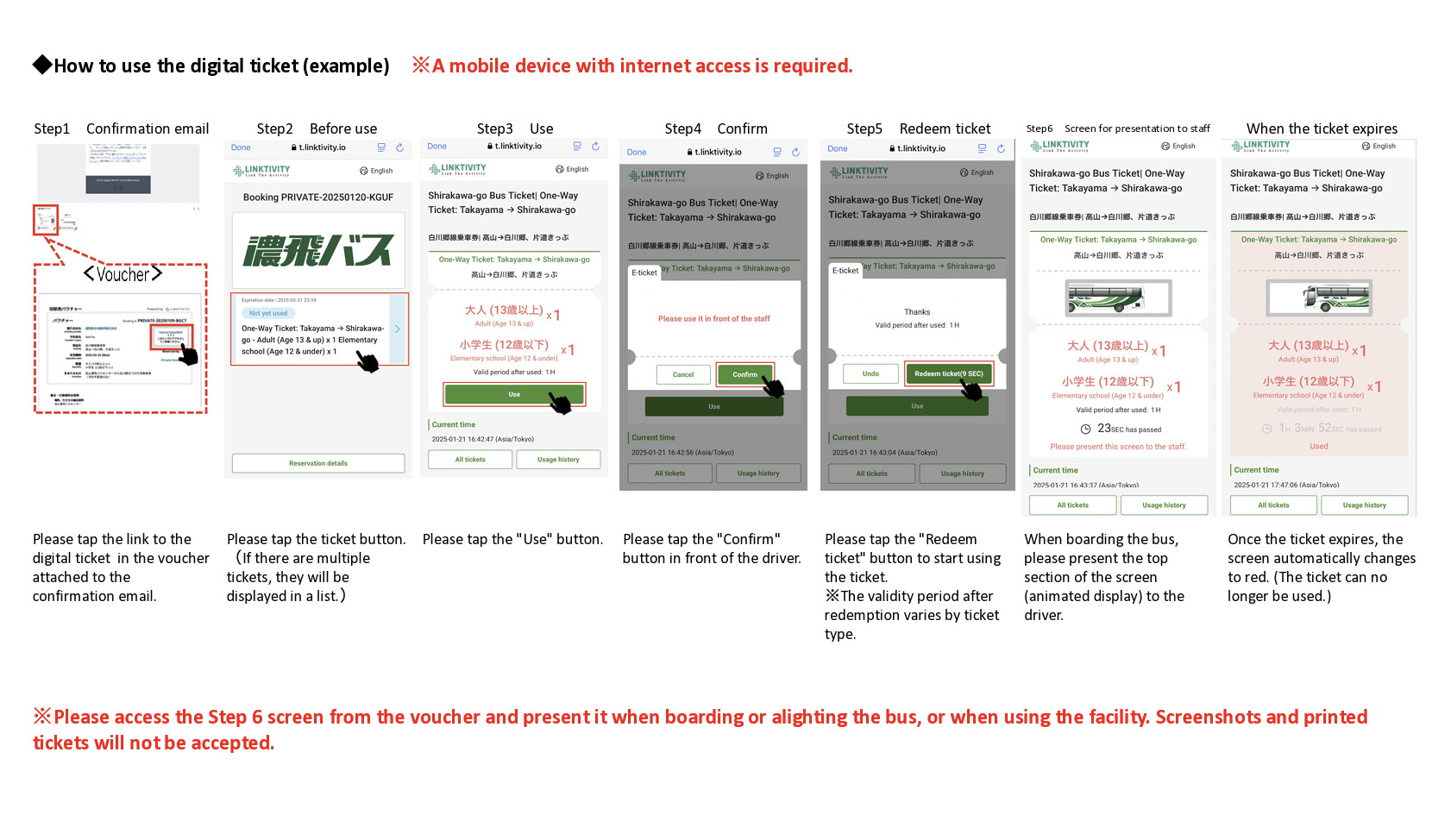
When boarding, open the usage screen from the link sent to you at the time of purchase, press the “Use” button, and show the screen to a staff member (driver)
-
Please ensure you have a stable network connection, as you will need to access the web page on your smartphone
-
Screenshots and printed copies cannot be accepted
-
If you purchase multiple tickets in one transaction, they cannot be used separately, and all tickets will be activated simultaneously. To use the tickets individually, please purchase them separately
-
For security purposes, you may be required to authenticate using a one-time password (OTP). If prompted, please follow the steps below:
-
- Enter the email address to receive the OTP and press the send button
-
- Check that the OTP has been received by the email address set up in step 1. (The email containing the OTP will be sent from the domain “@linktivity.co.jp.” Please also check your spam folder just to be sure. If you can’t find it there, your email address may be incorrect. Open the URL for the usage screen from the voucher again and try again by entering your email address.)
-
- Enter the OTP listed in the received email into the ticket screen and press the Confirm button. If you enter it correctly, the usage screen will be displayed. (Once OTP authentication is complete, the OTP will be sent to the email address you set. This email address cannot be changed, so please set an email address that can be confirmed locally on the day of use.)
- How to use the digital ticket
How to use the digital ticket

One-way ticket from Shirakawa-go to Takayama
Included
- One-way transfer ticket
- One-way **non-reserved** ticket from Shirakawa-go to Takayama Nohi Bus Center
Not Included
- Reserved seat
Confirmation
- You'll get confirmation within minutes. If you don't see any confirmation, reach out to our customer support.
Usage validity
- The voucher is valid until 31 Mar 2026 23:59
Voucher type
- Present your mobile voucher
Redemption information
- Present your QR code/voucher to enter directly
Shirakawa-go Bus Terminal
-
Please refer to the map for assistance
-
When boarding, open the usage screen from the link sent to you at the time of purchase, press the “Use” button, and show the screen to a staff member (driver)
-
Please ensure you have a stable network connection, as you will need to access the web page on your smartphone
-
Screenshots and printed copies cannot be accepted
-
If you purchase multiple tickets in one transaction, they cannot be used separately, and all tickets will be activated simultaneously. To use the tickets individually, please purchase them separately
-
For security purposes, you may be required to authenticate using a one-time password (OTP). If prompted, please follow the steps below:
-
- Enter the email address to receive the OTP and press the send button
-
- Check that the OTP has been received by the email address set up in step 1. (The email containing the OTP will be sent from the domain “@linktivity.co.jp.” Please also check your spam folder just to be sure. If you can’t find it there, your email address may be incorrect. Open the URL for the usage screen from the voucher again and try again by entering your email address.)
-
- Enter the OTP listed in the received email into the ticket screen and press the Confirm button. If you enter it correctly, the usage screen will be displayed. (Once OTP authentication is complete, the OTP will be sent to the email address you set. This email address cannot be changed, so please set an email address that can be confirmed locally on the day of use.)
- How to use the digital ticket
How to use the digital ticket

Round-trip ticket between Takayama and Shirakawa-go
Included
- Round-trip transfer ticket
- Roundtrip **non-reserved** ticket between Shirakawa-go to Takayama Nohi Bus Center
Not Included
- Reserved seat
Confirmation
- You'll get confirmation within minutes. If you don't see any confirmation, reach out to our customer support.
Usage validity
-
The voucher is valid until 31 Mar 2026 23:59
-
Once the voucher is activated, it is only valid for use on the same day
Voucher type
- Present your mobile voucher
Redemption information
- Present your QR code/voucher to enter directly
Takayama Nohi Bus Center
- Please refer to the map for assistance
Shirakawa-go Bus Terminal
-
Please refer to the map for assistance
-
When boarding, open the usage screen from the link sent to you at the time of purchase, press the “Use” button, and show the screen to a staff member (driver)
-
Please ensure you have a stable network connection, as you will need to access the web page on your smartphone
-
Screenshots and printed copies cannot be accepted
-
If you purchase multiple tickets in one transaction, they cannot be used separately, and all tickets will be activated simultaneously. To use the tickets individually, please purchase them separately
-
For security purposes, you may be required to authenticate using a one-time password (OTP). If prompted, please follow the steps below:
-
- Enter the email address to receive the OTP and press the send button
-
- Check that the OTP has been received by the email address set up in step 1. (The email containing the OTP will be sent from the domain “@linktivity.co.jp.” Please also check your spam folder just to be sure. If you can’t find it there, your email address may be incorrect. Open the URL for the usage screen from the voucher again and try again by entering your email address.)
-
- Enter the OTP listed in the received email into the ticket screen and press the Confirm button. If you enter it correctly, the usage screen will be displayed. (Once OTP authentication is complete, the OTP will be sent to the email address you set. This email address cannot be changed, so please set an email address that can be confirmed locally on the day of use.)
- How to use the digital ticket
How to use the digital ticket

Choose from available options above
Cancellation Policy
- 100% refunds will be issued for cancellations made before a voucher is activated and within the voucher validity
Similar Activities
Tours
Public Transfer - Non-API
Hida Folk Village Round-Trip Bus & Admission Ticket from Takayama
Tours
Takayama History and Temples One Day Tour with Handcraft Experience
Tours