An electronic voucher will be sent to your email instantly after booking confirmation
Activation Process
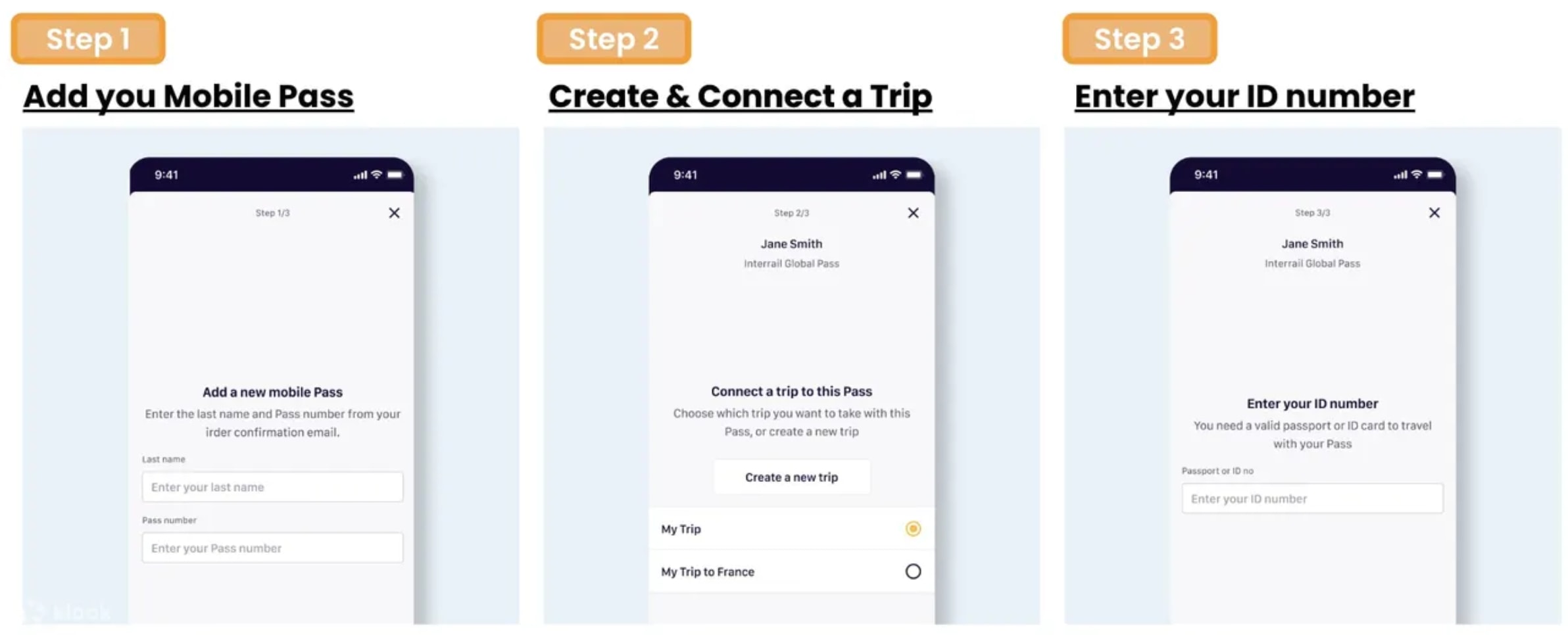
You can actively use the Mobile Pass up to 11 months from the date of purchase by downloading the Eurail/Interrail Rail Planner app
Step 1: Add your Pass by entering your Last Name & Pass Number sent by Klook
Step 2: Connect a trip to your Pass by either creating a new trip or choosing a trip you’ve already created in the App
Step 3: Activate your Pass by entering your Passport / ID Number and choosing your first travel day. Note that you can't board your first train unless your Pass has been activated, and you need to be online to activate your Pass
Do take note that it is not necessary to activate your pass to make seat reservations
Phones must be set as Gregorian calendar in order to activate the pass in Rail Planner App
Once the Eurail Mobile Pass gets activated, you may start your travel with the following easy steps
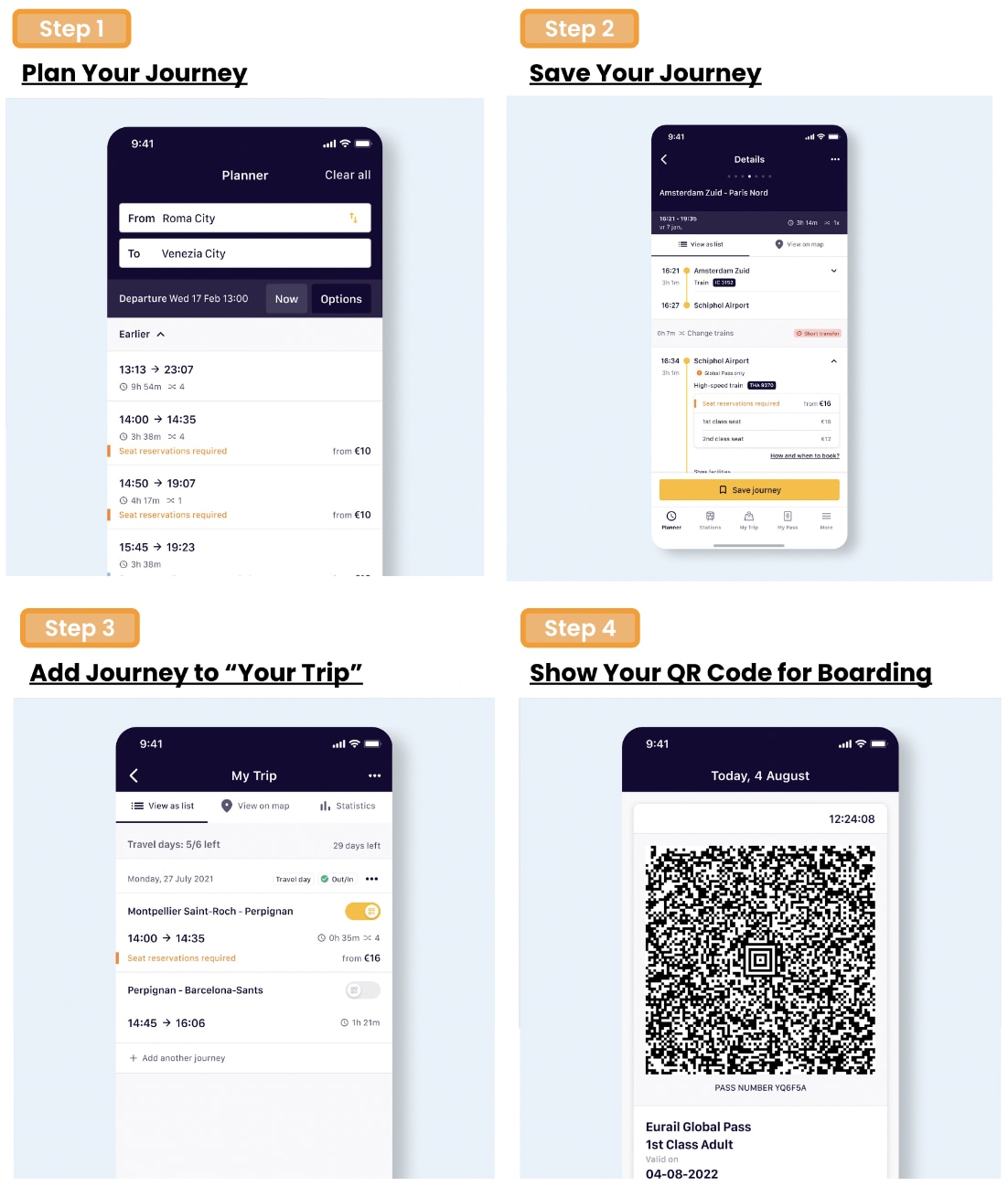
Step 1: Plan your journey by searching for train times in the Eurail/Interrail Rail Planner app
Step 2: Tap to save the preferred journey to your trip
Step 3: Once you are ready to travel, tap to add your journey to your Pass
Step 4: For ticket inspection, simply present your Mobile Pass by going to My Pass and tapping ‘Show ticket’. Note that every travel day in your Pass has a different ticket, and each ticket shows all the journeys you add to your Pass for that travel day
Flexi Passes only: If the date of your journey is not a travel day yet, you'll need to use one of your travel days. You can see how many travel days you have left in My Trip and in My Pass, along with an overview of all your travel days
Group Travel
In case you are traveling in a group and loading more than one Pass on your device, please note the following:
For each Pass, you need to create a separate trip in the App
If you've already created a trip, you can duplicate an existing trip to connect a copy of that trip to another Pass. Please name each trip differently to keep track of all your journeys
For ticket inspection, you'll need to show a ticket for everyone traveling with a Pass. Simply choose another Pass from the list in My Pass, then tap 'Show ticket'
Seat Reservation Process
Reservations are required to board domestic high speed trains, international trains, scenic trains and night trains
Reservations can be made at Eurail.com website or Eurail/Interrail Rail Planner app. To view final prices and seat availability, you must be logged in and have a Pass
Alternatively, reservations can also be made at local train stations or respective railway carriers websites
There’s no need to activate the pass to make seat reservations
An electronic voucher will be sent to your email instantly after booking confirmation
Activation Process
You can actively use the Mobile Pass up to 11 months from the date of purchase by downloading the Eurail/Interrail Rail Planner app
Step 1: Add your Pass by entering your Last Name & Pass Number sent by Klook
Step 2: Connect a trip to your Pass by either creating a new trip or choosing a trip you’ve already created in the App
Step 3: Activate your Pass by entering your Passport / ID Number and choosing your first travel day. Note that you can't board your first train unless your Pass has been activated, and you need to be online to activate your Pass
Do take note that it is not necessary to activate your pass to make seat reservations
Phones must be set as Gregorian calendar in order to activate the pass in Rail Planner App
Once the Eurail Mobile Pass gets activated, you may start your travel with the following easy steps
Step 1: Plan your journey by searching for train times in the Eurail/Interrail Rail Planner app
Step 2: Tap to save the preferred journey to your trip
Step 3: Once you are ready to travel, tap to add your journey to your Pass
Step 4: For ticket inspection, simply present your Mobile Pass by going to My Pass and tapping ‘Show ticket’. Note that every travel day in your Pass has a different ticket, and each ticket shows all the journeys you add to your Pass for that travel day
Flexi Passes only: If the date of your journey is not a travel day yet, you'll need to use one of your travel days. You can see how many travel days you have left in My Trip and in My Pass, along with an overview of all your travel days
Group Travel
In case you are traveling in a group and loading more than one Pass on your device, please note the following:
For each Pass, you need to create a separate trip in the App
If you've already created a trip, you can duplicate an existing trip to connect a copy of that trip to another Pass. Please name each trip differently to keep track of all your journeys
For ticket inspection, you'll need to show a ticket for everyone traveling with a Pass. Simply choose another Pass from the list in My Pass, then tap 'Show ticket'
Seat Reservation Process
Reservations are required to board domestic high speed trains, international trains, scenic trains and night trains
Reservations can be made at Eurail.com website or Eurail/Interrail Rail Planner app. To view final prices and seat availability, you must be logged in and have a Pass
Alternatively, reservations can also be made at local train stations or respective railway carriers websites
There’s no need to activate the pass to make seat reservations
An electronic voucher will be sent to your email instantly after booking confirmation
Activation Process
You can actively use the Mobile Pass up to 11 months from the date of purchase by downloading the Eurail/Interrail Rail Planner app
Step 1: Add your Pass by entering your Last Name & Pass Number sent by Klook
Step 2: Connect a trip to your Pass by either creating a new trip or choosing a trip you’ve already created in the App
Step 3: Activate your Pass by entering your Passport / ID Number and choosing your first travel day. Note that you can't board your first train unless your Pass has been activated, and you need to be online to activate your Pass
Do take note that it is not necessary to activate your pass to make seat reservations
Phones must be set as Gregorian calendar in order to activate the pass in Rail Planner App
Once the Eurail Mobile Pass gets activated, you may start your travel with the following easy steps
Step 1: Plan your journey by searching for train times in the Eurail/Interrail Rail Planner app
Step 2: Tap to save the preferred journey to your trip
Step 3: Once you are ready to travel, tap to add your journey to your Pass
Step 4: For ticket inspection, simply present your Mobile Pass by going to My Pass and tapping ‘Show ticket’. Note that every travel day in your Pass has a different ticket, and each ticket shows all the journeys you add to your Pass for that travel day
Flexi Passes only: If the date of your journey is not a travel day yet, you'll need to use one of your travel days. You can see how many travel days you have left in My Trip and in My Pass, along with an overview of all your travel days
Group Travel
In case you are traveling in a group and loading more than one Pass on your device, please note the following:
For each Pass, you need to create a separate trip in the App
If you've already created a trip, you can duplicate an existing trip to connect a copy of that trip to another Pass. Please name each trip differently to keep track of all your journeys
For ticket inspection, you'll need to show a ticket for everyone traveling with a Pass. Simply choose another Pass from the list in My Pass, then tap 'Show ticket'
Seat Reservation Process
Reservations are required to board domestic high speed trains, international trains, scenic trains and night trains
Reservations can be made at Eurail.com website or Eurail/Interrail Rail Planner app. To view final prices and seat availability, you must be logged in and have a Pass
Alternatively, reservations can also be made at local train stations or respective railway carriers websites
There’s no need to activate the pass to make seat reservations
An electronic voucher will be sent to your email instantly after booking confirmation
Activation Process
You can actively use the Mobile Pass up to 11 months from the date of purchase by downloading the Eurail/Interrail Rail Planner app
Step 1: Add your Pass by entering your Last Name & Pass Number sent by Klook
Step 2: Connect a trip to your Pass by either creating a new trip or choosing a trip you’ve already created in the App
Step 3: Activate your Pass by entering your Passport / ID Number and choosing your first travel day. Note that you can't board your first train unless your Pass has been activated, and you need to be online to activate your Pass
Do take note that it is not necessary to activate your pass to make seat reservations
Phones must be set as Gregorian calendar in order to activate the pass in Rail Planner App
Once the Eurail Mobile Pass gets activated, you may start your travel with the following easy steps
Step 1: Plan your journey by searching for train times in the Eurail/Interrail Rail Planner app
Step 2: Tap to save the preferred journey to your trip
Step 3: Once you are ready to travel, tap to add your journey to your Pass
Step 4: For ticket inspection, simply present your Mobile Pass by going to My Pass and tapping ‘Show ticket’. Note that every travel day in your Pass has a different ticket, and each ticket shows all the journeys you add to your Pass for that travel day
Flexi Passes only: If the date of your journey is not a travel day yet, you'll need to use one of your travel days. You can see how many travel days you have left in My Trip and in My Pass, along with an overview of all your travel days
Group Travel
In case you are traveling in a group and loading more than one Pass on your device, please note the following:
For each Pass, you need to create a separate trip in the App
If you've already created a trip, you can duplicate an existing trip to connect a copy of that trip to another Pass. Please name each trip differently to keep track of all your journeys
For ticket inspection, you'll need to show a ticket for everyone traveling with a Pass. Simply choose another Pass from the list in My Pass, then tap 'Show ticket'
Seat Reservation Process
Reservations are required to board domestic high speed trains, international trains, scenic trains and night trains
Reservations can be made at Eurail.com website or Eurail/Interrail Rail Planner app. To view final prices and seat availability, you must be logged in and have a Pass
Alternatively, reservations can also be made at local train stations or respective railway carriers websites
There’s no need to activate the pass to make seat reservations
An electronic voucher will be sent to your email instantly after booking confirmation
Activation Process
You can actively use the Mobile Pass up to 11 months from the date of purchase by downloading the Eurail/Interrail Rail Planner app
Step 1: Add your Pass by entering your Last Name & Pass Number sent by Klook
Step 2: Connect a trip to your Pass by either creating a new trip or choosing a trip you’ve already created in the App
Step 3: Activate your Pass by entering your Passport / ID Number and choosing your first travel day. Note that you can't board your first train unless your Pass has been activated, and you need to be online to activate your Pass
Do take note that it is not necessary to activate your pass to make seat reservations
Phones must be set as Gregorian calendar in order to activate the pass in Rail Planner App
Once the Eurail Mobile Pass gets activated, you may start your travel with the following easy steps
Step 1: Plan your journey by searching for train times in the Eurail/Interrail Rail Planner app
Step 2: Tap to save the preferred journey to your trip
Step 3: Once you are ready to travel, tap to add your journey to your Pass
Step 4: For ticket inspection, simply present your Mobile Pass by going to My Pass and tapping ‘Show ticket’. Note that every travel day in your Pass has a different ticket, and each ticket shows all the journeys you add to your Pass for that travel day
Flexi Passes only: If the date of your journey is not a travel day yet, you'll need to use one of your travel days. You can see how many travel days you have left in My Trip and in My Pass, along with an overview of all your travel days
Group Travel
In case you are traveling in a group and loading more than one Pass on your device, please note the following:
For each Pass, you need to create a separate trip in the App
If you've already created a trip, you can duplicate an existing trip to connect a copy of that trip to another Pass. Please name each trip differently to keep track of all your journeys
For ticket inspection, you'll need to show a ticket for everyone traveling with a Pass. Simply choose another Pass from the list in My Pass, then tap 'Show ticket'
Seat Reservation Process
Reservations are required to board domestic high speed trains, international trains, scenic trains and night trains
Reservations can be made at Eurail.com website or Eurail/Interrail Rail Planner app. To view final prices and seat availability, you must be logged in and have a Pass
Alternatively, reservations can also be made at local train stations or respective railway carriers websites
There’s no need to activate the pass to make seat reservations
An electronic voucher will be sent to your email instantly after booking confirmation
Activation Process
You can actively use the Mobile Pass up to 11 months from the date of purchase by downloading the Eurail/Interrail Rail Planner app
Step 1: Add your Pass by entering your Last Name & Pass Number sent by Klook
Step 2: Connect a trip to your Pass by either creating a new trip or choosing a trip you’ve already created in the App
Step 3: Activate your Pass by entering your Passport / ID Number and choosing your first travel day. Note that you can't board your first train unless your Pass has been activated, and you need to be online to activate your Pass
Do take note that it is not necessary to activate your pass to make seat reservations
Phones must be set as Gregorian calendar in order to activate the pass in Rail Planner App
Once the Eurail Mobile Pass gets activated, you may start your travel with the following easy steps
Step 1: Plan your journey by searching for train times in the Eurail/Interrail Rail Planner app
Step 2: Tap to save the preferred journey to your trip
Step 3: Once you are ready to travel, tap to add your journey to your Pass
Step 4: For ticket inspection, simply present your Mobile Pass by going to My Pass and tapping ‘Show ticket’. Note that every travel day in your Pass has a different ticket, and each ticket shows all the journeys you add to your Pass for that travel day
Flexi Passes only: If the date of your journey is not a travel day yet, you'll need to use one of your travel days. You can see how many travel days you have left in My Trip and in My Pass, along with an overview of all your travel days
Group Travel
In case you are traveling in a group and loading more than one Pass on your device, please note the following:
For each Pass, you need to create a separate trip in the App
If you've already created a trip, you can duplicate an existing trip to connect a copy of that trip to another Pass. Please name each trip differently to keep track of all your journeys
For ticket inspection, you'll need to show a ticket for everyone traveling with a Pass. Simply choose another Pass from the list in My Pass, then tap 'Show ticket'
Seat Reservation Process
Reservations are required to board domestic high speed trains, international trains, scenic trains and night trains
Reservations can be made at Eurail.com website or Eurail/Interrail Rail Planner app. To view final prices and seat availability, you must be logged in and have a Pass
Alternatively, reservations can also be made at local train stations or respective railway carriers websites
There’s no need to activate the pass to make seat reservations
An electronic voucher will be sent to your email instantly after booking confirmation
Activation Process
You can actively use the Mobile Pass up to 11 months from the date of purchase by downloading the Eurail/Interrail Rail Planner app
Step 1: Add your Pass by entering your Last Name & Pass Number sent by Klook
Step 2: Connect a trip to your Pass by either creating a new trip or choosing a trip you’ve already created in the App
Step 3: Activate your Pass by entering your Passport / ID Number and choosing your first travel day. Note that you can't board your first train unless your Pass has been activated, and you need to be online to activate your Pass
Do take note that it is not necessary to activate your pass to make seat reservations
Phones must be set as Gregorian calendar in order to activate the pass in Rail Planner App
Once the Eurail Mobile Pass gets activated, you may start your travel with the following easy steps
Step 1: Plan your journey by searching for train times in the Eurail/Interrail Rail Planner app
Step 2: Tap to save the preferred journey to your trip
Step 3: Once you are ready to travel, tap to add your journey to your Pass
Step 4: For ticket inspection, simply present your Mobile Pass by going to My Pass and tapping ‘Show ticket’. Note that every travel day in your Pass has a different ticket, and each ticket shows all the journeys you add to your Pass for that travel day
Flexi Passes only: If the date of your journey is not a travel day yet, you'll need to use one of your travel days. You can see how many travel days you have left in My Trip and in My Pass, along with an overview of all your travel days
Group Travel
In case you are traveling in a group and loading more than one Pass on your device, please note the following:
For each Pass, you need to create a separate trip in the App
If you've already created a trip, you can duplicate an existing trip to connect a copy of that trip to another Pass. Please name each trip differently to keep track of all your journeys
For ticket inspection, you'll need to show a ticket for everyone traveling with a Pass. Simply choose another Pass from the list in My Pass, then tap 'Show ticket'
Seat Reservation Process
Reservations are required to board domestic high speed trains, international trains, scenic trains and night trains
Reservations can be made at Eurail.com website or Eurail/Interrail Rail Planner app. To view final prices and seat availability, you must be logged in and have a Pass
Alternatively, reservations can also be made at local train stations or respective railway carriers websites
There’s no need to activate the pass to make seat reservations
An electronic voucher will be sent to your email instantly after booking confirmation
Activation Process
You can actively use the Mobile Pass up to 11 months from the date of purchase by downloading the Eurail/Interrail Rail Planner app
Step 1: Add your Pass by entering your Last Name & Pass Number sent by Klook
Step 2: Connect a trip to your Pass by either creating a new trip or choosing a trip you’ve already created in the App
Step 3: Activate your Pass by entering your Passport / ID Number and choosing your first travel day. Note that you can't board your first train unless your Pass has been activated, and you need to be online to activate your Pass
Do take note that it is not necessary to activate your pass to make seat reservations
Phones must be set as Gregorian calendar in order to activate the pass in Rail Planner App
Once the Eurail Mobile Pass gets activated, you may start your travel with the following easy steps
Step 1: Plan your journey by searching for train times in the Eurail/Interrail Rail Planner app
Step 2: Tap to save the preferred journey to your trip
Step 3: Once you are ready to travel, tap to add your journey to your Pass
Step 4: For ticket inspection, simply present your Mobile Pass by going to My Pass and tapping ‘Show ticket’. Note that every travel day in your Pass has a different ticket, and each ticket shows all the journeys you add to your Pass for that travel day
Flexi Passes only: If the date of your journey is not a travel day yet, you'll need to use one of your travel days. You can see how many travel days you have left in My Trip and in My Pass, along with an overview of all your travel days
Group Travel
In case you are traveling in a group and loading more than one Pass on your device, please note the following:
For each Pass, you need to create a separate trip in the App
If you've already created a trip, you can duplicate an existing trip to connect a copy of that trip to another Pass. Please name each trip differently to keep track of all your journeys
For ticket inspection, you'll need to show a ticket for everyone traveling with a Pass. Simply choose another Pass from the list in My Pass, then tap 'Show ticket'
Seat Reservation Process
Reservations are required to board domestic high speed trains, international trains, scenic trains and night trains
Reservations can be made at Eurail.com website or Eurail/Interrail Rail Planner app. To view final prices and seat availability, you must be logged in and have a Pass
Alternatively, reservations can also be made at local train stations or respective railway carriers websites
There’s no need to activate the pass to make seat reservations
An electronic voucher will be sent to your email instantly after booking confirmation
Activation Process
You can actively use the Mobile Pass up to 11 months from the date of purchase by downloading the Eurail/Interrail Rail Planner app
Step 1: Add your Pass by entering your Last Name & Pass Number sent by Klook
Step 2: Connect a trip to your Pass by either creating a new trip or choosing a trip you’ve already created in the App
Step 3: Activate your Pass by entering your Passport / ID Number and choosing your first travel day. Note that you can't board your first train unless your Pass has been activated, and you need to be online to activate your Pass
Do take note that it is not necessary to activate your pass to make seat reservations
Phones must be set as Gregorian calendar in order to activate the pass in Rail Planner App
Once the Eurail Mobile Pass gets activated, you may start your travel with the following easy steps
Step 1: Plan your journey by searching for train times in the Eurail/Interrail Rail Planner app
Step 2: Tap to save the preferred journey to your trip
Step 3: Once you are ready to travel, tap to add your journey to your Pass
Step 4: For ticket inspection, simply present your Mobile Pass by going to My Pass and tapping ‘Show ticket’. Note that every travel day in your Pass has a different ticket, and each ticket shows all the journeys you add to your Pass for that travel day
Flexi Passes only: If the date of your journey is not a travel day yet, you'll need to use one of your travel days. You can see how many travel days you have left in My Trip and in My Pass, along with an overview of all your travel days
Group Travel
In case you are traveling in a group and loading more than one Pass on your device, please note the following:
For each Pass, you need to create a separate trip in the App
If you've already created a trip, you can duplicate an existing trip to connect a copy of that trip to another Pass. Please name each trip differently to keep track of all your journeys
For ticket inspection, you'll need to show a ticket for everyone traveling with a Pass. Simply choose another Pass from the list in My Pass, then tap 'Show ticket'
Seat Reservation Process
Reservations are required to board domestic high speed trains, international trains, scenic trains and night trains
Reservations can be made at Eurail.com website or Eurail/Interrail Rail Planner app. To view final prices and seat availability, you must be logged in and have a Pass
Alternatively, reservations can also be made at local train stations or respective railway carriers websites
There’s no need to activate the pass to make seat reservations
An electronic voucher will be sent to your email instantly after booking confirmation
Activation Process
You can actively use the Mobile Pass up to 11 months from the date of purchase by downloading the Eurail/Interrail Rail Planner app
Step 1: Add your Pass by entering your Last Name & Pass Number sent by Klook
Step 2: Connect a trip to your Pass by either creating a new trip or choosing a trip you’ve already created in the App
Step 3: Activate your Pass by entering your Passport / ID Number and choosing your first travel day. Note that you can't board your first train unless your Pass has been activated, and you need to be online to activate your Pass
Do take note that it is not necessary to activate your pass to make seat reservations
Phones must be set as Gregorian calendar in order to activate the pass in Rail Planner App
Once the Eurail Mobile Pass gets activated, you may start your travel with the following easy steps
Step 1: Plan your journey by searching for train times in the Eurail/Interrail Rail Planner app
Step 2: Tap to save the preferred journey to your trip
Step 3: Once you are ready to travel, tap to add your journey to your Pass
Step 4: For ticket inspection, simply present your Mobile Pass by going to My Pass and tapping ‘Show ticket’. Note that every travel day in your Pass has a different ticket, and each ticket shows all the journeys you add to your Pass for that travel day
Flexi Passes only: If the date of your journey is not a travel day yet, you'll need to use one of your travel days. You can see how many travel days you have left in My Trip and in My Pass, along with an overview of all your travel days
Group Travel
In case you are traveling in a group and loading more than one Pass on your device, please note the following:
For each Pass, you need to create a separate trip in the App
If you've already created a trip, you can duplicate an existing trip to connect a copy of that trip to another Pass. Please name each trip differently to keep track of all your journeys
For ticket inspection, you'll need to show a ticket for everyone traveling with a Pass. Simply choose another Pass from the list in My Pass, then tap 'Show ticket'
Seat Reservation Process
Reservations are required to board domestic high speed trains, international trains, scenic trains and night trains
Reservations can be made at Eurail.com website or Eurail/Interrail Rail Planner app. To view final prices and seat availability, you must be logged in and have a Pass
Alternatively, reservations can also be made at local train stations or respective railway carriers websites
There’s no need to activate the pass to make seat reservations
Please note that there is no refund available on partially used, activated passes
A 100% refund applies to non-activated regular passes within 1 year from the date of purchase
Please deactivate the pass if you are requesting for a refund, you can deactivate your pass any time before the start of your chosen start date (00:00 CET on that day). On the Rail Planner App, go to My Pass, tap the three dots on the top right, and tap ‘Deactivate Pass’. You can then activate your Pass again when you’re ready to travel
You'll get a full refund as long as you don't redeem your voucher
Получить консультацию
Оставьте ваши данные и наш оператор свяжется с вами через Telegram








 Walking Tour